

Closed (works as designed)
Project:
Display Suite
Version:
7.x-1.2
Component:
User interface
Priority:
Normal
Category:
Support request
Assigned:
Unassigned
Reporter:
Created:
6 Jul 2011 at 20:53 UTC
Updated:
1 Aug 2013 at 10:03 UTC
Jump to comment: Most recent file


Comments
Comment #1
nils.destoop commentedDisplay Suite is perfect for this: http://drupal.org/project/ds
Comment #2
xenophyle commentedLooks like a really useful and interesting module. I have installed it but I don't see the title listed as a field on the manage display page. In the French screencast the title does appear. Do I need to do something special like make my own title field in addition to the built-in one?
Comment #3
swentel commentedYou need to select a layout first before extra fields appear.
Comment #4
xenophyle commentedI already had tried one- and two-column layouts.
Comment #5
swentel commentedAnd there is not title field ? That sounds weird, can you show me a screenshot of the manage display screen ?
Comment #6
swentel commentedDid a recheck on my local machine (and I also have dozens of tests with the title field) which is showing up fine, so this really works.
Comment #7
alexkb commentedI was having the same issue as xenophyle. What was weird, the title field was available in some content types and not others. As soon as you set the layout (down the bottom of the form), as per swentel's suggestion, the title field appears as an option to display.
Comment #8
KevinVanRansbeeck commentedI had the same issue. None of the display suite fields were displaying.
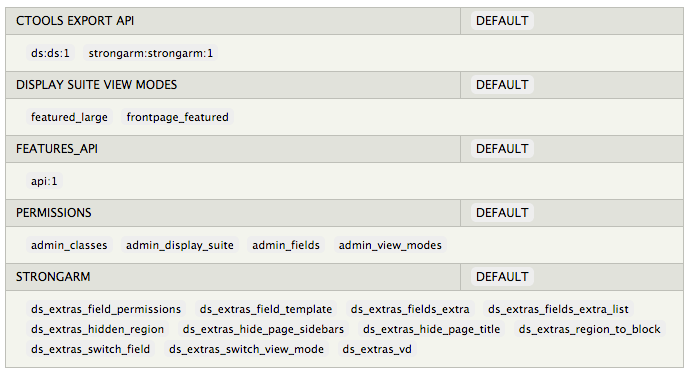
The solution for me:
I had a feature that was storing display suite configuration and view modes (see screenshot, that was all it did for some reason).
Disabling this feature allowed me to select my title, read more... fields again.
I don't know which part of this feature that was preventing me from adding these fields (maybe a permission, have to investigate it), but one of them did.