

Closed (outdated)
Project:
Commerce Email
Version:
7.x-2.x-dev
Component:
Code
Priority:
Normal
Category:
Support request
Assigned:
Unassigned
Reporter:
Created:
5 Nov 2011 at 09:25 UTC
Updated:
2 Jun 2020 at 18:23 UTC
Jump to comment: Most recent, Most recent file


Comments
Comment #1
paul.linney commentedHi vasike,
I don't think that using inline styles is wrong, on the contrary this is how they are coded for the best compatibility - albeit what I am doing here is very basic. However I think this raises another feature request, to be able to alter the inline styles for the different table elements.
There is always the option of the template file, for better control over the table of items you can always use the template instead.
I'll have a further think about this though, thanks.
Paul
Comment #2
vasikecommerce_email_order_items function it's full of inline styles.
this mean that i have to hack this module if i want to change the look of the order items.
an example:
i don't think everyone want a table of 50% width with this kind of border.
Comment #3
paul.linney commentedHi vasike,
I would strongly consider using a theme template for better control over the HTML.
Paul
Comment #4
vasikeit's about [commerce-email:order-items] token and its inline css in the textarea with no option to alter, not about using a template or change html within.
then instead of using this helpful, easy, quick module we're back to use custom php directly in checkout rule.
of course the template solution it's good to have.
please let me know how can i help with this. which are your doubts?
Comment #5
adamgerthel commented@paul In my opinion using the template doesn't really help. It's the theming of [commerce-email:order-items] that is needed here. Using inline css is best practice when it comes to HTML email so I strongly disagree with the initial poster. However, being able to change it somehow (template or via settings interface) would be useful. Perhaps an interface under "settings" where one could alter some inline css rules? It's not much thats needed. Being able to set "style:" value for Table, Tr, Thead, and TD would suffice.
In the meantime I'll probably have to hack the module.
Comment #6
minneapolisdan commentedThanks for the module and this thread. I was looking for a way to style the Table that the [commerce-email:order-items] comes in. Sounds like it's not so straightforward, although I wonder if I could use the template, and the CSS !important tag to override the inline styles on this token.
Comment #7
adamgerthel commented@minneapolisdan: probably not. HTML email doesn't really work the way you'd expect. A lot of email clients strip style from head, so you need it to be inline.
Comment #8
minneapolisdan commentedOh yeah, you're right about that, never mind.
Comment #9
johnpitcairn commentedHmm, this is proving troublesome here, I really do want to override that theme('table', ... ) call in this case. I don't want the quantities, and I probably don't want a table at all.
What if commerce_email were to register its own theme function for the html output of [commerce-email:order-items]? That can still just call theme('table', ...).
This would at least allow a module or theme to override the output if desired - much cleaner than trying to override theme_table() and target this one specific case.
Comment #10
johnpitcairn commentedTitle change as appropriate. Here's a patch.
You should be able to override the table output in a theme's template.php by implementing mytheme_commerce_email_order_items(&$variables). I have not tested this.
To override table output from a module, you'll first need to implement hook_theme_registry_alter() and override the theme function with your own, ie:
I have tested this.
Comment #11
johnpitcairn commentedThis one does not collide with the patch at #1658238: Support multicurrency - do not assume all order items use the same currency
Comment #12
johnpitcairn commentedAhem. Let's make it this one. #11 is definitely broken.
Comment #13
mrfelton commentedThis only passes in the data as prepared for producing a table output with variables for header, rows, and attributes. I think we need to pass in data further upstream. I need to change the product names to use product title instead of SKU. There is no way to do that with this patch.
Comment #14
johnpitcairn commentedFair enough, though we need to be careful not to break any existing implementations that may depend on the un-themed return option of commerce_email_order_items(). So it's necessary to construct that table-variable array regardless. Presumably somebody somewhere is using it.
Plan A (easy): also pass the $order object into the theme function.
Plan B (architecturally better): break out the table-specific code into a separate function. Call that from commerce_email_order_items() to produce the non-themed output option. Only pass the $order object into theme('commerce_email_order_items', $order), and again use the table function to produce the default themed output.
Comment #15
johnpitcairn commentedTry this patch. All the table-specific code is moved to a new function, commerce_email_prepare_table(). So if you're theming the output and don't want a table, that code doesn't have to run.
The theme function is passed a single variable, the metadata-wrapped commerce_entity.
Comment #16
johnpitcairn commentedBump. Anyone care to review? I have this running on a production site with no issues.
Comment #17
loze commented#15 is working well for me. Thanks for the patch!
Comment #18
johnpitcairn commentedI think we can call this RTBC then. Let's see if we can attract the module maintainer's attention...
Comment #19
johnpitcairn commentedShould be 7.x-2.x
Comment #20
derekw commentedDisregard, the problem was with my theme function. My corrected function (updated 11/30/2012):
Comment #21
jbekker commentedGuys, how do I use this?
Comment #22
johnpitcairn commentedYou mean how do you apply the patch?
Comment #23
jbekker commentedAhh I got it working now, the patch was no problem. I just didnt knew how to replace the token with a view. It works when I put my code in my theme but it didnt work in a custom module. That should also work right?
Comment #24
johnpitcairn commentedIn a custom module you also need to override the theme registry - see #10.
Comment #25
TamB commentedJohn, jbekker,
Any chance you guys could explain to me how to replace the "commerce order:commerce email.." token with the cart summary view? I've patched the module already.
Many thanks
Comment #26
johnpitcairn commentedSee #10 and #20. You could also just return views_embed_view(). Folks, this issue is not the place to be asking how to do a theme function override.
Just be aware that if you do replace the email table with the summary view:
A - you'll have a lot of extra views wrapper divs and cruft, more likely that various email apps will screw that up.
B - you won't have any table styling, all you'll have will be the views css classes, and some email apps will ignore stylesheets in the document HEAD. Best practice for email is to use inline styles, and you can't do that with views.
Comment #27
johnflower commentedI've been trying to get my head around how to get a good looking email with the right content from Drupal Commerce. Here's my summary of the thread above:-
This thread has two issues.
1) Has been made easier with John Pitcairns patch (#15). But it would be nice to be able to adjust the styling in browser admin interface of Drupal. Can this patch be committed? Could John Pitcairn be added to the list of module maintainers?
2) An admin interface for choosing which components go in to [commerce-email:order-items] would be nice. Views is almost perfect for this. Except that views uses stylesheets and best practice is inline styling. Below are two images showing the difference between this modules table (Figure 1) and one from Views (Figure 2). These are screenshots taken from emails viewed in Thunderbird 17.0.6 on Fedora 18.
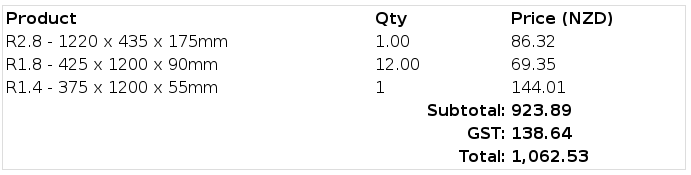
Figure 1: Commerce Email table
Figure 2: Views table
Note that the Views table looks ugly because it is missing the styling that it would have when viewed in browser. Also that it shows the View edit link (?because I'm ordering using the administrator account?).
In summary you need to dabble in code to make changes to the content and style of [commerce-email:order-items] . This is the track I'm going down. But it'd be nice if someone clever could improve this module.
Comment #28
johnpitcairn commentedI prefer to configure as much as possible in code, the patch at #15 does everything I need, and themers can use it as-is. I'm not really interested in becoming a maintainer for this module, sorry. Let's just get this committed if possible - I'll message the maintainers again.
I do not think using Views is a good solution, because as you say, you would still need to override the views theme functions to add inline style attributes. In which case you might as well just theme the commerce email output directly.
If you want some kind of tokenized admin interface to include components (perhaps similar to the way webform handles email output), I think that should be opened as a separate issue.
Comment #29
johnflower commentedThanks John. Hopefully the maintainer also pays attention to More Detailed Line Item Table which improves the defaut table - an easier win than creating an admin interface.
Comment #30
guillaumev commentedCommitted: http://drupalcode.org/project/commerce_email.git/commit/f9731be
If anyone is interested by becoming a co-maintainer of the 2.x branch, please contact me.
Comment #31
johnpitcairn commented@johnflower: I think there's nothing in #1532526: More Detailed Line Item Table that you couldn't accomplish with a theme override now?
Comment #33
vvs commentedI download version 7.x-2.x-dev and not found directory named "theme".
And not found on git: http://drupalcode.org/project/commerce_email.git/tree/refs/heads/7.x-2.x
Comment #34
tararowell commentedI just created a module to extend this one because I needed another template in the Commerce Mail module. I just made my own token based off of the way this one is built - [commerce-order:commerce-email-order-items] - and then I have the theme function in my module to do with as I please.
My site is set in admin/config/system/mailsystem to use a sitewide default of HTMLMailSystem and I can use the Full HTML filter on the template I added.
There is never any need to hack this module when you can just create your own token to use instead of the one that is standard with the module.
Comment #35
summit commentedHi @TaraRowell,
Are you willing to share your module?
Greetings, Martijn
Comment #36
dejavu1987 commented@Summit @TaraRowell did not reply for 3 years so, I think she is not willing to share her module :D
I think I am going to build one for me.. If I ever did then I ll share it with you..
BRO!!
Comment #37
tararowell commentedOH DUDE! @dejavu1987 I completely forgot about this and to be honest, my module was not community-ready! It was just a module that defined a new token, if I remember correctly. I probably even just patterned my new one after the code that built [commerce-order:commerce-email-order-items].
Comment #38
rszrama commented