

Closed (fixed)
Project:
Feeds
Version:
7.x-2.x-dev
Component:
Code
Priority:
Normal
Category:
Support request
Assigned:
Unassigned
Reporter:
Created:
18 Jan 2012 at 08:59 UTC
Updated:
20 Apr 2018 at 10:51 UTC
Jump to comment: Most recent, Most recent file


Comments
Comment #1
emackn commentedDon't use feeds, use migrate module.
Comment #2
mtoscano commentedMigrate is a completely different module and its use is not justified just to import address. Add Addressfield support in Feed make perfect sense considering that Geofield is supported.
Comment #3
mtoscano commentedI just figure out Addressfield already support Feeds import, but you should apply this patch to Feeds: http://drupal.org/node/1224836
Comment #4
emackn commentedfeeds is not a general purpose data import tool, it's supposed to be used for parsing data feeds and creating nodes of those items.
Comment #5
star-szrAddress fields can be imported with Feeds 7.x-2.x-dev and Address Field 7.x-1.0-beta2.
@emackn, while the default settings for Feeds are certainly geared towards data feeds, in my experience it works quite well as a general purpose data import tool. If Feeds didn't have a CSV parser and File upload fetcher I might be more willing to agree with you.
Comment #6
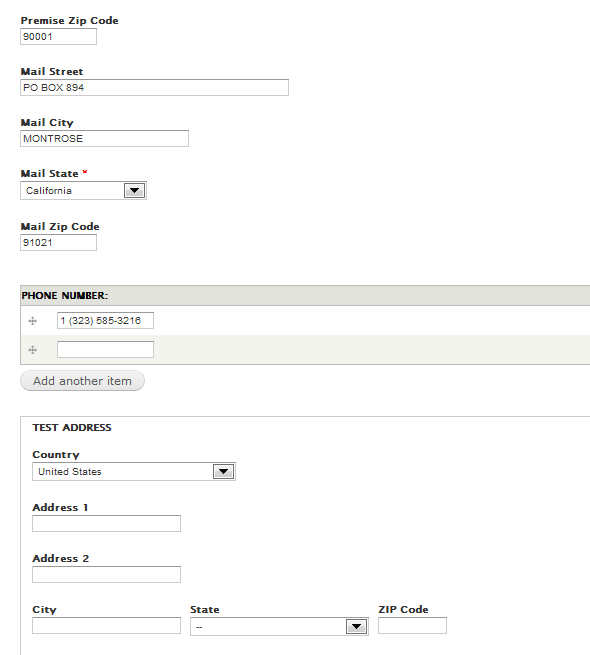
JSCSJSCS commentedI am using Feeds 7.x.2.x-dev (7.x-2.0-alpha4+45-dev) and Addressfield 7.x-1.0-beta2 and csv address fields are being imported just fine to regular content type fields, but not to the applicable addressfield inputs.
What is odd is that viewing the nodes shows some data, but editing the node shows NO data, except the default Country. No erros reported on import.
The "test address" in the images are the Addressfield.
Any help appreiciated.
Comment #7
star-szr@JSCSJSCS - I had the exact same experience. Like you, my import file didn't contain countries, so in the end the country was stored as NULL in the database. I ended up manually going into the database and doing a couple queries to update the field_data_field_address and field_revision_field_address tables (or whatever your field(s) are called) to put in the correct country code instead of NULL. I haven't looked into a better solution yet, Feeds Tamper might be able to help, or a patch on the address field module's Feeds integration to set the default country to what you have configured in your address field.
Comment #8
mrpeanut commentedI am having the same problem as JSCSJSCS. It seems as though the problem was with modulename.feeds.inc but according to this comment, that has been committed.
I'm also having trouble importing states (not sure if that's related or not).
Comment #9
mrpeanut commented@Cottser The address fields are still empty after importing and editing the node (see my comment #8).
Comment #10
star-szr@MrPeanut - Yup, that's what I saw. Look at your database and see if your country columns are NULL, if so you're seeing the same issue as myself and likely JSCSJSCS.
Comment #11
mrpeanut commentedMaybe I'm having a different problem. I can import all the address fields and when I view the node, it appears fine. However, when I click edit, the address fields appear to be empty. (Similar to this comment.)
EDIT: And also this comment.
Comment #12
star-szrYes, it's possible that you're having a different problem. I believe the problem myself and JSCSJSCS had is summarized here: #1023068-10: Feeds mapper for Address Field.
Even if you think you're having a different problem, I would still suggest entering an address manually then looking in your address field table to compare a manually entered vs. Feeds imported field. My data looked fine on view as well. Good luck!
Comment #13
JSCSJSCS commented@Cottser, I do not have any county fields in my CVS file, that is why I created the default to US. Feeds_tamper will not work. It has to have a legitimate source field to do its magic. Even if you use feeds_tamper to completely rewrite it, it won't work. I've tried several ways without success.
I really do not want to have to manually edit the source file every time I need to update the database. There has to be another way.
Comment #14
mrpeanut commentedI was able to add a country to each record (fortunately they were all 'US'). I also added each state as 'CA' rather than 'California'. My import worked fine for everything.
If the default is US, can't you just add that to each record?
Comment #15
star-szrTry using Rules to help out. This will only work with the dev version of Feeds, the stable version of Feeds doesn't have the Rules functionality.
user:field-address:country). Set the value to your default country using the dropdown.This should work if you are not importing a country at all with Feeds. If you do have an optional country field you are importing, and it might be empty, you can try this:
Add a condition: Data > Data value is empty. Choose the address field attached to your entity. I haven't thoroughly tested this condition, but in theory this should allow you to import multiple countries, with a default fallback for when the country field is empty.
Comment #16
zoraxSame as #11MrPeanut, when I edit the user the address is empty, but all informations are in the database in the adressfield.
Comment #17
JSCSJSCS commented@Cottser, Thanks for the responses. I have confirmed that if the Country field with two character country code (US) is not in the csv file then only some fields get populated in the database and only some display on the View node page and NONE show up in the Edit Node page. My manually adding the country field and data to the csv file, then it did import and all fields could be viewed and edited.
My next step is to evaluate therules dev vresion to see if i can automatically add this field and data somehow.
Comment #18
morelight commentedI do have my country code "SE" in the csv-file but I still get the same behaviour as in #6.
Note: I have specified that the users can have 3 adresses.
Comment #19
morelight commentedI'm the stupid one. I forgot to map country to the country field...
Comment #20
JSCSJSCS commented@Cottser, thanks for pointing me in the right direction. It appears that Feeds Tamper is a dead end. It can only tamper data from fields that exist in the source csv file.
I went to Rules and following your suggestion, I used the Feeds > Before saving an item imported via option and set the condition to simply Content of Type Node and set the The content type(s) to check for to my target content type. Im' sure your Entity selection would have worked too.
Lastly, I set the action to Data Set Value to change the field data (node:field-dealer-geocode-address:country in my case) to "United States" from the dropdown list provided from the AddressField module's "Available countries" settings list.
And Success!
Comment #22
jeffglenn commentedAfter lots of searching I can confirm that adding a country column to my .csv file then mapping the field works.
My setup is on my Content Type I have an address_field with the format handlers "Address form (country-specific)" and "Hide the country when only one is available" checked. My .csv file had everything mapped EXCEPT the hidden country field. When I would do an import I was getting the same thing as the initial post, the address fields were empty even though the information had been entered into the database.
Then, after adding a country column to my .csv file and mapping it to the hidden country field all information was entered and can be edited in the fields. Works perfectly.
Comment #23
Stomper commentedMy CSV list has the street address broken down into individual rows/columns - street address, city, state, zipcode etc.
My taxonomy vocabulary is using an Address Field, which means I need to find a way to be able to combine and format multiple CSV rows/columns to "create" the street address to work with my Address Field field.
I've tried importing via Taxonomy CSV but since my CSV has rows/columns than fields in my vocabulary, the import didn't not work properly.
I'd like to maintain the use of Address Field because I want to use it for geolocation.
Please advise
Comment #24
joekers@Cottser your comments (#7 & #15) worked a treat, thanks!
Comment #25
JamesMugford commented#22 worked for me. No hacks :)
Comment #26
george.plescan commented#22 worked for me also. Thanks !
Comment #27
nattyweb commentedGreat stuff #22 worked for me too. Thank you!
Comment #28
tararowell commentedYes! #22 rocks...Also be sure to have your States (for US addresses) either as two letter codes or use Feeds Tamper to make that adjustment for you.
Comment #29
texas-bronius commentedI hate to be "that guy," but #22 didn't do any more for me than Feeds + address fields out of the box. I do presume we are talking about the addressfield module?
What did work for me was the create a simple module to provide feeds alters. Here's one with some of the fields hardcoded and some provided by the import. The variable
$importpassed to this hook is the record being imported, and its array keys like 'Country' are the CSV column names.This hook (hook_feeds_presave) gives the developer a chance to change the thing as a node/entity before it is saved to the database.
$itemis an associative array of all your imported columns keyed on the CSV header values.Comment #30
dchatry#22 works well, thanks!
Comment #31
anybodyDrupal 8 follow-up: #2962672: Add Feeds target for Address