

 Come together with the global Drupal community in Rotterdam, 28 Sept – 1 Oct 2026. Sessions, contribution, connection, and Early Bird savings until 8 June.
I was perfectly happy with BaM, version = "7.x-2.0", from 2011-01-05.
Normally, I do a backup via the module, and then create a new test-site with the Acquia Dev Desktop.
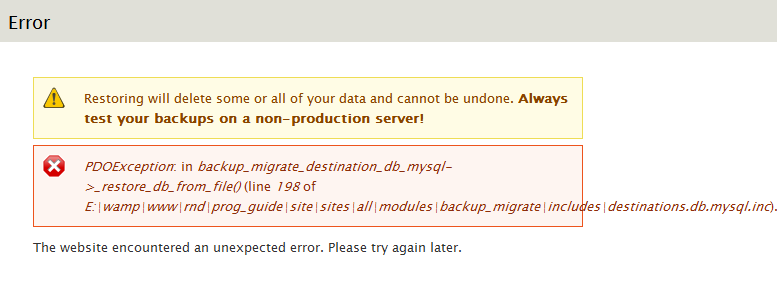
Today I did a backup and restore, but got the following error:
PDOException: in backup_migrate_destination_db_mysql->_restore_db_from_file() (line 198 of ...\backup_migrate\includes\destinations.db.mysql.inc).
As you see, there is no SQLSTATE reported.
I updated to the lates dev-version (which generates a zipped file - nice!), and tried to restore via Acquia and via the BaM menu item. No luck.
What might be the problem? DB too big? Errors (Diacritical characters?) in new content?
| Comment | File | Size | Author |
|---|---|---|---|
| #44 | backup_migrate-comment-detection-1542274-44.patch | 1.23 KB | LGLC |
| #7 | Capture.PNG | 18.1 KB | ajits |

Comments
Comment #1
ronan commentedDid you get the same error with the dev version? Same line number?
Comment #2
johnvI think there is an error with some corrupt content. The export gives an auto_spfload() error, which I've seen a few months back in another situation. It disappeared after resaving the node (after finding it...).
Comment #3
Shai commentedI seemed to have gotten the same error as the original poster. I'm using BM 2.3. bam-restore is working for the default Drupal db. However, restore is not working for my CiviCRM db. BM is backing up the CiviCRM database fine. But it won't restore it.
Here is the error.
Shai
Comment #4
irishgringo commentedwhats the status on this?
I just tried drup 7.13 to 7.13, and I am still having some issues with it. still not working. and I was experimenting with a single node test.
Comment #5
n.shalva commentedI am having the same issue.
PDOException: SQLSTATE[HY093]: Invalid parameter number: no parameters were bound in backup_migrate_destination_db_mysql->_restore_db_from_file() (line 198 of
Comment #6
geosmaga commentedsubscribe
Comment #7
ajitsI got the same error with version="7.x-2.4"
Comment #8
rudyard55 commentedSubscribe
Comment #9
pdeclarens commentedI have the same error using the D 7.15
backup_migrate_destination_db_mysql->_restore_db_from_file() (ligne 198
database is less than 4Mo
Comment #10
gbernier commentedWe are experiencing similar errors on our Drupal sites we are working with as well. Seems since we've update cores to 7.15 to really be dying on us.
Comment #11
vinotwit commentedExactly the same problem trying BaM from Drupal 7.15 to Acquia Dev Desktop 7.14
Addition: just found a solution. The problem is related to the GZIP compression. I did a backup/restore with ZIP (not GZIP) compression and this worked fine!
Cheers --Mike
Comment #12
pdeclarens commentedHi,
I just tried with the Zip compression and got the mesage: "Could not complete the backup"
is problem related to backup module or to 7.15 core version?
Comment #13
pdeclarens commentedIn the open publisher version there is a backup module in the core.
I also had a 7.x dev version in sites/all/modules and deletd it
I installed the 7.x-2.4 version module choosed the Zip compression
Works fine...
Comment #14
ajitsYes, I too used it without GZip compression, and it works fine.
Comment #15
johnvOK, current status of this issue:
Users encounter the error occurs while restoring DB from GZIP-compression. (as set under admin/config/system/backup_migrate/export/advanced )
The workaround is to use ZIP, therefor I set the status to minor.
This issue is still active for people who (need to) use the GZIP option.
The Original Poster encountered this message using Uncompressed restore. He blames it on corrupt content. (see #2)
Comment #16
bobsather commentedI had the same issues. I had just updated both my local and my live site to 7.15. I did some updates to my live site last week and backed it up first. I couldn't get my backup to work. I followed vinotwit's advice and it worked fine.
For some reason the gzip was causing an issue. Thanks vinotwit.
Comment #17
joachim commented> The workaround is to use ZIP, therefor I set the status to minor.
There's a workaround, sure, but ZIP is the default method.
If this is not an easy fix, could the default method be changed to GZIP, the one that works, and a new release made? Throwing an exception on basic use of the module's functionality isn't really minor, is it?
Comment #18
ouyang1512 commentedI got the error message when I was trying to restore the civicrm DB:
I had NO problem to restore the default drupal DB though.
Any idea of this error? Thank you!
Comment #19
Shai commented@ouyang1512,
I think a new issue should be opened. The original issue causes damaged gzip files which can't be used to restore a database.
I also have the same issue you described restoring civicrm dbs from the backup_migrate UI. However, the backup databases created by backup_migrate for civicrm are perfectly fine. So I restore such a db by going into phpMyAdmin dropping all the tables and then importing the backed-up copy. (Note that it is a bit of a pain to drop all the tables via phpMyAdmin because it respects foreign key dependencies and so you have to drop all the tables about 4 times before all the tables get removed). Of course, there are other tools for managing a MySQL db other than phpMyAdmin; I'm just describing for you what I have personally done and that worked for me.
Shai
Comment #20
ouyang1512 commentedThank you, Shai, for your suggestions! And yes, I can confirm that the backed-up civicrm db works well when using phpmyadmin or workbench to restore. It just cannot be restored using the UI that drupal provides. Is this a bug?
Comment #21
CinemaSaville commentedI'm getting this exact same error message. And within PHPMyAdmin I'm able to update.
Comment #22
nzcodarnoc commentedConfirming that I am experiencing the problem restoring a CiviCRM database with "zip" set as the compression method.
I wonder if something like this might help:
SET foreign_key_checks = 0;Do import
SET foreign_key_checks = 1;EDIT:
Confirming that this change let me restore a CiviCRM database. Here's my quick-and-dirty work-around for MySQL:
file: sites/all/modules/backup_migrate/includes/destinations.db.mysql.inc
line: 387 onwards
Comment #23
lafasofamily commentedI had this problem too and spent a lot of time searching the Drupal site before I came up with this wonderful relief. I am using Drupal 7.16 and the problem was fixed w/ zip instead of gzip. I was also unable to import through phpmyadmin to fresh database and pull up through drush... similar errors. Thank for the solution. Luckily I was just testing my own backup/restore procedures.
Comment #24
jim.edelstein commentedI've been getting this error consistently for a couple of weeks now. I've tried using zip instead of gzip, and I've tried adding the quick and dirty solution in #22, neither solution has resolved this issue. I'm not using CiviCRM. I've tried dropping and restoring the db from a mysql dump, works fine. After doing this, i tried making one change on the original db and using this module to migrate that single change to my second instance and i'm still getting this error. Any insights or advice on how to pinpoint the issue would be greatly appreciated. Thanks
Comment #25
Wolfgang Reszel commentedI have this problem also with BZip2.
Comment #26
Wolfgang Reszel commentedThis bug does not depend on the compression in my case. The Workaround in #22 does work for me, but I don't know if it has side effects.
I don't use CiviCRM and I also tried to ignore some more db tables.
It happens on my local and the remote server.
Comment #27
smitty commentedDis you have a look at Gzip creates corrupt backup?
Perhaps this is a duplicate of that issue?
Comment #28
Wolfgang Reszel commentedI don't use Gzip and I also tried plain SQL files.
Comment #29
ronan commentedHi all,
This issue has gotten way out of control. That's pretty understandable because of the way Drupal 7 works. Note: 1) A PDOException simply means a db query failed in some way and 2) Line 192 of backup_migrate_destination_db_mysql.inc is where the restore runs the sql statements that are part of the restore. That means pretty much any time a database restore fails for any reason the error will be the one described in the previous title of this issue.
I am focusing this issue on the sub-thread that seems to be most lucidly described and that's the issue of foreign keys (such as the ones in the CIVICRM schema) causing restores to fail. If your issue does not pertain to foreign keys then either a) Try the latest version of the code with and without compression to see if you're suffering from #1564408: Gzip backups are compressed twice when downloaded or b) open a new ticket.
For those suffering from the CIVICRM issue, can you please try the workaround listed in #22?
I'm not sure why this should be necessary because B&M is already adding this directive (look 5 lines up from the workarund in nzcodarnoc's example), but if I need to change the syntax of the file preamble to get these directives to take then I don't think that's a big deal. I don't think there's a strong need to support MySQL versions < 4.1 or whatever anymore.
Comment #30
Poieo commentedI can confirm the workaround in #22 is working for me with CiviCRM databases. However, I'm not sure what changed as this never used to be an issue...
Comment #31
vlad.leo commentedI made backup of my web site and try to restore on local but get
PDOException: SQLSTATE[23000]: Integrity constraint violation: 1217 Cannot delete or update a parent row: a foreign key constraint fails in backup_migrate_destination_db_mysql->_restore_db_from_file() (line 201 of /home/vlad/Documents/pramvv.ru.loc/web/sites/all/modules/backup_migrate/includes/destinations.db.mysql.inc).
I use drupal 7.23 and a lot of modules! I was trying Compression None, Zip and others
Comment #32
sonicthoughts commentedHi @ronan : I see this is marked postponed (maintainer needs more information) but not sure exactly what information you are looking for. I know people who thought they were backed up but unable to restore - would like to get more comfortable with BAM and CiviCRM. How can we help debug?
Comment #33
dmsid commentedDOException: SQLSTATE[23000]: Integrity constraint violation: 1217 Cannot delete or update a parent row: a foreign key constraint fails in backup_migrate_destination_db_mysql->_restore_db_from_file() (line 201
I am getting the same errors. Using Drupal 7.23 and BandM 7.x-2.7
I have tried all of the suggestions on this page and I still get the error when I go from my live site to our devl site.
- Checked php mem setting
- Tried Gzip, Zip and No Compression.
- Tried deleting and re-installing modules
- Tried upgrading both sites to newest dev module. Same error different line number.
- Both sites were updated to 7.23 recently
Comment #34
dale42I believe the problem is the
$first3variable in _read_sql_command_from_file in destinations.db.mysql.inc:The line:
/*!40014 SET @OLD_FOREIGN_KEY_CHECKS=@@FOREIGN_KEY_CHECKS, FOREIGN_KEY_CHECKS=0 */;gets stripped out of the command stream because it is evaluated as a comment instead of
/*! */style version specific code (http://dev.mysql.com/doc/refman/5.1/en/comments.html)Changing
$first3 = substr($line, 0, 2);to
$first3 = substr($line, 0, 3);resolved my foreign key constraint error.
Apologies for not being set up to submit a patch.
Comment #35
dale42Here is a patch for #34
Comment #36
lionsharz commentednope - patch applied. still happening...
Then attempted to add the workaroundin #22...
Comment #37
dale42@Lionsharz: When you applied the patch, did you get:
or did you just get a command prompt back?
I've found git apply -v isn't good about telling when a patch didn't apply. For me it typically happens when I've forgotten to apply the patch against a version of the module checked out of the Drupal repo.
If the patch did apply correctly then it's possible there are multiple problems causing this error. I've done some additional testing and there is definitely an issue with the current version not executing c-style backup commands.
Comment #38
ronan commentedYeah, that snippet of code is a bit of a mess. I've cleaned it up so it's no longer stripping out necessary comments.
Comment #39
lionsharz commented@dale42. Its been a while but I *think* git apply wouldn't work, or it didn't respond in the proper way (with a -v flag) so I went the
patch -p1 < path/file.patchroute instead.Anyway in the end it did apply but I still ended up getting errors on Restore of the migrated backup.
At the time I presumed it failed coz the error told me so, but on checking it it seems that it did actually backup. I only tested it here locally but am twitchy as hell now knowing that I can't rely on the backup system that's in place for our fairly massive CRM database. Eeek!
Comment #41
lionsharz commentedIs it actually fixed in the latest release? or just closed?
Comment #42
dale42It's in the 7.x-2.8 release: https://drupal.org/node/2128465 (#1542274)
Comment #43
Poieo commentedThis issue seams to have re-appeared in the 7.x-3.0 version.
Comment #44
LGLC commentedI'm getting this error too on 7.x-3.0. I don't run CiviCRM at all, so I'm updating the title.
Applying the patch from #34 (on both the source and destination environments) for destinations.db.mysql.inc alone wasn't enough to resolve the issue. I also had to update the same bit of code in sources.db.mysql.inc for the backup to successfully restore. Patch against 7.x-3.x attached.
Comment #45
banoodle commentedPatch @ #44 works well for me - many thanks!
Comment #46
interdruper commented#44 works fine.
Comment #47
knalstaaf commented#44 = win
Comment #49
ronan commented#44 applied. Thanks for your patience everyone.
Comment #51
djg_tram commentedAnd don't you think you should release a new stable version with this ASAP, for crying out loud? With a warning in VERY LARGE letters that upgrading is of paramount importance if they want to be able to restore when the shit hits the fan?
People make their backups without actually being aware of any problem (like I did), and the next time they need to restore for any reason, BM will butcher their site completely (I was on a work copy in a virtual machine, fortunately).