

 The 2026 Drupal Business Survey is open. Your response will help shape the future of the Drupal business ecosystem.
Hey guys, having a problem with panels/page manager. Not sure if i should post this in panels or ctools.
I migrated my old site to my new server and made some changes to it.
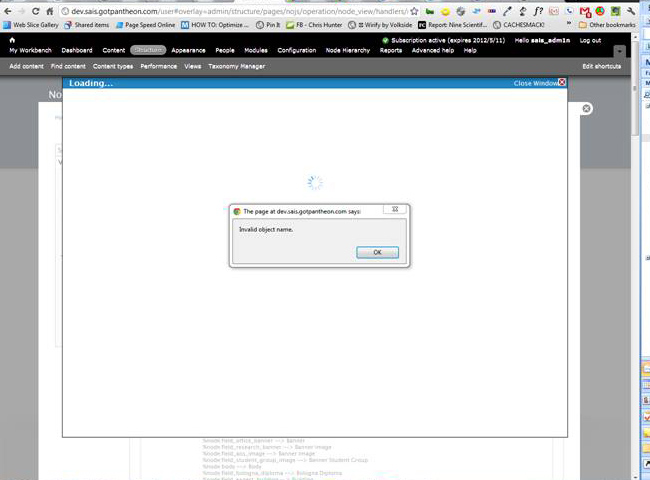
Now, when I try to add a context to a panel or page, a message pops up saying "Invalid object name.".
After that, the context window stays open until I close it, and only has the spinner. There are no log messages in drupal or apache.
It's similar to awebb's problem in this issue, except I don't use panelizer: drupal.org/node/1283246
I don't think the changes I made after importing the site is the cause of the problem. (just adding views, editing pages, etc.) I didn't have this problem in my old site...
Thanks :)
| Comment | File | Size | Author |
|---|---|---|---|
| #2 | img-1.jpg | 93.64 KB | chris.hunter |
| #2 | img-2.jpg | 17.77 KB | chris.hunter |


Comments
Comment #1
Ashlar commentedIn order to assist you we need additional information. The link in the issue leads to Page not found. Please check the link. Also, please review the drupal.org/node/571990 'Submission Checklist' for the type of information we are looking for. If we cannot duplicate your problem we cannot fix it, so tell us the steps necessary to recreate the problem. Include anything else the message says. (A screen shot might be helpful.) When you post information, please change the status back to active. Thanks.
Comment #2
chris.hunter commentedI'm also getting the error when I try to add contexts. Here is the URL where I get the error: admin/structure/pages/nojs/operation/node_view/handlers/node_view_panel_context_5/context. I've also attached 2 screenshots of the Invalid Object Name error message.
Comment #3
inky@inky3d.com commentedI've been getting the same "Invalid object name" when trying to add a context to a panel.
The Log message gives: "Invalid plugin module/type combination requested: module ctools and type cache"
I am using CTools 7.x-1.0
Comment #4
inky@inky3d.com commentedI've updated to the latest Dev version of Ctools and it's working now
Comment #5
ryrzy commentedThe problem was caused by pantheon (drupal host).
Fixed, closing
Comment #7
Anonymous (not verified) commented@ryrzy
I am on Pantheon and having this problem. In your case, how was the issue resolved?
Comment #8
ryrzy commentedYou will have to ask the pantheon team, i could not resolve the issue, and moved to a different host.
Comment #9
Anonymous (not verified) commentedThanks for the reminder. I had forgotten about this case.
The actual problem was that the CTools 7.x-1.2 code that was originally downloaded and installed was somehow incomplete -- don't ask me why or how.
As soon as I re-downloaded 7.x-1.2 and updated the DB, the problem went away.
It had absolutely nothing to do with Pantheon.
Case closed.
Comment #10
dddbbb commentedI was experiencing the same issue locally using MAMP.
I too managed to solve this by re-downloading 7.x-1.2 and then updating the DB, just as described in #9.
Still seems a little odd though.
Comment #11
Anonymous (not verified) commentedIt is obvious that there was some sort of quality assurance breakdown in the CTools release cycle, and that this resulted in an early download snapshot of 7.x-1.2 being incomplete.
Then, for some reason, a subsequent download snapshot of the same release was complete.
Even worse, nobody on the CTools team appears to have been aware of this critical anomaly. Or, if somebody was, we users were not notified.
Comment #12
merlinofchaos commentedYour definition of obvious does not match mine.
When releases are created, the packages are created entirely automatically by the system. The packages are created only once. What you say is obvious is actually impossible. That package is created once and once only, and the .tar.gz file is not created again unless one of about 3 or 4 people with administrative access to the drupal.org go and create it a second time. If this actually happened nobody told me, and it is extremely unlikely that it would have happened.
So I really don't think this is what happened, and you are trying to cast blame based on supposition and calling your supposition obvious.
What happens on a host, such as Pantheon, is completely out of the hands of the module administrators on drupal.org; so if somehow pantheon had an incomplete version of CTools that could be an issue. However, I'm currently using Pantheon and CTools there and haven't run into an issue like that. But that said, there are many different possible configurations.
One of the things that can happen is that when using some unpacking tools, people *have* had files disappear either due to misusing the UI or some tools just not being very smart. Sometimes people download files and then find a different file when they go to unpack it. And sometimes other things happen that I simply have no explanation for, but I am quite certain that once the .tar.gz file on drupal.org is created for an official release, it is static and never changes without some extremely extraordinary circumstances.
Comment #13
Anonymous (not verified) commentedDear Earl,
Re "you are trying to cast blame based on supposition and calling your supposition obvious." Not my intent at all, and I actually could resent the personalization of your note. But I won't.
Several of us on different hosts did experience precisely the same issue tracing to what appears to be the same anomaly. That is all that I meant. I am sure you will pardon me for being less than elegant and off-the-cuff with what I wrote.
Also, I am sure in my case that nothing had to do with Pantheon. They do not maintain my modules for me. I use drush to download, enable, and update all contrib modules in my dev environments. So, perhaps the common denominator here was drush. I don't know, and never will.
It remains a mystery that will not be solved, one that cost me several days of time and trial-and-error to resolve. It is in the past and water over the dam.
In any case, I do appreciate the insights into how releases get packaged, etc. Always up for learning more about your and the rest of the Drupal community's outstanding work.
Cheers,
Bob
Comment #14
ruplThis issue should indeed be closed. Installing the 7.x-1.2 release resolves the reported issue. I encountered this issue on a Pantheon/Commerce Kickstart combo, so it's clear from the report pattern that the problem does not lie in the CTools code or team.
Comment #15
snowguy commentedSorry for the newbie question but I am having exactly this same problem and i am unclear about the easiest way to uninstall and reinstall the ctools module.
I have several other modules which are dependent on it. Do I first have to disable each module dependent on it, then disable it, then uninstall, then reinstall, then enable each module again?
Or is there an easier way?
Comment #16
snowguy commentedI ended up using drush using the dl command. Unlike the modules page where I can install from url (the normal way I install modules), drush allowed me to install the same thing already installed.
That fixed the problem. And since I am using pantheon and did a commit right before and after the reinstall, I can easily see the changes that reinstalling did to fix the problem. reinstalling added the following files:
Maybe no one else is that interested in tracking down what the source of the problem is but I find it sort of interesting. My guess is that another installed module must have removed these files after I installed ctools the first time.
Comment #17
kiwad commentedSorry to comment on a closed issue, but might help someone.... I had this problem with latest dev version ctools installed (7.x-1.2+45-dev) and it took me a while to find out that...
- I'm not on Pantheon.
- I'm not using panelizer
- I've tried with seven and bartik as admin themes
- i've tried to disable toolbar
- i've tried to downgrade my jquery to 1.5 instead of 1.7
- Ran cron, updatedb, cleared all sort of cache
- Nothing shows in dblog
- Nothing in apache log
- the files mentionned in #16 are in my working directory
BUT
i'm using github with the default Drupal gitignore...which has "cache" in the ignore...
commenting that commited the three files mentionned in #16 to my staging... bug vanished
Comment #18
alan d. commented"i'm using github with the default Drupal gitignore...which has "cache" in the ignore... " no it doesn't, but this is a very generic folder name for general junk. Maybe it should get renamed?
Big thanks to snowguy / kiwad for working out the reason. Teach me to cut n paste of this committed install profile that has been used on 15 or so sites...
Comment #19
johnnydarkko commented#17 solved my issue, huge thanks to kiwad and snowguy!
I've added 'cache/' to my gitignore file as well only because I copied it from an example gitignore file I referenced a long time ago. Removing the 'cache/' directory from my gitignore file caused no other issues with my drupal install. I don't really see any reason why we should even be ignoring that folder pattern. Maybe it should be on the developers to make sure that we're not adding 'cache/' to the gitignore file.
Comment #20
Torenware commentedI've seen this issue in 1.3 as well. The symptom was that the Services module admin UI disappeared. Looking in the watchdog log, it turned out that I was seeing the error in this issue.
Deleting the ctools cache directory (by default: sites/default/files/ctools) made the problem go away. The ctools directory was NOT regenerated (perhaps it went to my memcache store?). Not sure why either.
Comment #21
tjhart87 commentedI too had the same issue as snowguy with ctools 1.3. I'm also using pantheon so I was able to identify that the below files were missing from my install of ctools:
as well as a small change in:
For those of you who don't use Drush and are looking for a way to quickly update the module files I recommend using something similar to cyberduck to SFTP the changes to your server.
Comment #22
jgreidy commentedI'm using git to move sites around as part of a capistrano deploy. I hit this same issue with the ctools cache directories. My .gitignore file needs to contain
cache/
for other reasons. My layout
.git
.gitignore
Capfile
cache
public/sites/all/modules/ctools/page_manager/plugins/cache/page_manager_context.inc
public/sites/all/modules/ctools/plugins/cache/simple.inc
public/sites/all/modules/ctools/plugins/cache/export_ui.inc
etc.
so I put this in .gitignore
cache/
!**/ctools/**/cache/
and now the ctools cache files are getting into git and out to the sites.
Comment #23
kwalser commented#16 and #21 were my issues - big thanks to snowguy and tjhart87 for the suggestions!
Comment #24
japerryDrupal 7 is no longer supported, closing.