

Closed (cannot reproduce)
Project:
Disable Term Node Listings
Version:
7.x-1.x-dev
Component:
Code
Priority:
Normal
Category:
Feature request
Assigned:
Unassigned
Reporter:
Created:
23 May 2012 at 23:41 UTC
Updated:
9 May 2014 at 19:34 UTC
Jump to comment: Most recent, Most recent file


Comments
Comment #1
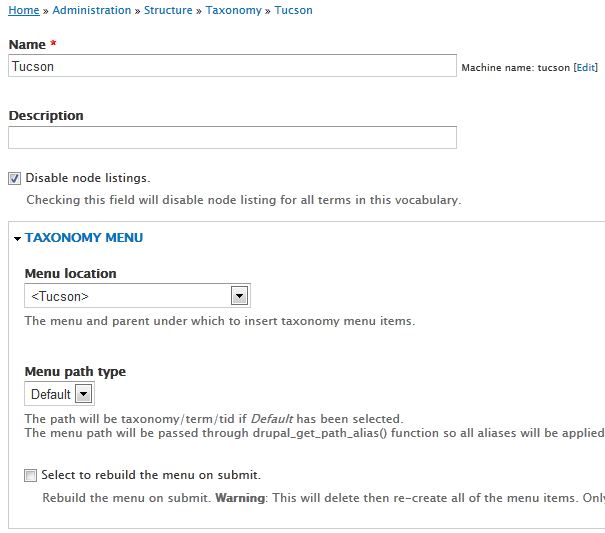
akeemw commentedHi decibel.places I am unable to reproduce the issue. I installed a brand new site with Taxonomy Menu and my module and everything seemed to work.
Here are the steps I took during testing:
Comment #2
decibel.places commentedAh I did not mention that I am adding the term via a cck field, not the taxonomy module
That's probably the difference
For now we are using CSS to hide the content and display a View in a block with Context.
When we get to theming, we may be able to create a custom template; I briefly tried a taxonomy tpl.php in the Zen sub theme which didn't work, probably because of how we are adding the term.
I am changing this to Feature Request since the "typical" control through the taxonomy module works as designed.
Comment #3
eclipsed82 commentedDecibel,
Did you come up with a solution to this? I also am associating the node with a term via a CCK field. I can't seem to get anywhere with this. Please let me know.
Thanks!
Comment #4
decibel.places commentedI am using CSS to hide the teasers then display them in the embedded view:
.node-[node_type]-teaser {display:none}
.view .node-[node_type]-teaser {display:inline}
it gets a little trickier because one node type has teasers added via node reference fields, not views:
.node-type-[node_type] .node-teaser {
display: block !important;
}
Comment #5
decibel.places commentedalso
We are using Taxonomy Menu to drive the menu system; that is how the term pages are triggered
Comment #6
akeemw commentedHi,
I'm not sure I understand this request fully. For Drupal 7 from my understanding the only way to tag a node with a taxonomy term is to use the Taxonomy Term Reference field and that CCK fields no longer exist. I have attached a screenshot of my fields for reference.
decibel.places is the following what your taxonomy structure looks like?
Tuscon (Taxonomy Vocabulary)
* Massage & Body (Taxonomy Term in Tuscon Vocabulary)
* Healthy Feet (Taxonomy Term in Tuscon Vocabulary)
Comment #7
decibel.places commentedakeemw,
I think you're correct, Drupal 7 requires a term field (which I loosely referred to as CCK because it is a custom field). I thought you could also add the content type to the vocab like D6, but apparently not (and that's a very good thing).
So regarding structure, we are driving the menu system with Taxonomy Menu and maybe that is the issue. We have a flat vocab for the Properties; on the node types we often have taxonomy term Hierarchical Select fields conditional on the Properties field - ie "Tucson" in Properties will reveal the "Tucson" vocabulary in a Hierarchical Select widget, which is a three-level vocab:
Properties (Vocabulary)
- Tucson
- etc
Tucson (Vocabulary)
- [2nd level term]
-- Massage & Body
-- Healthy Feet
- [2nd level term]
-- [3rd level term]
-- etc
I suppose any or all of Taxonomy Menu, Contextual Menu Block, Power Menu (used to "add" third level node items virtually to menus to make the Contextual Menu appear) or Hierarchical Select (2 levels) could be jamming your module.
I am not working on this project any longer, so I cannot test it further.
Comment #8
amonteroHi.
My tests:
Drupal core 7.14
Disable Term Node Listings 7.x-1.0
Taxonomy menu 7.x-1.2 (1.3 available)
Only one taxonomy vocabulary (many items each).
One custom field (type: file) for taxonomy terms.
Works OK.
HTH.
Comment #9
akeemw commentedA new feature in 1.1 (Currently in Dev version) will add a status report to help diagnose if another module is overriding this one and taking over the taxonomy term pages.
Comment #10
kpaxman commentedI was having similar problems. The patch in comment #4 in this issue queue solved it for me.