Problem/Motivation
If no value is set for 'On/Off values' in a boolean field's field-setting, two Problems arise:
a)
The rendered field will be empty if the Display Format "Default" is used (Which is the default setting).
b)
These 'On/Off values' are used as radio-/checkbox- labels on edit forms.
So, without labels a boolean field as input widget has no label(s) that describe the selection option(s). This is a usability error. An (unexperienced) site builder is confused by the field titles and descriptions on the boolean field 'Field settings' form.
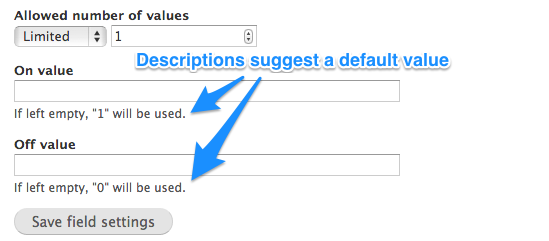
1. Add a new field of type boolean to a content type.
2. In the Field settings form, enter no 'On value' and no 'Off value'
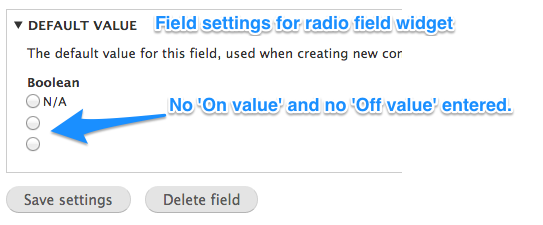
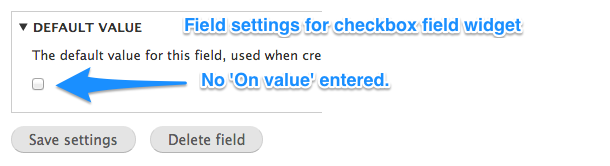
3. Notice that in the Edit form, under 'Default values' the selection options have no label.
4. Optionally: In 'Manage form display' select the 'single on/off value' widget.
5. Create two nodes, one with this field set and one without.
6. On the node form the field's selection option(s) have no label.
7. Display both nodes: no value is displayed.

Proposed resolution
D8 fixed this by making the 'On/Off values' required, so there are always labels for the input fields, and with a custom formatting option for the field output, so one can eg. output true as 'Yes' and no output for false.
Doing the same for D7 would potentially break some sites since it's a change in logic.
Therefore a functional backport would be problematic.
Quick fix:
Change the field titles and descriptions on the boolean field 'Field settings' form, see #48
Full fix 2nd step:
Have a fallback for the input widgets if no values for the labels are configured by using 0/1(as the current help text says) or On/Off (as D8 does by default)
User interface changes
Text changes only.
Original report by jramby
Hi,
I am trying to create a view by showing a field with a boolean value. In views_ui when I try to add the default publish status field of an article content type, we can by default choose a desired output format with the values : "Yes/No", "True/False", "On/Off", "Enabled/Disabled", "✔/✖", "Published/Not published".
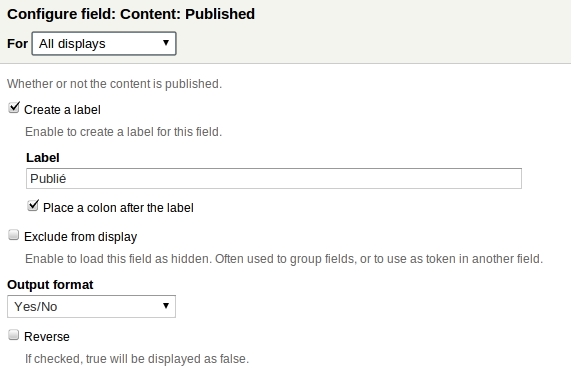
But with a custom boolean field we can't have these choices, We can just choose between : "Default translated", "Default", "Key", "Group subscription", We can't show anything else than 1 by selecting "Key".
In addition, when we add a filter on this same custom boolean node field, there is no possibility of choosing output format. Then in the filter dropbox there are the next values : "- Any -", " ", " ".
How can I provide a label to my exposed filter and my fields value.
Thank you all.


Comments
Comment #1
dawehnerSo are you talking about a fieldapi field or a custom views integration?
Comment #2
jramby commentedWell, well,
Drupal got me at this time :)... In fact, when you create a boolean field, there's a field about the value choices :
These choices are not for values, these are for labels, values are always 0 and 1.
Could someone confirm my affirmation,
Thank you very much.
Comment #3
jramby commentedThanks for your answer, I talked about fieldapi field.
Comment #4
dawehnerWell could maybe respect this setting, but from my perspective it is certainly not a bug
Comment #5
mrfelton commentedThis sounds related to #1348062: improve views integration for booleans with options
Comment #6
jramby commentedHi, this is not views issue for sure...
The problem is based on a caption mistake i think :
When creating a boolean field we are attending a boolean values (true/false or 0/1). The field system, in the caption, is suggesting yet values for the field (what else than boolean values?).
So, I think "value" should be replaced with "label" and all will be consistent.
Please tell me if I'm wrong,
Thank you all.
Comment #7
joachim commentedAs well as the UI text being misleading, there is a problem with the field's behaviour: this text in the UI is a lie:
If left empty, nothing is output for the field at all, and it looks broken.
Comment #8
dawehnerIt's a bit different in D8 already, like it has another label already. What about though about fallback to 1/0?
Comment #9
joachim commentedThis isn't about Views, just Field API, no? Otherwise, I need to open a new issue on Field API...
Comment #10
joachim commentedYup, confirming this is broken on D8.
- create a boolean field
- set it to the 'single checkbox' widget
- set it to 'Use field label instead of the "On value" as label'
- don't fill in anything else
Create two nodes, one with this field set and one without.
Look at both nodes: they appear identical.
Comment #11
dawehnerMove back to views.
Comment #12
joachim commentedComment #13
dawehnerOh i'm sorry, that's what you are talking about.
Comment #14
dawehnerThis seems to be an issue of options module.
Comment #15
dcam commentedhttp://drupal.org/node/1427826 contains instructions for updating the issue summary with the summary template.
The summary may need to be updated with information from comments.
Comment #16
brentrobbins commentedRe-roll patch since it failed to apply.
Comment #17
dawehnerI think we need a simpletest here as well, just to be sure it will not break in the future.
Comment #19
myselfhimself commented#16: drupal-1750950-16.patch queued for re-testing.
Last patched failed for retesting due to NodeBlockOrder error, which is unrelated.
Re-runned for testing again to see if patch passes again.
Comment #20
myselfhimself commentedHello,
after spending ~1 hour to try understand and try to reproduce this issue, it seems that this issue is a feature request that asks :
See some progress for exposed filter value in this issue : https://drupal.org/node/1998192
On a vanilla D8 install dated today, I can displays Views rows' boolean fields value (1/0) or custom values (as in #2).
Changing this ticket's category to "Feature request". Feel free to change the category back.
Comment #21
joachim commentedThis is a bug report -- please see comments 10 and 12 for an explanation.
Comment #22
dawehnerIf this is a bug we sadly need tests.
Comment #23
joachim commentedShouldn't be too hard -- test just has to:
- create a node type
- create a boolean field and an instance on that node type
- create two nodes
- check the output.
However, we first need to figure out what the output *should* be!
Comment #24
neRok commented#1793432: For boolean with empty values, list_allowed_values() should return array('0', '1') was closed as duplicate of this issue.
I would urge people submitting patches to read the aforementioned issue, as some points raised in that issue have not been covered in this issue.
In particular, you may actually want a boolean without a label. For example, you want to mark a wiki node as incomplete. When the boolean is ticked, incomplete will show on the node. When it is not ticked, nothing will display.
I have not looked at, nor tested how this is working in D8. Looking at the patch in #16, it appears that if the boolean has no value, something will be forced upon the field. This will fail the above use case when you do not want a label. I created a similar patch for D7 but did not post it as it failed this use case, as mentioned in the above issue (comment #2).
The suggested fix in the issue mentioned was to provide a default (pre-filled on the form) value. If the user did not want a value, they could remove it, and the above wiki case would work. This, in my opinion, is the correct solution.
I also believe this is a feature request, not a bug report. The picture in the original issue showing 'test boolean' on and off being rendered identically is 'working as designed'. They render identical because they were setup identical. There is no difference to putting Yes and Yes in both 0 and 1 boxes (although it would make no sense to do this).
Comment #25
Sk8erPeter commentedI just found this topic, and this is not related to Views at all.
There's a similar thread in #2061401: Use field label instead of the "On value" as label not working after update from 1.8, there was a bug in i18n module, which was fixed, but the problem that the default 0/1 value of the boolean field does not get printed, remained. First I thought this was related to i18n too, but had to find out it's related to the core.
Btw., I don't see why this would NOT be a bug - isn't it a bug when a field's value does not get printed? :)
Here's my related comment with many screenshots from a brand new standard Drupal 7.23:
https://drupal.org/node/2061401#comment-7878297
For convenience, I copy-paste the comment's main part and the screenshots too.
This is a screenshot of a brand new Drupal 7.23 standard install, with Bartik enabled, one simple content type, values set to default, "Use field label instead of the "On value" as label" checked; "
1" should appear (as a string), but no value gets printed:Thanks for any efforts to fix it!
Comment #25.0
Sk8erPeter commentedUpdated issue summary.
Comment #26
sutharsan commentedTrying to summarise the problems mentioned in this issue, before updating the issue summary.
#6 Caption mistake
The entered value is not used a On or Off value, but is used as label.
#7 Wrong description
The description says: 'If left empty, "1" will be used.'. But when left empty no '1' (or '0') value will be used as label. There will in fact be no labels.
#20 Missing labels
Missing labels makes boolean fields badly usable in Views. Both for the views administrator as for the end user when used in an exposed filter.
#24 No label is a feature
Some use cases require a on or off label no to be shown when displaying the value of the field.
Comment #27
sutharsan commentedI investigated the current behaviour in the light of the above mentioned problems. We have to consider that boolean values have two different input widgets: checkbox and radio buttons.
Re. #6 and #7: A checkbox uses one label, radio buttons two labels. Entering values in a form without label(s) is clearly a usability flaw. All commenters agree that the labels and/or description of the field settings are confusing.
Re. #0 and #20: Boolean label(s) are used in input forms. Missing labels when a boolean is used for input is not restricted to views. Node forms, and other entity input forms where booleans are used use the same (missing) labels. This issue is therefore not a views issue. Note that currently in D8 Views the boolean field when used as filter value uses the key (1, 0) as input and not the label.
Re. #24: When we use the solution as in #16 where empty On/Off labels (values) are replaced by their key value ('1' or '0'), the label is displayed according to display settings. The current usability problems with the boolean field are, in my opinion, much bigger than the feature we will loose. It is not a feature, it is a usability bug. When implementing a fix like in #16 there are still two possible solution: 1. Enter a space as value for the label; 2. Add a new display widget that only displays when the boolean is set to '1' and is hidden when '0'.
Comment #28
sutharsan commentedComment #29
ann b commentedComment #27 (re. #24) -- I support the idea of a special display widget that only displays when the boolean is set to '1' and is hidden when '0'. Views has a "hide empty fields" setting. I'm working on a view to implement the same requirement described in #24 (i.e. display the boolean field when the value is true, and do not display when it is false).
And thank you for summarizing these issues so well @Sutharsan.
Comment #30
sutharsan commented@all, Do we agree on using '1' and '0' as fallback/default value for the labels?
Not showing the zero value label can be a solved in a separate issue. Either as a new widget or a display option.
Comment #31
joachim commented> Not showing the zero value label can be a solved in a separate issue. Either as a new widget or a display option.
But isn't that problem what this issue is about...?
Comment #32
berdirNote that boolean fields recently moved to core and changed quite a bit.
Specifically, the default on/off labels are now On/Off and the default formatter always shows either the on or the off label.
Wondering if this can be moved to 7.x, if it is really something that we want to change there?
Comment #33
sutharsan commentedI did not look at the current state of core in this case. Yes, boolean field values are now required, and so there is always a value displayed.
@joachim, what I mean is that with the #8 patch (and the current D8 situation) either the "On" or the "Off" value is shown in the entity view and in an entity form either the "On" value (Checkbox) or both the "On" and "Off" values (Radios) are shown. And to my understanding, that is what this issue is trying to fix. But I referred to the comment of @neRok in #25, that with this change we lose the ability to only show the "On" value and hiding the "Off" value in the entity View.
Comment #34
sutharsan commentedBecause think that this issue is now fixed for Drupal 8, I started on the backport to Drupal 7. This is my proposal:
This screenshot is the initial field settings form. Unlike Drupal 8 I have not made the "On label" and "Off label" values required as that could break current installations. Both On and Off labels can be left empty. I don't expect both labels to be empty very often, it may be the case. I have not used a description like "If left empty, "On" will be used." as the statement is not true. I could not come up with a description that adds real value.
Comment #35
ann b commentedPatch #34 works for me using Drupal Core 7.27. Thank you.
Comment #36
himanshupathak3 commentedThere is a specific module for this Boolean Formatter
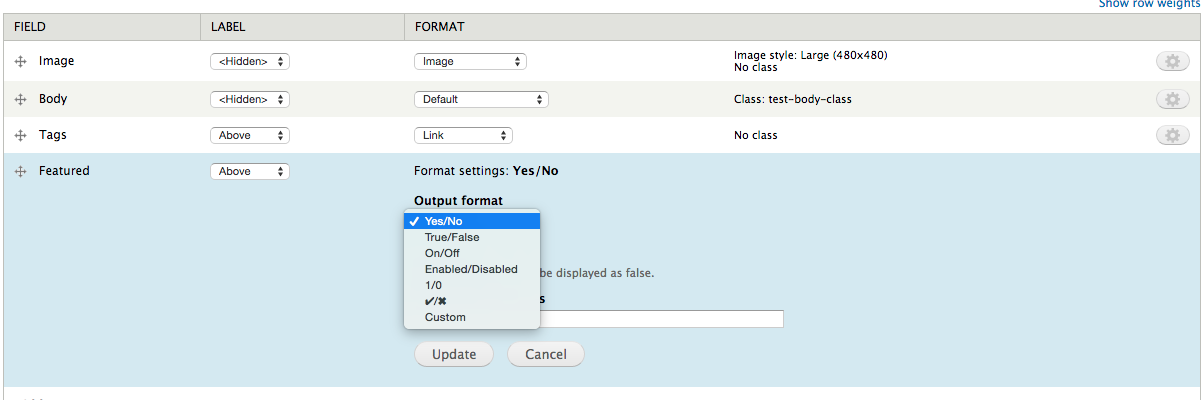
Adding image for this
Comment #37
himanshupathak3 commentedComment #38
Studiographene commentedHi All,
You can used the Boolean Formatter module and manage your display setting and select the the option you want to display your boolean value or if you don`t want to use any module then just go
to the manage display and select the "key" from list. In node view you find the value 1 will be shown and then based on 1 you can print the label you want.
Comment #39
streever commentedThis seems like a fairly straight-forward issue; shouldn't the text in the UI simply say "If left blank then no value will be used (i.e. your boolean field won't be available to use anywhere)"?
Comment #40
hgoto commentedThe patch #34 works good for me, too. It surely improve the usability without breaking existing sites.
I'd like to move it to RTBC but I'm feeling that substitute descriptions make the UI better rather than removing them.
Comment #41
jeromewiley commentedJust spent several minutes confused about why my field was not displaying in a view result.
Found this thread.
Seems this has not been fixed yet? So, I decided to put in a 1 and 0 as values/labels, and then my view worked. But captions are wrong, because they make you think the system will work if you leave the values blank.
Comment #42
donquixote commentedA boolean field can be shown in different contexts, where "label" means different things.
Examples:
1. Status: [x] Published.
2. Status: (*) Any, ( ) Published, ( ) Unpublished.
3. Status: Published.
1. [ ] Wrap as a gift.
2. Wrap as a gift: (*) Any, ( ) Yes, ( ) No.
3. Wrap as a gift: Yes
The different purposes of the labels should be properly communicated in the field configuration form.
Comment #43
donquixote commentedRe #40:
I think this would be more accurate:
Comment #44
donquixote commentedOr rather
Comment #45
donquixote commentedOr maybe use Yes / No as a default, instead of On / Off?
Comment #46
donquixote commentedOtherwise, the patch works for me.
Comment #47
Munavijayalakshmi commentedChanged patch as per #44.
Comment #48
sirtetJust bumped into this problem too on my D7 site.
This issue is for 7.x, so i refer to 7.x only...
I was caught up by the fact that on node pages, the field values did not show, but only the corresponding field label:
Based on the help text for the field settings, i expected to see 0/1 values:
So, the bug to fix would be either to change this help text or to enforce what the current text promises.
As some use cases actually WANT to not show a value, see comments above, i guess changing the help text would be the easyest and most reasonable fix.
The issue title seems to be about rendered output to be empty, but the summary also mentions not having labels on the edit pages, which is kind of a different or child- issue.
The current UI creates more of that confusion by labelling the setting "On/Off value", which suggests this is what's stored in the DB (what would be strange).
Most comments above suggest rename 'value' to 'label', that would be correct for the edit forms, where this is used for labelling the input widgets, but it's confusing for the case of the rendered field, where you have a field-label and the field-value. And there, these on/off values are used as field value instead of the 0/1 DB Key.
So, i would suggest a Label that's neither Label nor value, something like the following:
Showing 2 options for help text, maybe a fieldset with one single help text would be better.
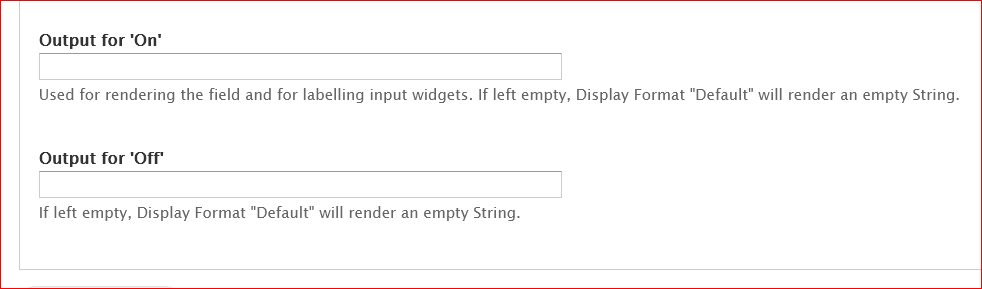
Comment #49
sirtet