

Closed (works as designed)
Project:
Open Atrium
Version:
7.x-2.12
Component:
Code
Priority:
Normal
Category:
Bug report
Assigned:
Unassigned
Reporter:
Created:
31 Dec 2013 at 16:20 UTC
Updated:
6 Nov 2018 at 22:44 UTC
Jump to comment: Most recent, Most recent file


Comments
Comment #1
mpotter commentedI am not able to reproduce any problem with OG vocab, but it sounds like maybe you followed a different process.
1) Create the Space and Section as you did
2) From the Space landing page, select Config from the gear menu in the upper-right
3) Select the "Taxonomy" option. That opens the OG Vocab page
4) Click the "Add Vocabulary" link.
5) Enter a name for the vocabulary and check the "Enable" box for the content type you want (Node - Document Page)
6) Add some terms to the vocab.
7) Go back to the Space page and click the "+" button in the toolbar and select Document Page to create a new document.
8) Enter the name and body of the document. Down at the bottom of the Node/Add page you'll see a Chosen selection field for the vocabulary you added. Select a term.
9) Publish the document and the selected term will be shown below the document body as a link to the taxonomy listing page.
So try this again and let me know where your procedure differed from mine.
Comment #2
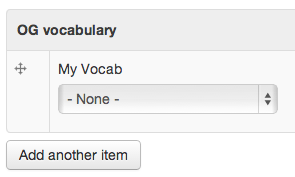
Argus commentedI think I used the same procedure, up to point 7) in your list. At point 8 I do see the vocabulary I just added, but the terms do not show up. Also it is not a Chosen selection field, but a regular drop-down.
Comment #3
mpotter commentedIf there are not any terms, then the dropdown would be empty and Chosen won't activate. So that sounds correct.
The question is why your terms do not appear. I still cannot reproduce any problem with that. Maybe document and list any other settings you changed for the Vocabulary itself?
Comment #4
Argus commentedI just tried this on a fresh unchanged installation on Pantheon and get the same problem there.
Comment #5
grpenner commentedI can get existing terms to display in the widget. I can not get new terms to be saved to the vocabulary. I can not seem to find an option that will allow the adding of new terms from the node (new Document).
It would be helpful to allow my users to create these terms on their own.
Comment #6
Argus commentedYeah it is likely a permission issue. I have gone through all the (OG) permissions in search of a clue but haven't been able to find a solution yet.
Comment #7
mpotter commentedgrpenner: if you want users to be able to add terms try editing the vocabulary and then set the Widget Type to "Autocomplete (Tags style)". I think that allows new terms to be added. There is probably a permission for this though.
You might also post this to the og_vocab module issue queue since that's the module Open Atrium is using to add taxonomy to spaces/groups.
Comment #8
Argus commentedI repeated your steps again on an unchanged fresh OA2 installation (Pantheon). I tried all the widgets available: no difference. Set to unlimited or a limited number: no difference. Set to Required: no difference.
When I install og and the og_vocab module on a clean Drupal installation I have no problem creating nodes with tags from the Group Vocabulary.
Comment #9
potassiumchloride commentedI have successfully added OG vocabulary to a Space, followed mpotter's documentation to add that to a custom content type, and the terms display in the node/edit page. Maybe check the entity selection mode? Following the steps, it should end up as "simple (with optional filter by bundle" and with no target bundle selected.
Comment #10
grpenner commentedterms in the vocab work. free tagging does not regardless of the widget.
Comment #11
Argus commentedIn the vocabulary settings page ALL the nodetypes have the description "...when creating this field in the iCal importer type.". Could this be part of the problem? If not I will open a separate issue for it.
Separate issue: #2181505: Typo's in Vocabulary Nodetype selection screen
Comment #12
Argus commentedI opened a separate issue for the free tagging problem: #2181383: Users can't add new terms
Comment #13
Argus commentedFinally figured out what I did wrong: for the content type the og_vocabulary field's target type should be set to "Taxonomyterm" not OG_vocab like I mentioned in the issue summary.
Comment #14
r0nn1ef commentedI can verify #13 on 7.x-2.12 being the fix. I also installed a clean copy of 7.x-2.13 and it is fixed in that version apparently.
Comment #15
Yorgg commentedWhat if your view's relationship and contextual filter cannot are not compatible with "Taxonomyterm" but only work with "OG vocab"?
I am trying to do a entity reference view to fetch og_vocab's terms into a term reference field, but I am getting "Error: The selected "Target type" OG vocab does not have bundles that are a group type".
Can someone point into the right direction?
Comment #16
Argus commentedWell that won't work. You will have to use Taxonomyterm in your views.