

Needs work
Project:
Views Gantt
Version:
7.x-2.x-dev
Component:
User interface
Priority:
Normal
Category:
Feature request
Assigned:
Unassigned
Reporter:
Created:
16 Mar 2014 at 18:21 UTC
Updated:
4 Sep 2019 at 22:23 UTC
Jump to comment: Most recent, Most recent file




Comments
Comment #1
thfalvar commentedComment #2
lalbright commentedI too have this problem. I have created Project A, and Project B with tasks as follows:
Project A
Task 1
Task 2
Task 3
Project B
Task 1
Task 2
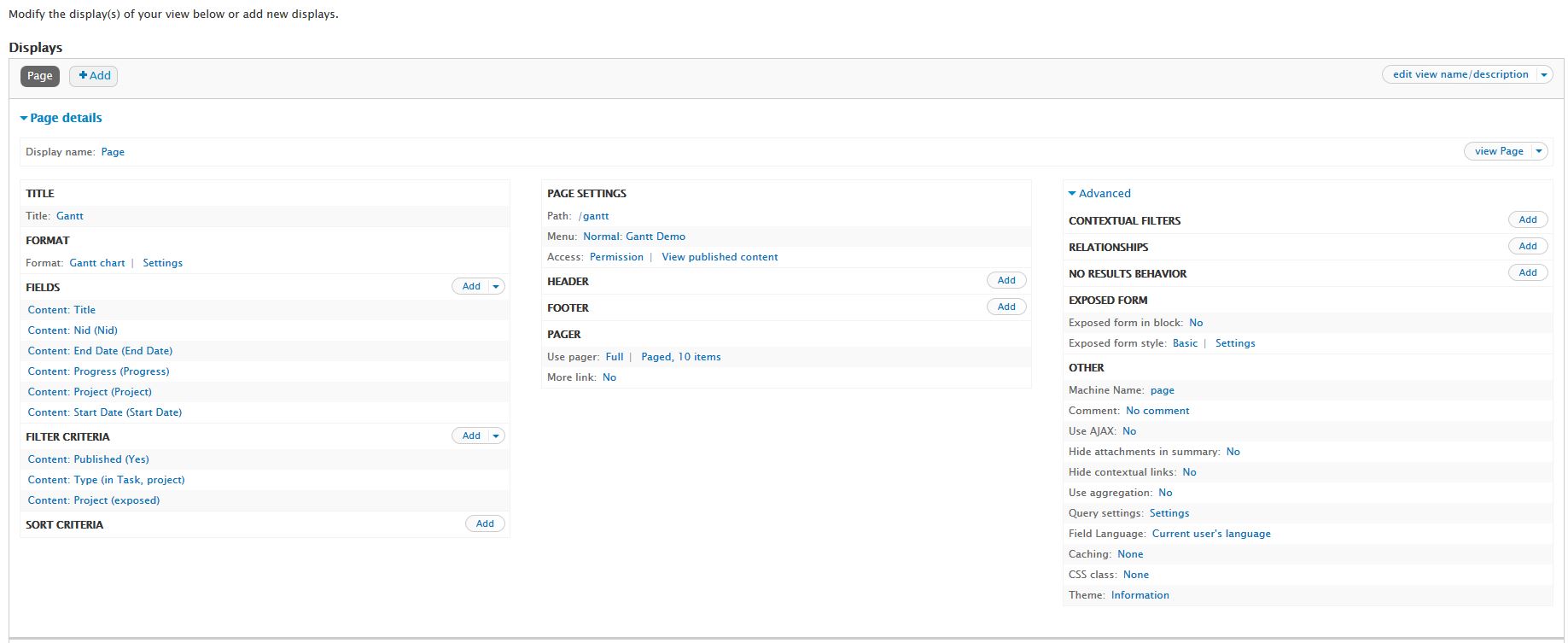
In the gantt view, I can see the Project A line, and its tasks (1-3), but also attached to the same project are tasks 1 & 2 from Project B. See the attached screenshot (gantt.jpg).
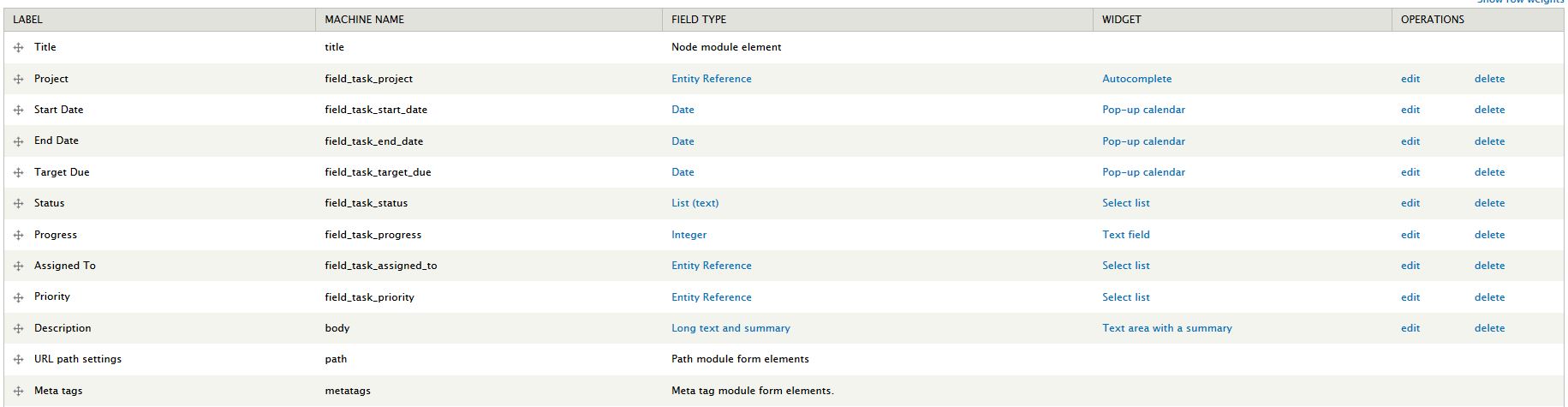
I am using Drupal 7.24, and the Views Gantt module, version 7.x-2.0-alpha1. I have a project content type, and a task content type, with the task.project field as an entity reference to the associated project node. The Task content type has the following fields:
Do you need any other information from me to help resolve this issue?
Comment #3
lalbright commentedI have added screenshots of the Task Content Type Manage Fields screen, the views screen, and the views style options for the gantt. Hope this helps. :)
Comment #4
clemens.tolboomComment #5
alexshipilov commentedCurrently module supports one project by diagramm. We will add multi project support near future.
Comment #6
dobe commentedAttached is a patch that accomplishes this (latest dev). We are starting to do a lot of development on this module so if you need help maintaining let us know.
-Jesse
Comment #7
dobe commentedI was going to split this patch up between the two queues but thought that would be nonsense. This patch adds the autoscroll to current date. We are soon to have a patch that provides finer grain control of views gantt as well.
-Jesse
Comment #8
clemens.tolboomAs there is a patch this is a feature which now needs review.
I unassigned this from @thfalvar.
I wonder why the core https://api.drupal.org/api/drupal/includes!graph.inc/7 is not used for the tree building.
Checking for http://docs.dhtmlx.com/gantt/desktop__how_to_start.html#step4loaddatatot... there does not seem to be any need to build trees?
@dobe thanks for your patch. I wish I had some time/money left to contribute too.
Comment #9
Yuri commentedIt got worse..
When I apply patch#7, none of the projects are visible, only the tasks bars appear in the gantt view.
Also, before patching I could doubleclick on the taskname in the left column and open the task. This does not work any more.
Comment #10
Yuri commentedOk I got something working...I've put the project ID as the 'Parent ID field' and now they show up. The tasks are also clickable links.
Am I doing this the right way?
Comment #11
dobe commentedCurrently the way we have it setup is:
Task content type:
Project is an entityreference field to a task (projects don't have parents).
Parent is an entityreference field to a task.
Comment #12
dobe commented#8 We agree with you. However the build tree is doing some clean up as far as we can tell. We may attempt to strip out tree in a future patch.
We took a step back from this and gave it a re-look, seems that we can accomplish getting projects to work as intended with a really, really simple patch. If what we are doing is going to cause unforeseen conflicts post it up. Enjoy.
Comment #13
sinasalek commentedNice patch! #12
The patch is applicable but how to test it?
Comment #14
manuelBS commentedIf we get it tested, I am really looking forward to commit it. Can somebody post an example view or feature so others can test it?
Comment #15
thfalvar commentedHello, I passed in views Gantt 7.x-1.0-beta2 and the problems are always here (n projects, bug when using direct the diagram for changed the % progress, and the change start date in diagram don't changed in the task table).
So i do not pass the patch because i think that they are for the anterior version.
Comment #16
samstamport commentedI'm pretty new to Drupal. This is the first time I've tried to patch. Maybe I'm doing something wrong ...
None of the three patches seem to match the current code in views_gantt 7.x-2.0-rc1 or views_gantt 7.x-2.x-dev.
Please help.
Comment #17
jaspher commentedConfirming with #16 that this patch #12 does not apply to rc1 and dev:
Comment #18
clemens.tolboomSo the patch needs work :)
Comment #19
BigEd commentedWas there any progress on this issue?
I may need this for an upcoming project and its a bit of a deal breaker if i can't do more than one project.
Comment #20
marceldeb commentedSame problem here. Much appreciated!
Comment #21
clemens.tolboomI still did not manage to generate multiple projects. Not even with #12.
Should we use #7 instead?
Comment #22
clemens.tolboomRemoving $project_id should be corrected in line 85
'type' => $id == $project_id ? 'project' : 'task',
Code part should look like
I'm not sure what to replace the 'type' line with.
Comment #23
iaminawe commentedI am also interested in this solution
Comment #24
iaminawe commentedI have this working with multiple projects using the patch from #7
I needed to add a relationship to the view based on the project reference field
Then I added a second nid, start date, end date and title all using the project relationship
The project ID field I used the nid using the relationship and then for Parent ID field I used the entity reference field to the project and it worked!
I do receive the following error but it seems to work correctly
Notice: Undefined index: id in views_gantt_plugin_style_gantt->views_gantt_before_render() (line 827 of /Users/***/Sites/****/sites/all/modules/views_gantt/views_gantt_plugin_style_gantt.inc).
Comment #25
matthieu_collet commentedhi
effectively, none of the patches work with 7.x-2.0-rc1
anybody has an idea how to progress ?
in fact, I don't understand if the patches where removing projects trees, of multipliying them (i hope it was this second option)
when I apply them it removes the tree display
with patches 7 and 8, is it required to put project id in "Parent ID field" ?
is this project still active ?
thank you
matthieu
Comment #26
asntbladewriter commentedFor anyone wondering what the setup from #24 might look like, I got multiple projects to work on my test-bench with this: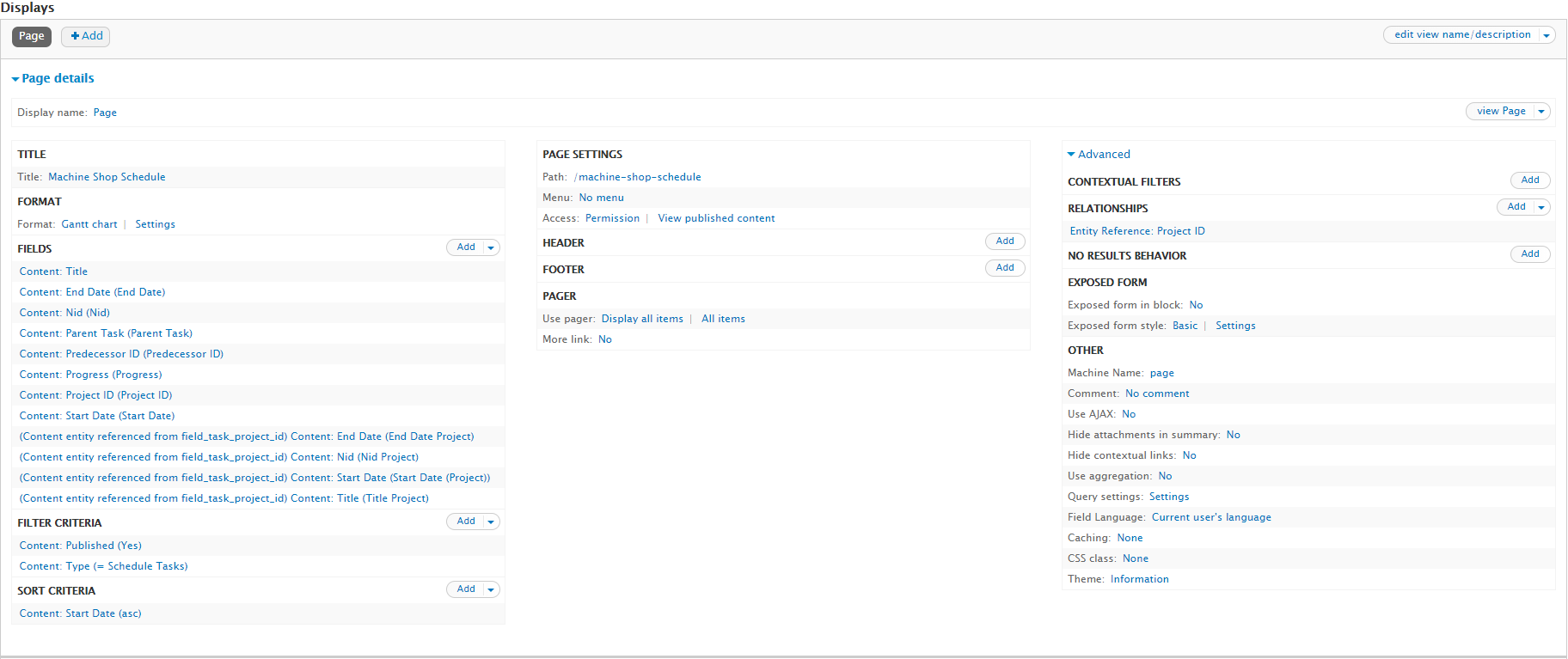
Comment #27
drupupp commentedPer #26: How did you set up the settings for the chart?