

Needs review
Project:
Commerce Core
Version:
7.x-1.x-dev
Component:
User experience
Priority:
Normal
Category:
Task
Assigned:
Unassigned
Issue tags:
Reporter:
Created:
29 Jun 2010 at 19:04 UTC
Updated:
22 Jan 2019 at 17:41 UTC
Jump to comment: Most recent, Most recent file


Comments
Comment #1
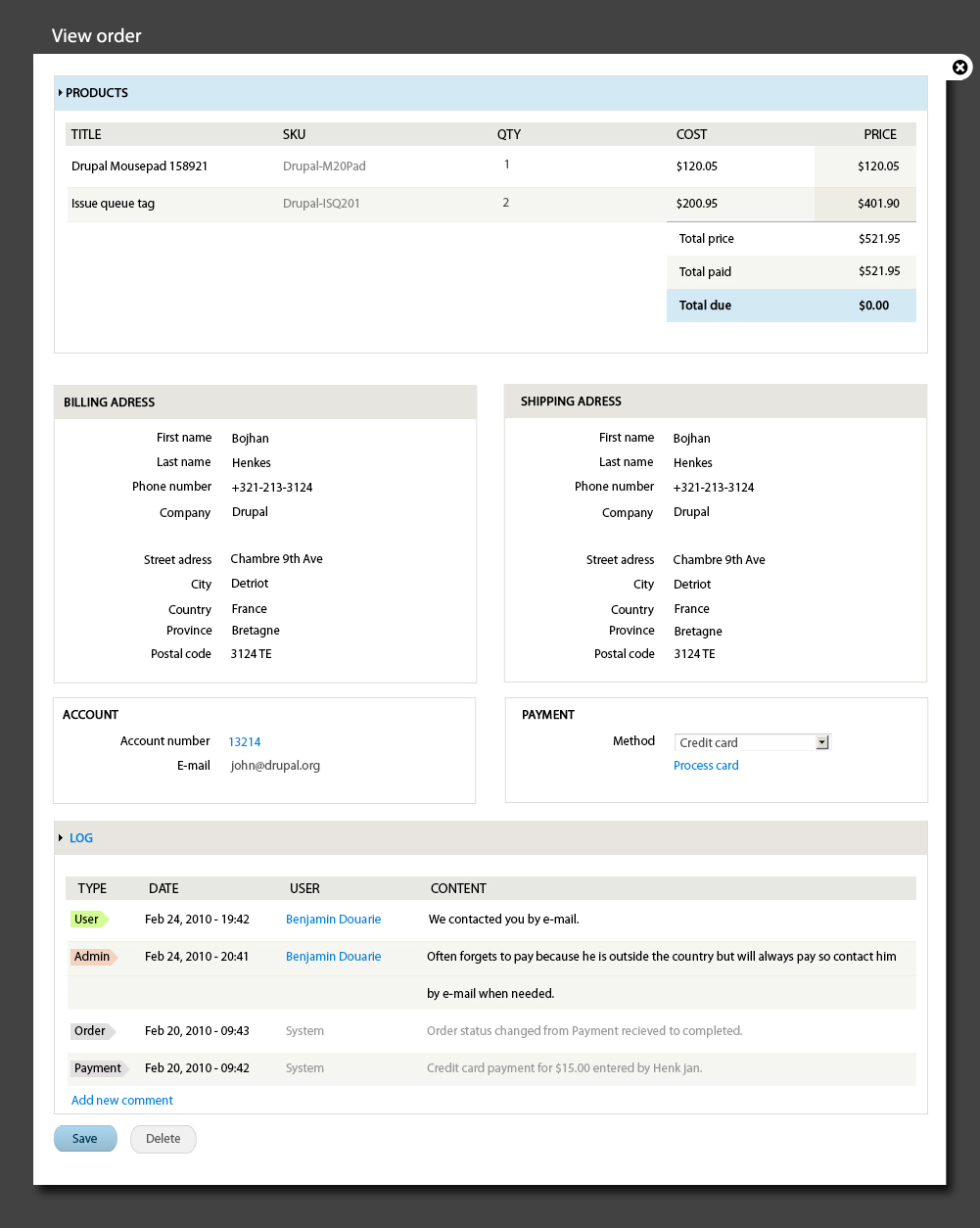
Bojhan commentedSo I would love feedback specifically on the line item balance integration. I feel its lost some of its strength and the line isn't adding clarity however we do need a divider there.
Onto the activity log, I have used colors to indicate two more important states and decreased the importance of system messages, I think the grayness could use some work and make it contrast just enough to create the "this is less important feeling".
Comment #2
mertskeli commentedI dare to suggest few things.
1. Every order should have some unique ID.
2. Regarding Products table:
SKU is usually short, mostly numeric (like A123 or just 1234), and usually goes first. It is a unique identifier, more important than Product Name (Title). Name you might want to edit from time to time, but SKU (ID, Article, Item Number) usually never changes. Accounting, warehousing, warranty personel mostly deal with it. They don't care so much about titles, would it be a keyboard or a dog.
Last two coloumn headers are very strange. Normaly they are: Unit Price and Total Price. And below that (after all product lines) goes Subtotal.
From usabilty point of view it is even better to have Quantity after Unit Price, not before.
3. Would be nice to have Billing and Shipping Addresses collapsible. Withrepeated numerous orders from the same client it just occupies a precious space.
4. Activity log looks ok. IMHO, there's no need for any colour accents. This log will not contain dozens of lines to be lost in.
Comment #3
Bojhan commented1. I cant comment on that, I don't know if the system provides it. @rszrama you know?
2. I can put it first, I kinda wanted to put the title first to keep the commerce system somewhat more human. But if you say its more important I can move it up first.
3. We can make them collapsible.
4. Sadly, I do think its necessary indeed they will not get lost in it. But visually they will, even if there are only 5 system messages.
Comment #4
mertskeli commentedRe: Activity Log
Probably you are right. Anyway CSS gives full control of that.
But the idea of such an appending log to every order is a great idea, I must admit. It gives you a kind of CRM.
Jesus, when that D7 will be released?...
Comment #5
nevets commentedAs for SKU vs Title, I think the importance depends on the use. Not everyone even use SKUs (example small shop selling handmade items). Also, SKU are not always short, some can be pretty long.
Comment #6
mertskeli commentedSure. But if a shop is not using any product id except title, it should start to use it asap. Even if admins or clients can live without product id, system can not. Thats why it has been used since the first days of accounting book-keeping.
It's ok if you have products like Book, Pen, Car. Their titles are a kind of SKUs themselves.
But imagine such a product:
Device Panasonic X-123 Black-Silver
where Device - Product Group, Panasonic - Product Brand, X-123 - Product Model, Black-Silver - Product Main/Secondary Colours.
It could easily be presented like:
Device Panasonic X-123 Black-Silver
Device Panasonic X123 Black-Silver
Device Panasonic X-123 Black Silver
Device Panasonic X123 Black Silver
All of them are different for a system, although it is the same product. The only way to get rid of such duplication and further mess is to set strict SKU (1, 2, 3, etc.)
Yes, this title could be splited into separate fields thus reducing Title to Model only lets say. But the problem is that nobody ever has no time nor desire for that. It always ends up with just 3 fields: ID Name Price. Besides, as in example above, model number can be presented in different ways. And we even do not mention language differences, where C and C are two different keyboard characters. Numbers are not - they are language-insensitive.
Still I believe rszrama is experienced enough to settle it the most business-friendly way. I do agree that some small webshops can live without SKU. Although SKU has nothing to do with quantity. It is a fingerprint of a product, deaf and blind number, like phone number, and it doesn't care who or what is behind it: a grandma or a president.
You can live with just ID and without Title if you have a good memory but you can not live without id as long as title has more characters than id.
May be it is possible just to have an option to show or hide it?
Comment #7
Bojhan commented@mertskeli Its a view in those kind of cases, you would just edit the view.
Comment #8
rszrama commentedQuick bit of feedback: good catch on the unit price / total price (as opposed to Cost / Price). : )
When we implement Bojhan's mark-ups, we're changing some titles like that where appropriate - pretty sure we did as mertskeli suggested on the edit tab.
As for the Title vs. SKU question, I'm still undecided. Right now, I don't think SKU will necessarily work as a column title anyways - we may need other types of line items to use that same column in the table that would not have SKUs (discounts / taxes for example) but do have "labels." At the very least, as Bojhan mentioned, the table is prepared by a View and will be easily customizable.
Thanks for the feedback - and thanks to Bojhan for his work and for getting the discussion going.
Comment #9
rszrama commentedComment #10
patcon commentedJust to provide input @ mertskeli in #2
1. Agreed, Order ID should be visible somewhere though not too prominently. It's often written on cheques received, so might be nice to see some feedback that we're in the right place before submitting changes/comments
2. No comment. Not very critical to my use-case (only a few products), so not sure how others might use it.
3. Collapsibility of address fieldsets is great, but is it possible to remember the collapsed state across all orders (in a cookie perhaps)? I can imagine a situation where the user might want to browse address info between a few orders (for whatever reason), and it would be irritating if it were always closed.
4. Love the activity log design. Definitely important to de-emphasize system messages, as I always wished my own stood out more. Great idea!
Comment #11
redben commented1. Is there a rational behind putting customer data under the table and not on top, wouldn't it be better for the user to see it on top just like regular orders/invoices on paper ?
2. Billing and shipping data, since we are in view mode, shouldn't we get rid of the field labels (first name last name...etc) and have it formatted like in printe orders :
Bohjan Henkes
Drupal
Chambre 9th Ave
Detriot, Bretagne
3124 TE France
+312 891 8912
This sure would take less space and less "eye scan time"
ANd yeah the log looks great !
Comment #12
rszrama commentedThis view is specifically for administration, so we can move things around for the customer facing order view. However, your point stands that simply formatting the address should do fine here or there.
Comment #13
Bojhan commentedWe can actually remove that text, one reason I put them there is because of multi country shops - who have an international administration, I have experienced field labels to be critical when looking at an address not in your own country.
Comment #14
redben commentedI see what you mean...Not all countries format the address in the same way.
Comment #15
torgospizzaI love the way this looks so far. To add my response to the comment from #2:
For your store, maybe. But if the file downloads get logged in DC the same way they are in UC, the highlighting will be extremely nice to have.
Comment #16
mertskeli commentedChecked the new demo site.
Shopping cart "Remove" checkboxes are not necessary. It does not give any benefits, you need 2 actions anyway: check + "update" button. The same can be done with Qty input: 0 or nothing + "update" makes the same.
What is realy necessary is a "Delete" button, like discussed here http://drupal.org/node/841954#comment-3153644
Comment #17
rszrama commentedThere will be a delete button like you describe - it just hasn't been implemented yet. I just didn't want to release an alpha 1 without some sort of cart form. However, we still had to implement the form as such so it was JS degradable - changing the checkbox to a button will be done via JS.
Comment #18
DjebbZ commentedFor the "Billing address" (and "Shipping address") to be styled properly it needs this patch to be committed, which give full power to themers through proper markup and classes.
Comment #19
rszrama commentedTagging.
Comment #20
recidive commentedOk, let's put together a plan for implementing this.
Right now the Order view page is rough. It only shows up line items and billing address bellow that with no formatting.
We also have "Edit" and "Payment" pages/tabs. Is the page mockup in #1 meant to replace View page/tab only or to also put all 3 pages/tabs into one?
I see there's a "Process card" card action in the mockup. Not sure what this mean, but maybe it refers to the "Add payment" widget like the one in the "Payment" tab?
Here are some observations/suggestions from reading this issue and it's comments:
Comment #21
rszrama commentedYeah, disregard the "Process card" button. That's just a UI relic from Ubercart... adding payments and capturing amounts from credit card authorizations will all happen through the Payment tab. So... we don't need a payment fieldset at all.
Also, in order for the log to get to the mock-up level, we're going to need to get to a point of additional Views integration w/ entity revisions. I'm not sure it's worth the time for beta, but there is at least one open issue dealing with order revision integration.
I think Djebbz actually has the address formatting working in a patch above, we just need to get some review on it.
Comment #22
recidive commentedI think DjebbZ patch you're talking about is the one for the Editing Order UI (#725658: Editing order UI). I'm going to review that and see if there are something we can leverage for both View and Edit tabs, like blocks formatting/positioning, etc.
For the logs, I'll have a look at what's involved into integrating order revisions with views. The log display is something we can add later when we can build the view.
Comment #23
rszrama commentedUntagging. Tthough I would've loved the interfaces to be nicer for the release, a beta is about function not form. This is obviously still a priority item. : )
(Some of the mock-up in here has been implemented with all the work surrounding the order total field, so it's not a total wash.)
Comment #24
missym commentedI just started using this so I might be posting the wrong thing in the wrong place so please delete if that is the case. We might have an area for order level user defined fields here.
Comment #25
Bojhan commentedThe log still needs to be made + pretty much everything else still needs to be fine tuned
Comment #26
webadpro commentedJust curious, Is that markup available to be used? Can we download it somewhere?
Comment #27
rszrama commentedNope, still needs to be implemented.
Comment #28
webadpro commentedI see. thanks for the update.
Comment #29
googletorp commentedI have revised the order page a bit.
I think we should have a clear indication of which order that is being displayed. It would also be very nice to have the payment history present. Here payment modules could add functionality for capture. In EU you can't capture before the goods are sent, so this could potentially be a very common operation.
Comment #30
rszrama commentedOooh, thanks for giving this attention. Is there any reason not to keep the payment history inline but maybe emphasize it a little more? See the bottom row in the log visualization.
Comment #31
Bojhan commentedWe could make the log more intelligent, e.g. allow for quick filtering? Not sure if this UI is being worked on though, the drafts on this date from two years ago.
Comment #32
yannisc commentedThe drafts look nice!
They need order history available in views though, something that is achieved by this patch by Ryan: http://drupal.org/node/804850
Is there a roadmap on this?
Comment #33
jonathan_hunt commentedThis looks good. What needs to happen to make this available? Can it be achieved by editing an existing view?
Comment #34
Bojhan commented@jonathan_hunt I think by views + some theming
Comment #35
DjebbZ commentedSorry if it's a bit off-topic, but seeing the draft makes me think : this should be print friendly.
Comment #36
rszrama commentedGood feedback. Are you saying it doesn't look print friendly as mocked-up or it does and that's a good thing?
Comment #37
liupascal commentedI mainly see 2/3 reasons for a printable order summary :
-> Order preparation, In my project, I ended up creating a view with custom template to get what i need - but since I think it's a pretty common need, why not include it here as a order view mode and a customizable template ?
-> Delivery "receipt", not sure how to call that, but in many case, you want to add a delivery summary to your client along with the parcel
-> and maybe invoice ? i know there is a module, but it mainly creates invoice numbers, I tried the invoice + htmlmail and i must say it's pretty complex to have it functional...
I hope this is not "too" off topic.
The view i see in #29 just look awesome :-)
Comment #38
googletorp commentedI had a client who needed account info on the order.
I'm attaching a patch that adds this to the order page, with styling similar to the mockup created here. It might not be the full solution for the order page overhaul that's needed, but it would be a good start to at least add the account info which current isn't available at all. I created the account info markup as a theme function, so it's easy to customize if needed.
Comment #39
lsolesen commentedSeems to be a small error in this code snippet
Shouldn't the elseif be $account->mail instead?
Comment #40
rszrama commentedLooks like; also, when you reroll, would you mind adding !empty() around those? We prefer the explicit empty check throughout Commerce in general unless the variable is a boolean.
Comment #41
googletorp commentedReroll with fix from #39 and using !empty check for consistency as suggested in #40
Comment #42
lsolesen commentedI've applied the patch, but it seems that the user info is NOT showing on the admin/commerce/orders/xxx. I have cleared the caches. Do I need to do anything special to make it work?
Comment #43
googletorp commentedThe user info should be showed on admin/commerce/orders/xxx, so that is indeed how it is supposed to work. You can configure if you want to show or not under manage display.
Comment #44
lsolesen commentedOk. After clearing the caches again, it shows where I expected. I would change "Account number" to e.g. "Account name" or "Username". For me it is RTBC when that is changed.
Comment #45
rszrama commentedYeah, I'd go for whatever it's called elsewhere in the UI (username?). Also, it looks like that theme function is doing quite a bit of work getting variables ready. Shouldn't that happen in a preprocess function?
Comment #46
lsolesen commentedMaybe also make it possible to change the status from the order entity view page #1665550: Add an extra field to orders that shows an order status update form to administrators
Comment #47
googletorp commented#45 I created this as a regular theme function instead of a templated theme function - what you like is a matter of preference. Regular theme functions don't have preprocess functions IIRC, that's only for templated theme functions. I wouldn't call formatting the username and getting the email for "quite a bit of work getting variables ready", which is the only variable format I do, the rest is the actual markup.
I changed Account number to Username. I did call it Account number since that was in the mockup for this case. You might want to check with Bojhan which is better.
Comment #49
lsolesen commented#47: 840786-add-account-info-3.patch queued for re-testing.
Comment #51
chris matthews commentedThe 6 year old patch in #47 applied cleanly to the latest commerce 7.x-1.x-dev and (if still relevant) needs to be reviewed.