


This module displays "Add to Calendar" event links for Google Calendar, Microsoft Outlook, and calendars that read standard iCal format. It is intended to be used with Smart Date fields.
This module is similar to Add to Cal or Add To Calendar Button. Unlike those modules, this one has no external dependencies or libraries it relies on. Another key difference is that this module leverages the Date Augmenter API to provide a plugin that will add these links to another formatter, instead of forcing you to choose a formatter that only adds add to calendar links. So you can use a feature-rich formatter (providing it also supports this API) and add the links to its output.
How this module is used
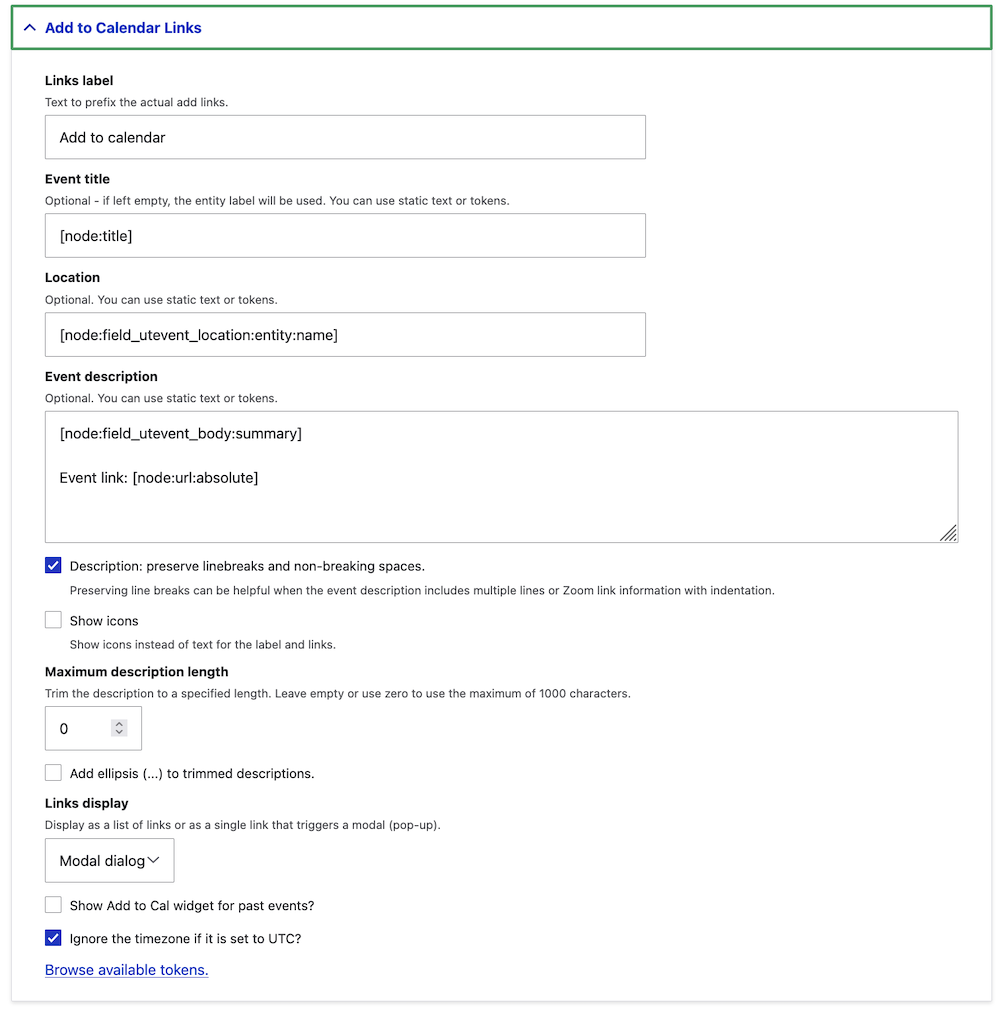
This module augments the Drupal "Field Formatter" for applicable field types (e.g., smart_date). In the Drupal UI, this is under the "Manage Display" settings for entity types. As shown in the screenshot below, the field can be configured to display "Add To Calendar" links with options for the title, location, and event description, as well as how the links display.
| Attachment | Size |
|---|---|
| addtocal_augment.png | 189.1 KB |
Project information
- Project categories: Content editing experience, Integrations, Site structure
- Ecosystem: Date, Date Augmenter API, Smart Date
 3,621 sites report using this module
- Created by mandclu on , updated
 Stable releases for this project are covered by the security advisory policy.
Look for the shield icon below.


