

 The 2026 Drupal Business Survey is open. Your response will help shape the future of the Drupal business ecosystem.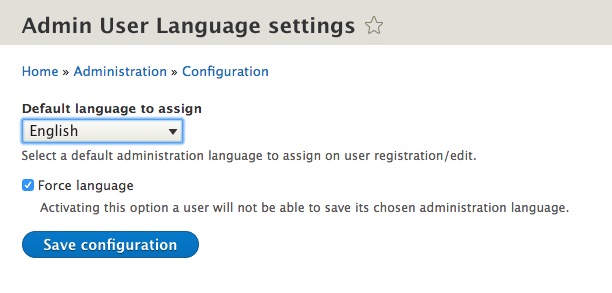
Synopsis
The Admin User Language module makes sure that any user has a pre-selected administration pages language.
This is useful when you want to give a consistent user experience to your users, in the specific, when you want to force the back end navigation to be always in a specific language (e.g. English).
If your users have any administration privilege in fact, since their registration, they will have the administration pages language set to - no preference - unless manually changed.
This module makes sure that on every user registration/update, its administration language will always be set to a specific one of your choice. Further, it can also be forced to avoid arbitrary user customisation.
Requirements
- The site must have at least two active languages
By default Drupal shows the language selector in the user profile if some conditions are met:
- The user has the permission 'access administration pages'
- The language negotiator 'Account administration pages' is enabled under admin/config/regional/language/detection
If you don't meet these requirements, the user won't be able to pick any language, so this module would never act to change the admin user language.
If you don't want to give an user full admin rights just to be able to switch their admin interface language, please check out this module admin_language_negotiation.
Roadmap
Admin User Language is currently under active development.
Installation
- Download the module via composer
- Enable the module via drupal console (recommended)
Configuration
- Navigate to /admin/config/admin_user_language/settings
- Select the Default language to assign
- Tick the checkbox Force language only if you don't wont to allow
an arbitrary administration pages language by your users
Check that everything works as expected
Once the configuration is done we can run an easy test:
Register a new user and verify that its administration pages language is set to the one you defined in the configuration.
If you selected Force language, try to change the administration pages language to a language that is different from the one you configured, then save the user.
Open the user profile and check if the administration pages language has been
re-set to the one you specified in the configuration.
Contributing
Any help is welcome to support and improve the project, but considered feature-complete by its maintainers.
Troubleshooting and info
Please refer to the README.md in the project root.
Supporting organizations:
Funded development
Project information
 Maintenance fixes only
Considered feature-complete by its maintainers.- Project categories: Administration tools, Multilingual
 1,157 sites report using this module
- Created by aless_io on , updated
 Stable releases for this project are covered by the security advisory policy.
Look for the shield icon below.
Releases
8.x-1.2
released 8 August 2024
released 8 August 2024
Works with Drupal: ^8 || ^9 || ^10 || ^11
Add Drupal 11 compatibility & option to copy language from 'site language' field.
Install:
Development version: 8.x-1.x-dev updated 8 Aug 2024 at 14:55 UTC


