

The Azure AI Search VDB Provider works with the AI module, allowing you to do vector searches with AI Search.
Features
It provides a Vector Database provider for the AI module, allowing you to use it to connect to Azure AI Search services.
This allows you to use the AI Search features from the AI module.
Pre-Installation
- Ensure you have an index created already in Azure AI Search
- Add the following fields to the index:
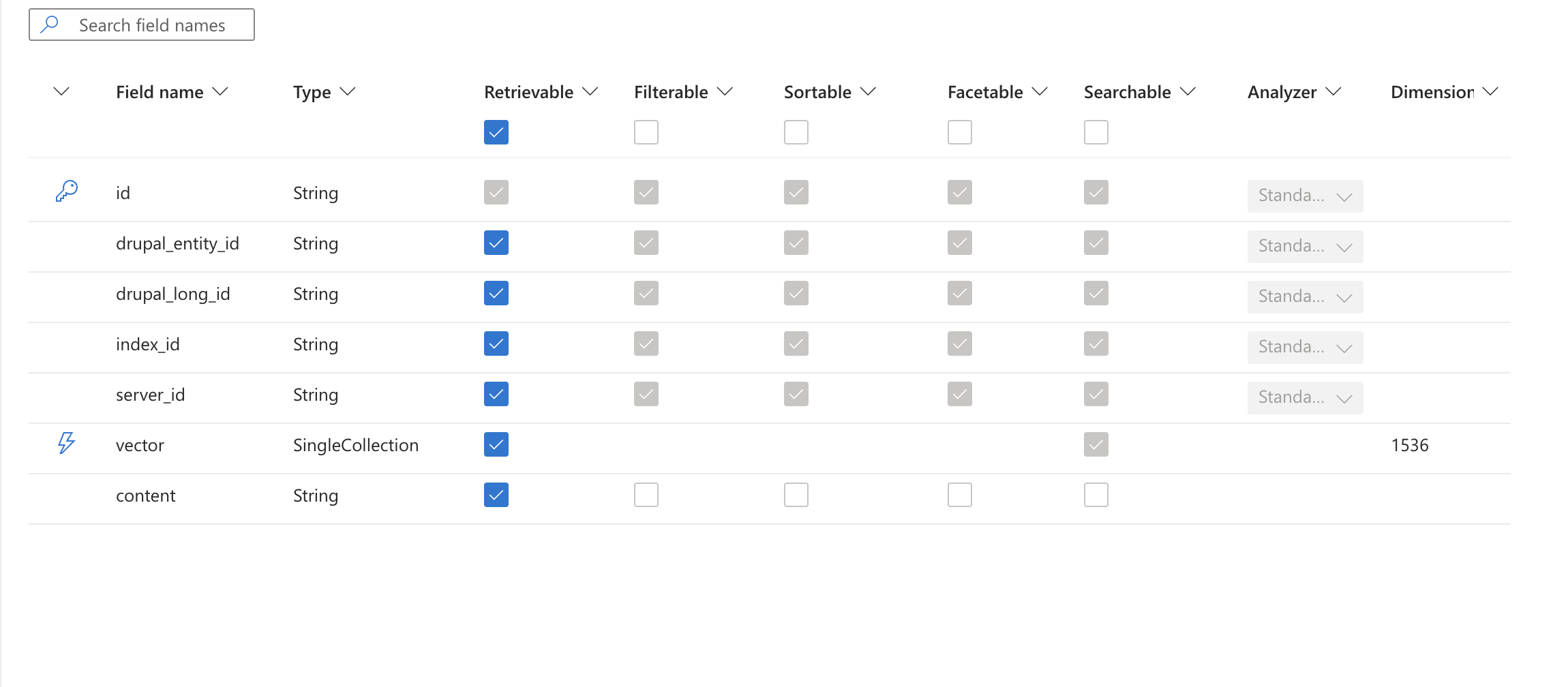
(these fields are automatically populated by the search API)
Post-Installation
- Install this module
- Add the API Key in the Keys configuration page
- Create a new Search Server.
- Select the "Azure AI Search DB" option under the "Vector Database" field.
- Then add the index name, URL, API version and select the API key.
Additional Requirements
| Attachment | Size |
|---|---|
| Azure AI Search Config | 138.29 KB |
Project information
- Project categories: Site search
 61 sites report using this module
- Created by vivek panicker on , updated
 Stable releases for this project are covered by the security advisory policy.
There are currently no supported stable releases.
Releases
Development version: 1.0.x-dev updated 19 Dec 2025 at 10:26 UTC


