

 The 2026 Drupal Business Survey is open. Your response will help shape the future of the Drupal business ecosystem.
This Ajax login popup module gives ajax validation for user login form.Redirection flexibility means once user logged in, user can redirect any page where he/she wish to redirect.
Installation
1. Paste ajax_login_popup folder inside the modules folder
2. Enable the ajax_login_popup, it will be under Custom
3. Now the module is ready to do the configuration
Configuration
After enabling the Ajax login popup we're ready to configure it:
1.Go to: Administration->Configuration->System->Redirection Config Form

2.Add URL name or node number like node/1 for redirection after the user logged in.
3.Add the Button Name which will display on the popup block.
4.Click the "Save Configuration" button.

5.This module will generate two Blocks
1.Ajax Login form popup
2.Custom Ajax User Login Block
6.Goto: Administration->Structure->Block layout
7.Click on the Place block button next to Primary menu
8.Type Ajax Login form popup. It will show the Ajax Login Popup.Then Place the Block.

9. The user login form will come as a modal login form as below.
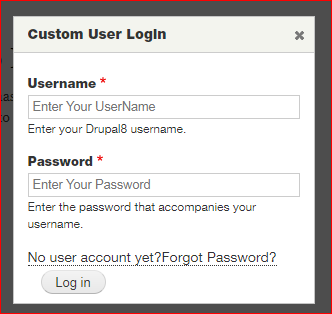
10. Custom Ajax User Login Block will give simple login form which will work with ajax
validation.The form will appear as below.

Project information
 Maintenance fixes only
Considered feature-complete by its maintainers.- Project categories: Access control
 47 sites report using this module
- Created by dipikas on , updated
 Stable releases for this project are covered by the security advisory policy.
Look for the shield icon below.


