




Azure Key Vault REST API Integration
BEFORE INSTALLING
For a sovereign vault we suggest you use Vault instead of azure_key_vault
This module is providing the REST API integration between Drupal 10/11 and 'Azure Key Vault' using the 'Azure Active Directory' (AAD) token authentication (https://docs.microsoft.com/en-us/azure/key-vault/general/authentication).
Additionally, this module provides another sub module to use 'Azure Key Vault' as a provider in 'Key' module (https://www.drupal.org/project/key), so that it'll provide the lacking GUI in the meantime. Please refer to the documentation of 'Key' module for further details (https://www.drupal.org/docs/contributed-modules/key). Only working with the "Key type: Authentication", "Key type: Encryption" (via Azure Key Vault - Secrets) and "Key type: Azure Encryption" (new key type created for Azure Key Vault - Keys) for now.
Azure Key Vault module developed as a requirement of Bayside City Council (https://www.bayside.vic.gov.au).
Available methods:
Create Secret
Method: PUT
Endpoint: https://{vaultBaseUrl}/secrets/{secret-name}?api-version=7.4
Documentation: Set Secret - REST API (Azure Key Vault)
Get Secret
Method: GET
Endpoint: https://{vaultBaseUrl}/secrets/{secret-name}/{secret-version}?api-version=7.4
Documentation: Get Secret - REST API (Azure Key Vault)
Get Secrets
Method: GET
Endpoint: https://{vaultBaseUrl}/secrets?api-version=7.4
Documentation: List Secrets - REST API (Azure Key Vault)
Delete Secret
Method: DELETE
Endpoint: https://{vaultBaseUrl}/secrets/{secret-name}?api-version=7.4
Documentation: Delete Secret - REST API (Azure Key Vault)
Purge Secret
Method: DELETE
Endpoint: https://{vaultBaseUrl}/deletedsecrets/{secret-name}?api-version=7.4
Documentation: Purge Deleted Secret - REST API (Azure Key Vault)
Get Data (Vault Information)
Method: GET
Endpoint: https://management.azure.com/subscriptions/{subscription-id}/resourceGroups/{resource-group-name}/providers/Microsoft.KeyVault/vaults/{vault-name}?api-version=7.4
Documentation: Vaults - Create Or Update - REST API (Azure Key Vault)
Encrypt Key
Method: POST
Endpoint: https://{vaultBaseUrl}/keys/{key-name}/encrypt?api-version=7.4
Documentation: Encrypt - REST API (Azure Key Vault)
Decrypt Key
Method: POST
Endpoint: https://{vaultBaseUrl}/keys/{key-name}/decrypt?api-version=7.4
Documentation: Decrypt - REST API (Azure Key Vault)
Get Key
Method: GET
Endpoint: https://{vaultBaseUrl}/keys/{key-name}/{key-version}?api-version=7.4
Documentation: Get Key - REST API (Azure Key Vault)
Delete Key
Method: DELETE
Endpoint: https://{vaultBaseUrl}/keys/{key-name}?api-version=7.4
Documentation: Delete Key - REST API (Azure Key Vault)
Generate Key
Method: POST
Endpoint: https://{vaultBaseUrl}/keys/{key-name}/create?api-version=7.4
Documentation: Create Key - REST API (Azure Key Vault)
Example of use:
Install the 'azure_key_vault' module. (For more information on installing modules, visit:
https://www.drupal.org/node/1897420 for further information.)
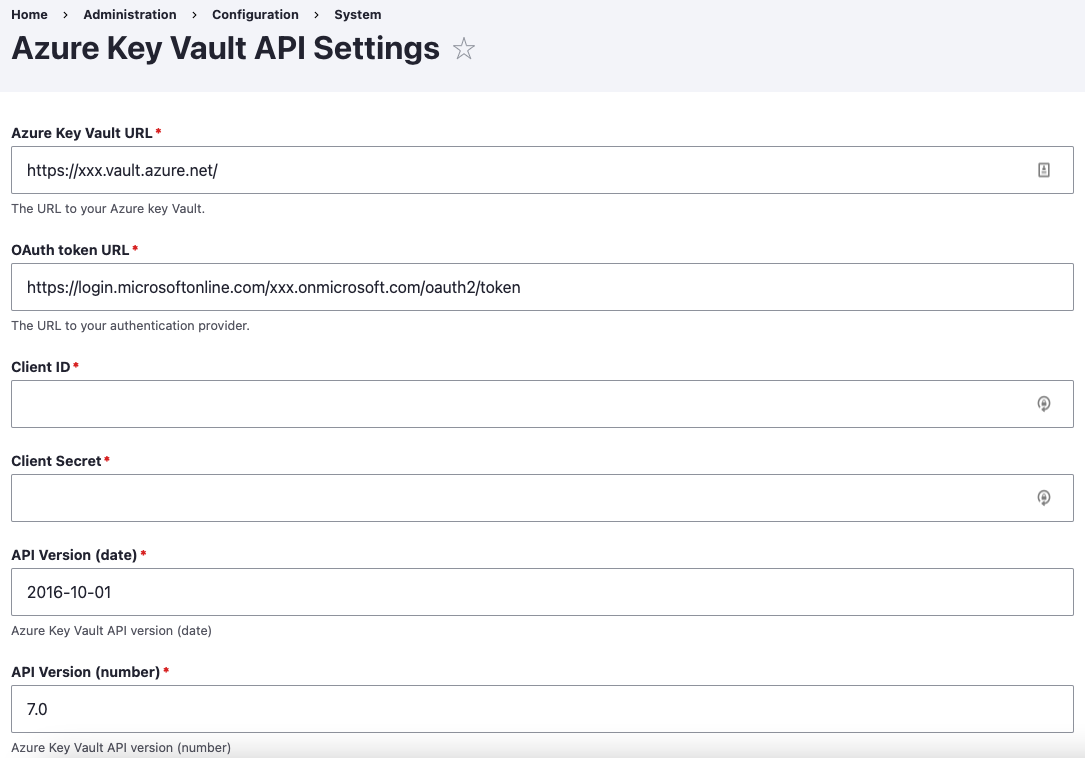
Navigate the configuration section 'site/admin/config/system/az_key_vault_config' and configure with your Azure Key Vault URL, Token OAuth URL, client ID and client secret.
If you need the secret or key inside a module or theme file (or anywhere you can't use injection),
$secret = \Drupal::service('azure_key_vault.http_client')->getSecret("your_secret_name");
If you need the secret or key inside a class where you can use injection, then you'll need below code snippets added in different places of your class.
For references,
use Drupal\azure_key_vault\AzureKeyVaultRequestHandlerInterface;
For class properties,
/**
 * Azure Key Vault Request Handler.
 *
 * @var \Drupal\azure_key_vault\AzureKeyVaultRequestHandlerInterface
 */
protected $azkvHandler;
For '__construct' function,
/**
 * Constructs a new instance.
 *
 * @param \Drupal\azure_key_vault\AzureKeyVaultRequestHandlerInterface $azkv_handler
 *   The Azure key vault handler.
 */
public function __construct(AzureKeyVaultRequestHandlerInterface $azkv_handler) {
  $this->azkvHandler = $azkv_handler;
}
For 'create' function,
/**
 * {@inheritdoc}
 */
public static function create(ContainerInterface $container) {
  return new static($container->get('azure_key_vault.http_client'));
}
Where you need the Azure key vault secret,
public function exampleMethod() {
  $secret = $this->azkvHandler->getSecret("your_secret_name");
}
Optionally, you can enable the 'azure_key_vault_key_provider' sub module as well, in-case you would like to manage the keys / secrets via 'Key' module GUI. Beware, the functionality is limited here and not fully compatible with all key types the 'Key' module offering.
Important:
It's recommended to restrict the Azure Key Vault API access to prevent any unauthorised access as the authorisation token secrets might be available in the GIT repository, config files (if you are exporting the config and sync through GIT) and database configuration tables.
As an alternative, you may use the 'Key Configuration Overrides' feature provided by 'Key' module to load these configs directly from 'settings.php' or '.env' file and use the hosting provider's environment variables to inject them into the 'settings.php' / '.env'. This way you'll be keeping the authorisation token secrets only on your hosting server and reducing the risk of having those on multiple locations such as GIT, database and code base.
Please follow the below steps to add your override your token secret configs with environment variables.
- Make sure you have the secrets configured with Azure Key Vault module provided settings section first.
- Create your environment variables with hosting provider (e.g. If Acquia Cloud, use the 'Variables' section).
- Inject the environment variables to 'settings.php' file as below.
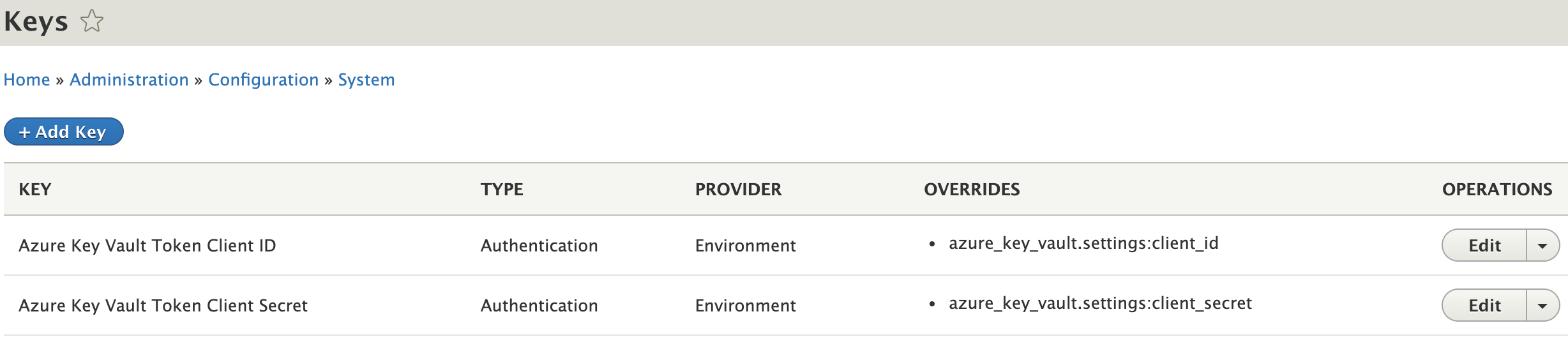
putenv("AZKV_CLIENT_ID=$_ENV['SERVER_CUSTOM_ENV_VAR_FOR_ID']"); putenv("AZKV_CLIENT_SECRET=$_ENV['SERVER_CUSTOM_ENV_VAR_FOR_SECRET']"); - Add 2 keys with 'Key' module 'Add Key' feature for Client ID and Secret by selecting the 'Key type: Authentication' and 'Key provider: Environment' and providing the 2 variable names 'AZKV_CLIENT_ID' and 'AZKV_CLIENT_SECRET'.
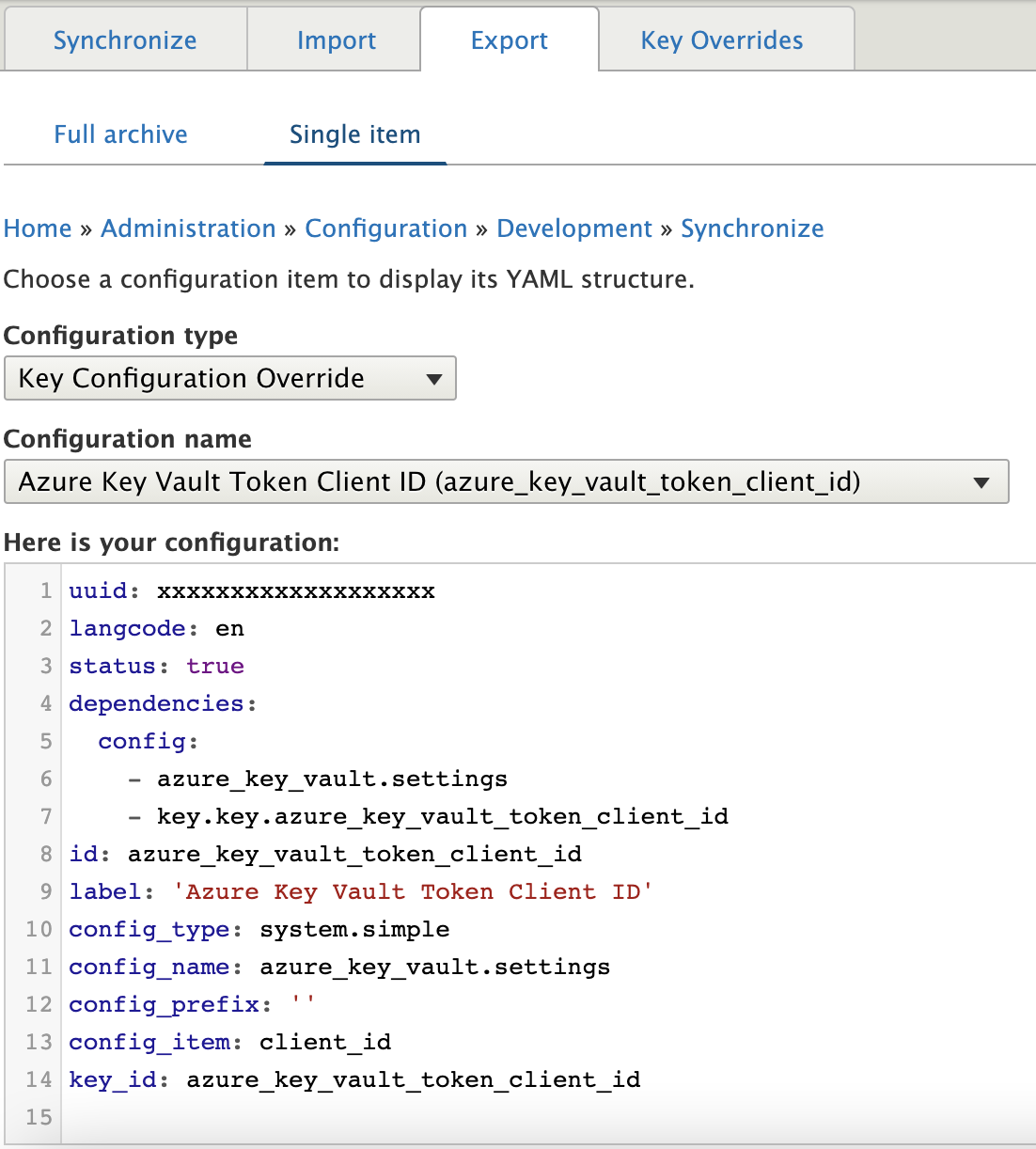
- Use the 'Key' module 'Key Configuration Overrides' feature to override the
azure_key_vault.settings:client_idandazure_key_vault.settings:client_secretwith these environment variables and you should have 2 entries added there.

- Select 'Simple configuration' as 'Configuration type'.
- Then select 'azure_key_vault.settings' from 'Configuration name'.
- Select 'client_id' or 'client_secret' as the 'Configuration item'.
- Select the created 'Key' in above item 4.
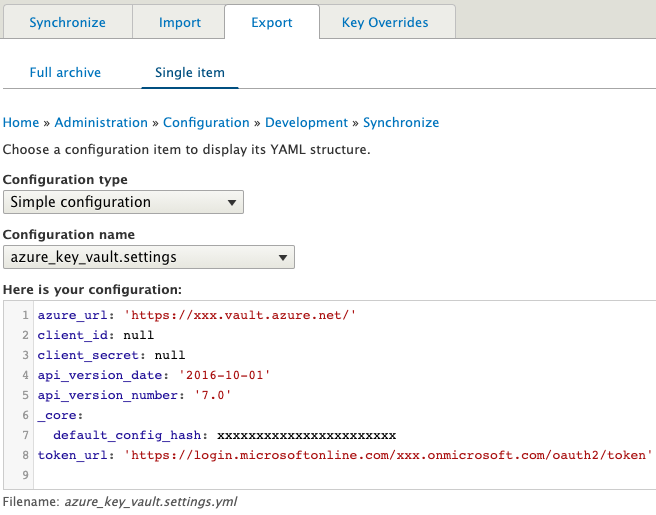
- Tick the checkbox 'Clear overridden value' to remove the client_id and client_secret from azure_key_vault.settings configurations.
- If you receive an error from 'Key' module about missing 'config_export' in it's 'KeyConfigOverride' entity, please apply the patch from https://www.drupal.org/project/key/issues/3212374
Added token secrets using 'Key' 'Environment' provider will display as below:
'Azure Key Vault' settings config export will display as below after the override:
Finally, 'Key Configuration Override' config export will display as below:

ToDo:
- Implement caching to keep the secrets in cache for a certain time period to reduce number of API calls which will help with reducing Azure costs.
- Integrate with additional API functions from Azure Key Vault API (https://docs.microsoft.com/en-us/rest/api/keyvault/)
Project information
- Project categories: Administration tools, Developer tools, Security
 32 sites report using this module
- Created by ozwebapps on , updated
 Stable releases for this project are covered by the security advisory policy.
Look for the shield icon below.


