

 The 2026 Drupal Business Survey is open. Your response will help shape the future of the Drupal business ecosystem.
This project is not covered by Drupal’s security advisory policy.
Overview
The CKEditor RemoveDiv module offers a straightforward solution for managing div elements in CKEditor, Drupal's default WYSIWYG editor. This module simplifies the content editing experience by allowing users to effortlessly remove div elements directly from the text editor, without needing to access the HTML source mode.
Why Use CKEditor RemoveDiv?
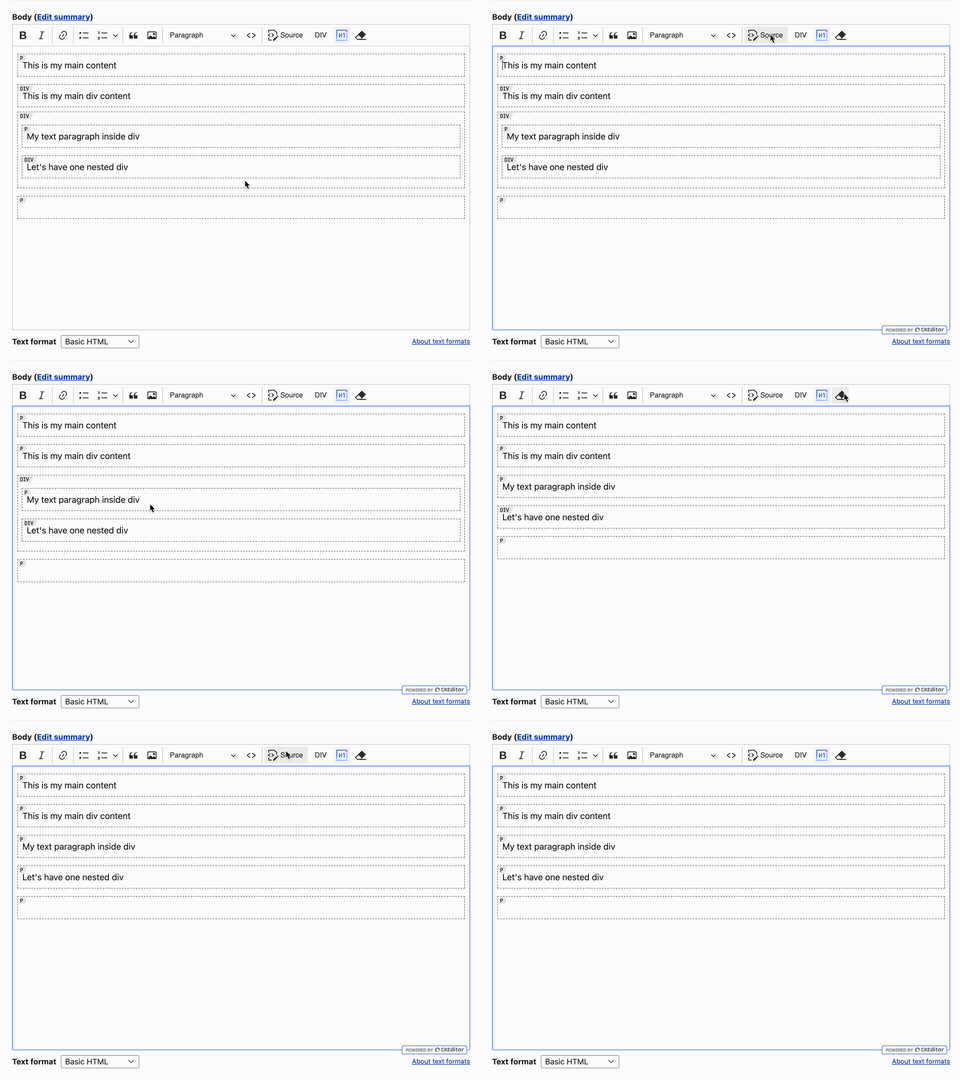
Managing divs can be cumbersome, especially for editors who prefer to avoid diving into HTML. Traditionally, removing these elements required switching to "Source" mode and manually editing the HTML, a process both tedious and error-prone. The CKEditor RemoveDiv module streamlines this task, providing a simple button that removes the div containing the cursor or its nearest parent div, converting it to a paragraph to maintain valid HTML structure.
Key Features
- Easy Div Removal: Removes div elements with a single click.
- Maintains HTML Structure: Converts divs to paragraphs to ensure valid HTML.
- Seamless Integration: Works directly within the CKEditor interface.
Installation & Configuration
- Navigate to Configuration > Content Authoring > CKEditor.
- Edit the CKEditor profile where you want to enable the RemoveDiv button.
- Add the RemoveDiv button to the desired toolbar configuration.
- Save the changes.
Watch the module in action:
Download & Try
Get started with the CKEditor RemoveDiv module today and simplify your content editing process.
Supporting organizations:
Development
| Attachment | Size |
|---|---|
| remove_div_promo1.gif | 539.69 KB |
Project information
 Minimally maintained
Maintainers monitor issues, but fast responses are not guaranteed.- Maintenance fixes only
Considered feature-complete by its maintainers. - Project categories: Content editing experience
- Ecosystem: CKEditor 5, CKEditor 4 - WYSIWYG HTML editor
 12 sites report using this module
- Created by botanic_spark on , updated
 This project is not covered by the security advisory policy.
Use at your own risk! It may have publicly disclosed vulnerabilities.


