


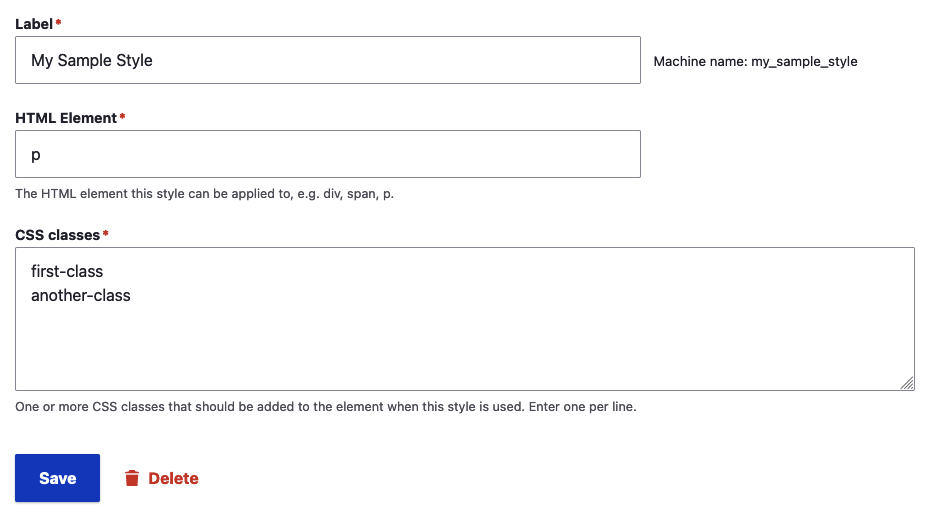
This module allows specifying what styles are available in the CKEditor "Styles" dropdown selection using configuration entities. Site builders can add, edit, and delete individual styles. Because each style is a config entity, themes can provide their own default styles as well.
While Drupal core already provides an interface for managing these styles, it's embedded in the CKEditor configuration form. Using this module allows you users to manage the styles separately from the entire CKEditor and text format configuration.
This module also does something that core doesn't: It will dynamically add the specific CSS classes you define for your styles to the allowed HTML filter.
Usage
- Enable the module
- Edit one of your formats that uses CKEditor and make sure the "Styles" button is added to the toolbar
- Configure styles available via /admin/config/content/ckeditor-standalone-styles
Note that any styles you define from the main editor configuration page will be ignored.
Version Info
The 2.0.x version of this module is compatible with Drupal 9 and 10. For Drupal 10, it requires using the contrib CKEditor 4 module. It does not yet work with the CKEditor 5 module provided by Drupal 10 core.
Project information
 Maintenance fixes only
Considered feature-complete by its maintainers.- Project categories: Content editing experience
 46 sites report using this module
- Created by bkosborne on , updated
 Stable releases for this project are covered by the security advisory policy.
Look for the shield icon below.
Releases
Development version: 2.x-dev updated 4 Aug 2023 at 18:27 UTC

