

 The 2026 Drupal Business Survey is open. Your response will help shape the future of the Drupal business ecosystem.
This module allows lots of widget buttons to be placed in a dropdown list so that they don't clutter the CKEditor toolbar.
CKEditor 5
Place the widget_menu button into a CKEditor 5 toolbar between | pipe separators with other buttons to the right. The other buttons will be removed from the main toolbar and added into a dropdown menu.
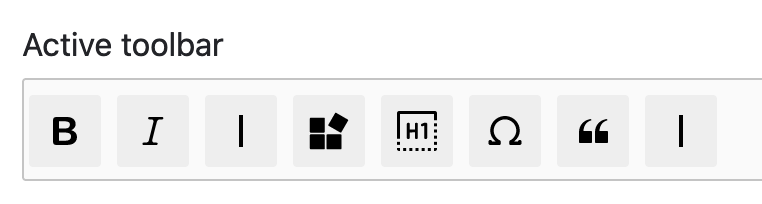
CKEditor 4
You can still use this with the CKEditor 4 module.
Required JavaScript Library
https://www.npmjs.com/package/ckeditor-widgetmenu
Place the JavaScript package into your project's root /libraries directory. Ensure that the directory is named widget_menu. Verify that the package path is correct by locating the following plugin.js file at /libraries/widget_menu/plugin.js.
Adding Buttons into the menu
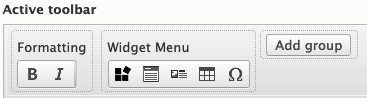
Place the widget_menu button into the CKEditor toolbar within a Group
containing other buttons. Each button in the group will be removed from the main
toolbar and added into a dropdown menu.
Project information
- Project categories: Content editing experience
- Ecosystem: CKEditor 4 - WYSIWYG HTML editor, CKEditor 5
 169 sites report using this module
- Created by segovia94 on , updated
 Stable releases for this project are covered by the security advisory policy.
Look for the shield icon below.

