

 The 2026 Drupal Business Survey is open. Your response will help shape the future of the Drupal business ecosystem.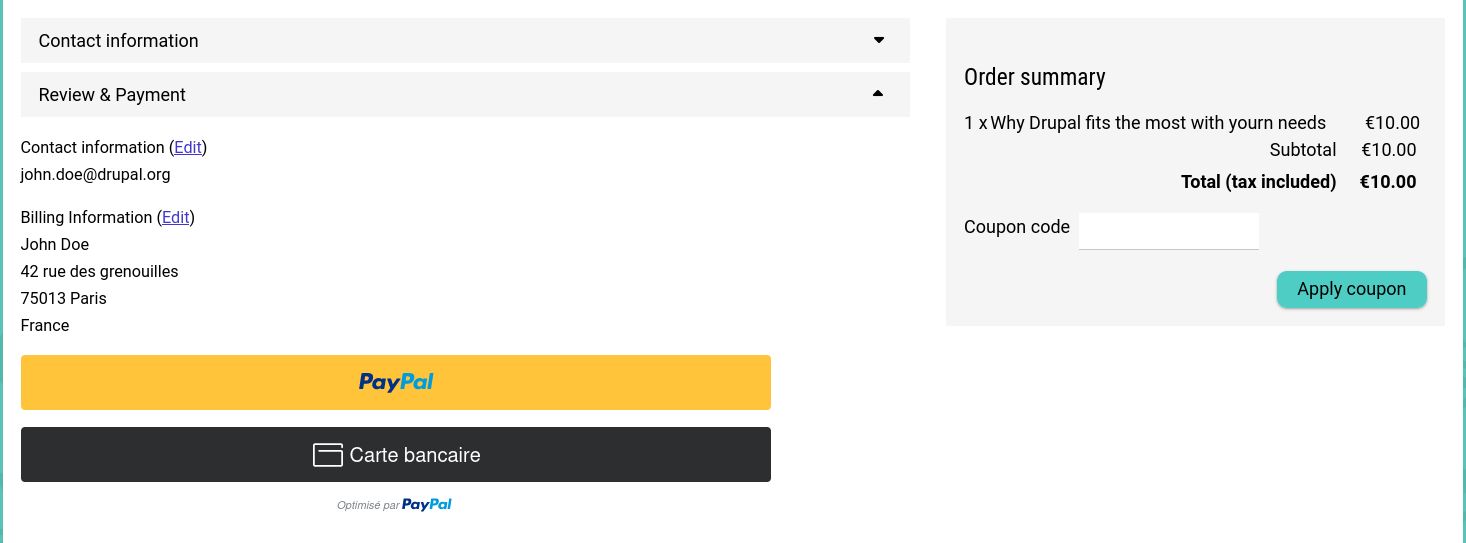


This project is not covered by Drupal’s security advisory policy.
Drupal Commerce Step Pane provide a way to split existing checkout steps in smaller ajax steps.
This module provide a way to manage a one page checkout process by inserting sub steps (step panes) on the checkout flow.
Other Panes between the first step pane and the following (or end the the step) will be part of same ajax sub step.
This module have been developed from this initiative https://www.drupal.org/project/commerce/issues/3016621
How to:
- First you need to create a dedicated checkout flow with the Step Pane plugin.
This flow is based on the checkout flow with panes. - Next you will need to define the number of Step Panes you need on the checkout flow and the label of the first ajax step
- Configure the label of each step pane
- As some panes are normally part of specific steps (ex: Review pane is intended to work on the Review Step), you can configure a Step id on the step pane to fix the behavior of a pane that have been moved from it's original step.
E.g: If you want to have all the steps before the review/payment process in the Order Information step, the review pane need to be included in an ajax step pane that is related to the review step.
Currently this module doesn't work for all payments processes.
Some problems occurs in javascript for payment module that auto-submit the form.
All the panes and process orders haven't been tested yet.
Supporting organizations:
R&D availability
Project information
 Minimally maintained
Maintainers monitor issues, but fast responses are not guaranteed.- Project categories: E-commerce
- Ecosystem: Commerce Core
- Created by pilulu on , updated
 This project is not covered by the security advisory policy.
Use at your own risk! It may have publicly disclosed vulnerabilities.

