


INTRODUCTION
This module allows you to create and sell tickets.
- Tickets are fieldable entities, that can easily be extended.
- Tickets have a state are related to a workflow.
- Created > Active > Cancelled
- You can use this workflow to connect "Commerce Ticketing" to an entry gate server backend.
- As soon as a ticket is paid in full, it can be activated on an entry gate server.
- For all transitions, events are fired. Therefore it's easy to implement your own custom logic.
Commerce Ticket PDF with QR Code
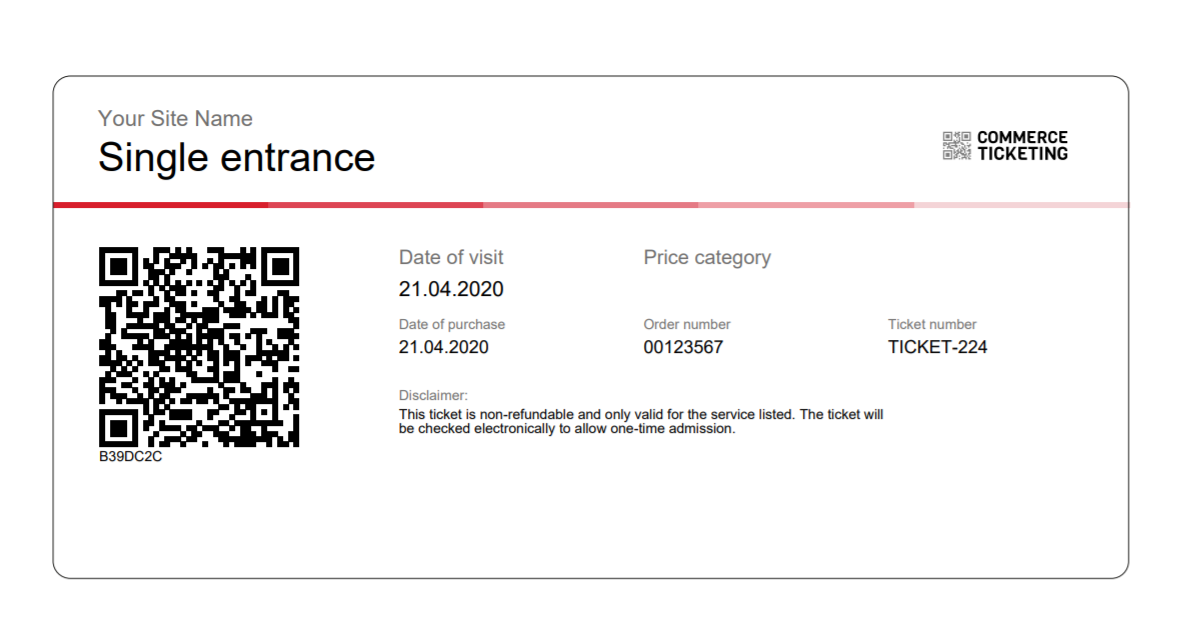
A submodule allows you to create PDF Tickets, send PDF tickets by mail and download PDFs with a QR Code.
Useful projects
Commerce Ticketing Scanner provides a way to scan ticket QR codes from a tab controlled by permissions.
REQUIREMENTS
Drupal Commerce module is required for this module.
INSTALLATION
- Using composer require drupal/commerce_ticketing to install the module and its
dependancies. - Install as you would normally install a contributed Drupal module.
See: https://www.drupal.org/node/895232 for further information.
CONFIGURATION
- Install the module using composer. This is important, because it will download the dependencies for creating PDFs.
- Under /admin/commerce/config/tickets you can create a ticket type and add custom fields
- A new number pattern for tickets will be automatically installed
- To start, you first have to enable tickets for at least one order type under /admin/commerce/config/order-types/default/edit
- Select a ticket type that is related to a specific order item.
- Create a new product and product variation type that relates to the ticket type.
- On the product variation configuration under /admin/commerce/config/product-variation-types you have to enable the entity trait "Is a ticket".
- If "Is a ticket" is enabled, you can choose to automatically create a ticket entity for every order line item
- You can automatically activate the ticket if you want.
- In our use-case, ticket are only valid on a specific date. You can add a "Visit Date" field to the order item. Then the user can select the date during checkout.
Supporting organizations:
Project information
- Project categories: E-commerce
 44 sites report using this module
- Created by ayalon on , updated
 Stable releases for this project are covered by the security advisory policy.
Look for the shield icon below.
Releases
2.0.0-alpha7
released 3 February 2023
Works with Drupal: ^9
Install:
Development version: 2.x-dev updated 31 Oct 2025 at 18:06 UTC


