

If you want to have a separate add-to-cart button for each product variation, then this module is for you. Besides showing buttons for each variation, there are additional settings, like the option to display price, currency, and quantity. You can also choose which product attributes to show in your add-to-cart form.
On the permissions page 'admin/people/permissions' you can control who can use Add to cart button. Search for the 'Access variation add to cart' permission.
How to use it?
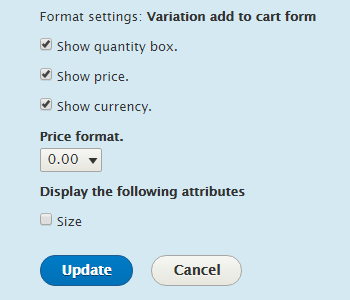
After you install the module go to product types 'admin/commerce/config/product-types' and click on the Edit button of your product type. Now go to the Manage display tab and choose 'Variation add to cart form' as a formatter for the Variations field. If you click on the gear icon, you will see additional settings.
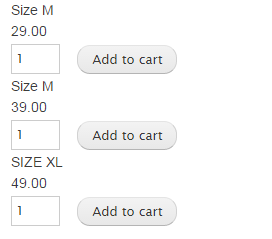
The first screenshot shows settings for the 'Variation add to cart' formatter, and in the second screenshot, you can see the add to cart form with three separate buttons. Besides adding to the cart button, each product variation has its own quantity input box, price, and size attribute.
IMPORTANT NOTE
You should probably not use this module anymore, because it's not under active development and it's only minimally maintained! Please check out out this module: Commerce Variation Cart Form
Supporting organizations:
sponsored development
Project information
 Minimally maintained
Maintainers monitor issues, but fast responses are not guaranteed.- Maintenance fixes only
Considered feature-complete by its maintainers. - Project categories: E-commerce
- Ecosystem: Commerce Core
 162 sites report using this module
- Created by gnikolovski on , updated
 Stable releases for this project are covered by the security advisory policy.
Look for the shield icon below.
Releases
2.0.0
released 12 January 2024
released 12 January 2024
Works with Drupal: ^9 || ^10
Install:
Development version: 2.0.x-dev updated 28 Jan 2024 at 13:52 UTC
8.x-1.06
released 30 January 2023
released 30 January 2023
Works with Drupal: ^8 || ^9
Install:
Development version: 8.x-1.x-dev updated 1 Apr 2021 at 09:14 UTC


