

This project is not covered by Drupal’s security advisory policy.
This module creates a DataCamp Code content type that uses the DataCamp Light libary to render either a Python or R editor in your node. When used with the Node Embed module you can render an editor anywhere in a node.
Installation:
1. Download and enable the module.
2. Place the DataCamp Light js file in your libraries folder so the path is /sites/all/libraries/datacamp/datacamp-light-latest.min.js

- Convert any website or blog to an interactive learning platform.
- Works for both R and Python. Sessions are maintained on DataCamp's servers.
- Convert existing markdown documents to an interactive course using the tutorial package.
- Check out a demo R and Python example.
- Leverage the same Submission Correctness Tests (SCT) DataCamp uses for all their courses. For R, there's the testwhat (GitHub wiki); for Python, there's pythonwhat (GitHub wiki).
Student flow
The user attempts to solve the exercise.
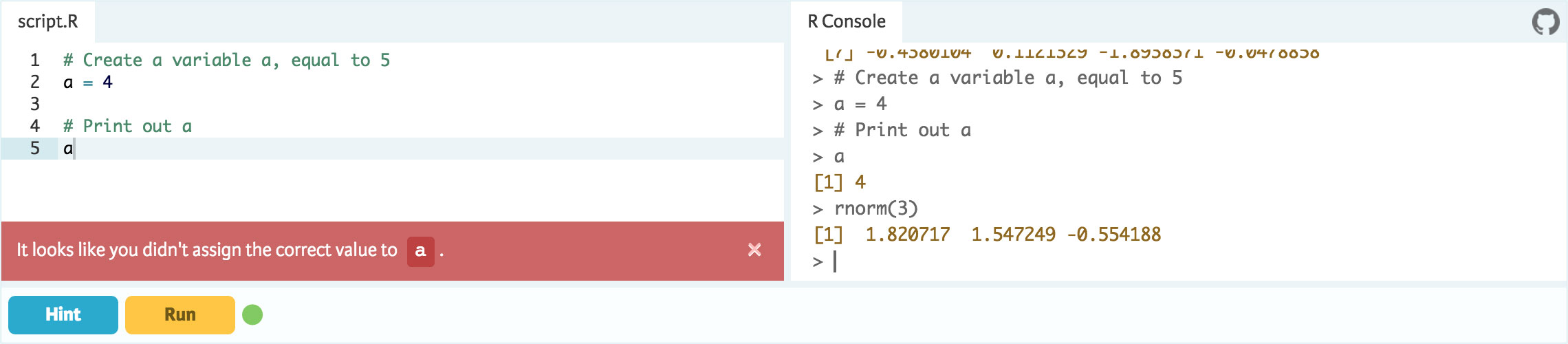
The user can play around in the interactive R or Python console on the right.

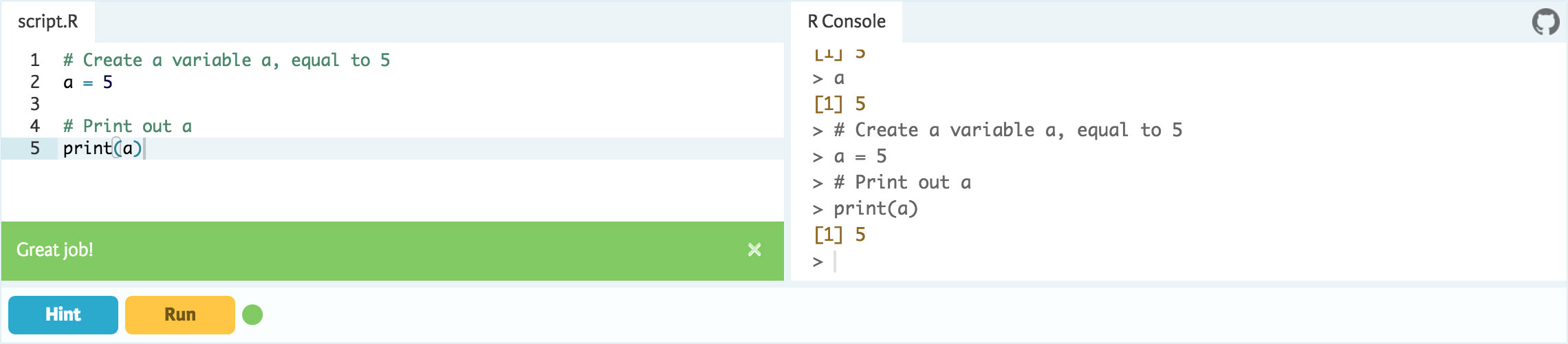
By giving automated feedback, the user is guided to the correct solution.
Supporting organizations:
Project information
- Project categories: Content editing experience
 115 sites report using this module
- Created by mcroyle on , updated
 This project is not covered by the security advisory policy.
Use at your own risk! It may have publicly disclosed vulnerabilities.
Releases
8.x-1.6
released 10 August 2023
Works with Drupal: ^8 || ^9 || ^10
Updates for Drupal 10 compatibility.
Install:

