

 The 2026 Drupal Business Survey is open. Your response will help shape the future of the Drupal business ecosystem.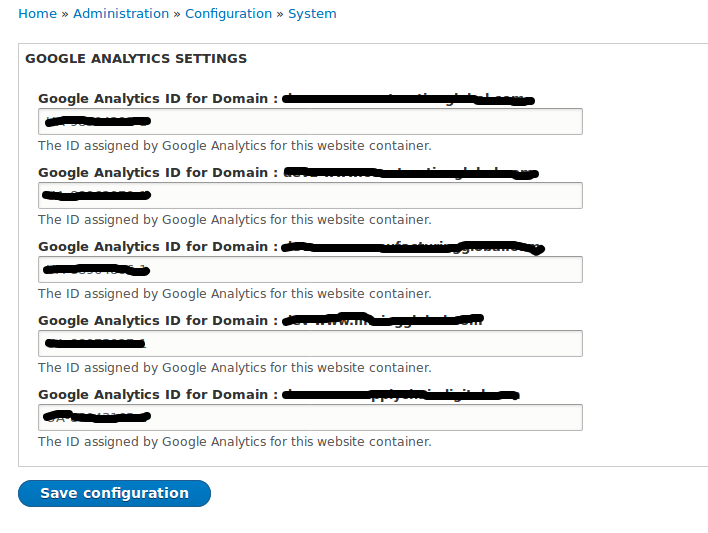
Google Analytics for multidomain
Add Google Analytics tracking system to your multi domain website. Please see below the steps to configure module.
1) Install/enable domain module (only domain module is required for multi domain GA module)
2) create a domain records on domain config page (http://example.com/admin/config/domain). see below screenshot

3) Now enable the multidomain GA module.
4) add GA code at multidomain GA config page(http://example.com/admin/config/system/multidomain-google-analytics).
5) finally you can checkout GA code at any page by using view source.
Requirements
Google Analytics account
Domain Module
Installation Process
1) Download the module.
2) Enable module and go to the configuration page.http://example.com/admin/config/system/multidomain-google-analytics.
3) Add GA code for your respective domain and save.
Supporting organizations:
Project information
 Maintenance fixes only
Considered feature-complete by its maintainers.- Project categories: Integrations
 112 sites report using this module
- Created by sushilpal on , updated
 Stable releases for this project are covered by the security advisory policy.
Look for the shield icon below.
Releases
3.0.2
released 15 October 2025
released 15 October 2025
Works with Drupal: ^9 || ^10 || ^11
Install:
Development version: 3.0.x-dev updated 2 Sep 2026 at 11:53 UTC
8.x-2.5
released 30 December 2024
released 30 December 2024
Works with Drupal: ^8 || ^9 || ^10
Install:
Development version: 8.x-2.x-dev updated 27 Oct 2025 at 09:03 UTC
8.x-1.0
released 9 May 2017
released 9 May 2017
Works with Drupal: 8.x
Install:
Development version: 8.x-1.x-dev updated 26 May 2017 at 06:43 UTC


