

Closed (duplicate)
Project:
Drupal core
Version:
7.54
Component:
update.module
Priority:
Minor
Category:
Task
Assigned:
Reporter:
Created:
18 Apr 2017 at 13:16 UTC
Updated:
13 Oct 2017 at 17:05 UTC
Jump to comment: Most recent, Most recent file




Comments
Comment #2
yash_khandelwalYou can change the settings of the update module/available updates itself. if you don't want to deactivate it.
-> Go through /admin/reports/updates/settings.
-> Remove your email(s) from the Textarea: "E-mail addresses to notify when updates are available"
-> Save it.
(Note: If you want to stop the "available updates" emails and the update alert messaging then simply disable the update module.
Comment #3
yash_khandelwalComment #4
yash_khandelwalComment #6
tinko commentedHello,
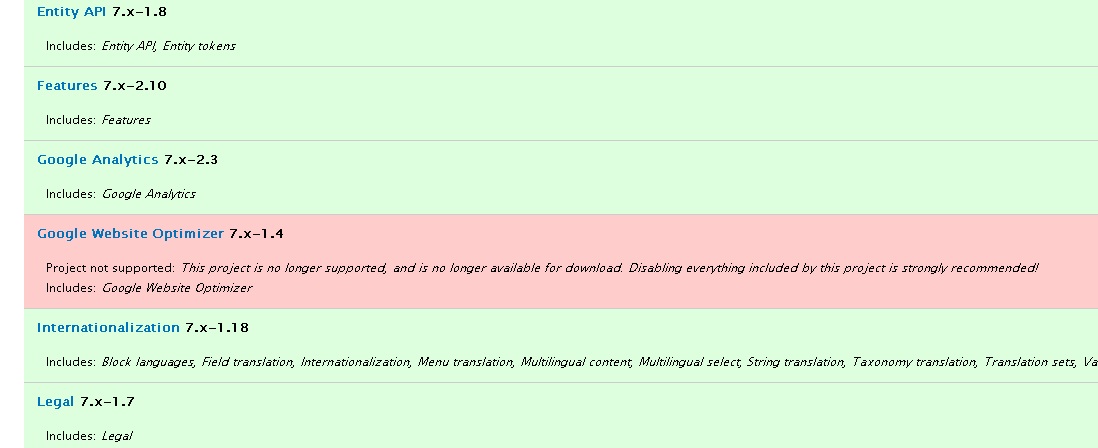
You can view the unsupported modules or themes at admin/reports/updates (image_1.jpg)
If you use the attached patch then you will see a table with unsupported modules or themes at Available updates -
admin/reports/updates/update (image_2.jpg)
Greetings
Comment #7
yash_khandelwalComment #9
David_Rothstein commentedLooks like this was closed by mistake, but it's also a duplicate of #961060: If a module is Not Supported, Drupal's warning links to available updates page, which says everything is OK.