

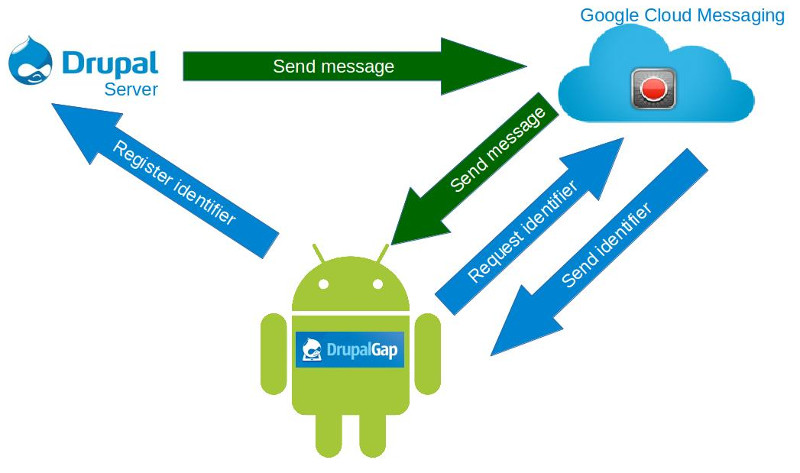
The easy way to send notifications from our website to mobile devices. On the mobile device must be installed an application capable of managing incoming notifications.
This module provide a "Mobile Notifications" node type and a view called "Mobile Notifications". When you add a new Mobile Notification post, the module send a push notification to registered devices. You can choose the roles that receive this notification. You can, also, send a link to a site node.
The system supports recording devices without linking them to any registered user.
If you are using DrupalGapp to develop your mobile application, you can use Mobile Notifications to manage the registration and notification in app side.
How does it work?
- The mobile device sends a request to Google Cloud Messaging
- GCM provide a identifier
- The mobile device records its identifier on the website
- The site send notifications to GCM
- GCM push the notification
In depth
Your mobile application sends a request to GCM and receives an identifier.
Your mobile application sends a request to drupal site in the address "http://your-drupal-site.org/services/session/token", and receives a session token.
Your app send session token and GCM identifier to drupal site, in the address "http://your-drupal-site.org/drupalgap/push_notifications". Important: you need Push Notifications module.
Now, mobile device is registered in your drupal site.
On the website you post a new "Mobile Notification". You can combine user roles, registered users or anonymous users to select recipients.
When notification is pushed to mobile, the device beep and your app display the notifications view.
You can add links to content in the notification.
Install and configure
Install the module as usual. The configuration is provided by PushNotifications module.
Project information
 2 sites report using this module
- Created by carlos espino on , updated
 Stable releases for this project are covered by the security advisory policy.
There are currently no supported stable releases.

