

 The 2026 Drupal Business Survey is open. Your response will help shape the future of the Drupal business ecosystem.
This project is not covered by Drupal’s security advisory policy.
eSewa is Nepal's leading digital wallet, enabling instant online payments for mobile recharges, utility bills (electricity, internet, water, TV), insurance premiums, bus, airline, and movie tickets, and many more services.
The eSewa Payment Gateway module integrates eSewa into Drupal Commerce using the official eSewa ePay v2 API with HMAC-SHA256 cryptographic signature verification. When a customer selects eSewa at checkout they are securely redirected to the eSewa payment page. After completing payment, eSewa redirects back to your site with a base64-encoded, cryptographically signed response. The module verifies the signature before recording the payment, preventing fraudulent or tampered responses from ever fulfilling an order.
Key features:
- Full eSewa ePay v2 API integration (HMAC-SHA256 signed POST form)
- Cryptographic response verification via
remotemerge/esewa-php-sdk - Replay-attack prevention (transaction UUID cross-check)
- Amount tamper detection (±0.01 NPR tolerance check)
- Automatic sandbox credentials in test mode — no configuration required
- Drupal Commerce event dispatch on payment success / failure
- Hook support for custom success / failure messages
- Form validation: live credentials required when mode is set to Live
- Supports Drupal 10 and Drupal 11
Supported currencies: NPR (Nepalese Rupee) only.
To submit bug reports and feature suggestions, or to track changes:
https://www.drupal.org/project/issues/esewa
REQUIREMENTS
This module requires the following:
Drupal modules
-
Drupal Commerce
^3.0(includes commerce_order, commerce_payment, commerce_cart)
PHP
- PHP 8.1 or higher
- PHP extensions:
ext-curl,ext-json(required by the SDK)
Composer library (installed automatically)
INSTALLATION
Step 1 — Install via Composer
Always install this module and its PHP dependency via Composer so that autoloading of the SDK is handled automatically. From your Drupal project root, run:
composer require drupal/esewa
This single command will:
- Download the
drupal/esewamodule intomodules/contrib/esewa - Automatically install
remotemerge/esewa-php-sdk ^4.0intovendor/ - Regenerate the Composer autoloader
Custom module note: If you are managing this as a custom module in
modules/custom/esewa, add only the SDK dependency:
composer require remotemerge/esewa-php-sdk ^4.0
Step 2 — Enable the module
Via Drush (recommended):
	drush en esewa -y
drush cr
Via the Drupal UI:
- Navigate to Administration » Extend (
/admin/modules) - Find eSewa Payment Gateway under the Commerce package
- Tick the checkbox and click Install
- Clear caches via
drush cror Administration » Configuration » Performance
Step 3 — Verify the SDK library
php -r "require 'vendor/autoload.php'; echo class_exists('RemoteMerge\Esewa\EsewaFactory') ? 'SDK OK' : 'SDK MISSING';"
Expected output: SDK OK. If you see SDK MISSING, run composer install and then drush cr.
CONFIGURATION
Set your store currency to NPR
eSewa only processes NPR (Nepalese Rupee) payments. Before adding the gateway:
- Navigate to Administration » Commerce » Configuration » Currencies and confirm NPR is present. If not, click + Add currency and add Nepalese Rupee (NPR).
- Navigate to Administration » Commerce » Configuration » Stores, edit your store, and set NPR as the default currency.
The module will display an error at checkout and refuse to build the payment form if the order currency is not NPR.
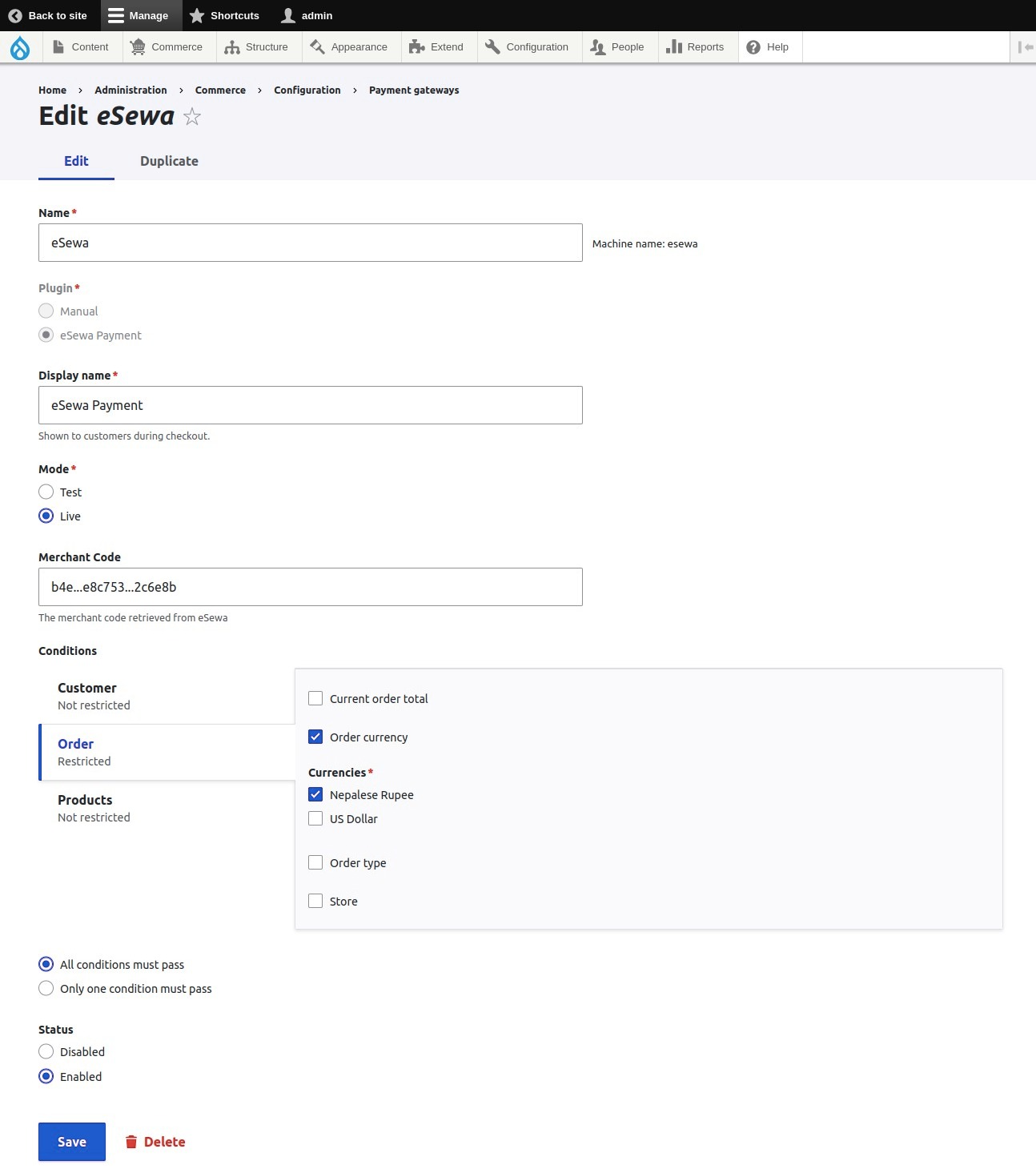
Add the payment gateway
- Navigate to Administration » Commerce » Configuration » Payment gateways (
/admin/commerce/config/payment-gateways) - Click + Add payment gateway
- In the Plugin dropdown select eSewa
- Fill in the fields described below
- Click Save
Gateway configuration fields
| Field | Required | Description |
|---|---|---|
| Name | Yes | Internal admin label, e.g. eSewa |
| Display name | Yes | Customer-facing label shown at checkout, e.g. Pay with eSewa |
| Mode | Yes | Test (development / staging) or Live (production) |
| Test Product Code | No | Leave blank to use the eSewa sandbox default EPAYTEST automatically |
| Test Secret Key | No | Leave blank to use the eSewa sandbox default automatically |
| Live Product Code | Live only | Merchant code from your eSewa Merchant Dashboard, e.g. NP-ES-YOURCODE |
| Live Secret Key | Live only | HMAC-SHA256 key from your eSewa Merchant Dashboard. Stored securely. |
| Status | Yes | Set to Enabled |
Test mode: When Mode is set to Test, the official eSewa sandbox credentials (
EPAYTEST/8gBm/:&EnhH.1/q) are applied automatically. You do not need to enter a Product Code or Secret Key for testing.
TEST CREDENTIALS
Official eSewa sandbox credentials from the eSewa Developer Portal. No real money is involved in test mode.
eSewa test user accounts
| Field | Value |
|---|---|
| eSewa ID |
9711111111 / 9711111112 / 9711111113 / 9711111114
|
| Password |
Nepal@123
|
| MPIN |
1122(mobile app only) |
| OTP / Token |
123456
|
Merchant / SDK sandbox credentials (applied automatically)
| Field | Value |
|---|---|
| Product Code |
EPAYTEST
|
| Secret Key |
8gBm/:&EnhH.1/q
|
eSewa environment URLs (for reference)
| Environment | Purpose | URL |
|---|---|---|
| Test | Payment form POST |
https://rc-epay.esewa.com.np/api/epay/main/v2/form
|
| Test | Transaction status check |
https://rc.esewa.com.np/api/epay/transaction/status/
|
| Production | Payment form POST |
https://epay.esewa.com.np/api/epay/main/v2/form
|
| Production | Transaction status check |
https://esewa.com.np/api/epay/transaction/status/
|
These URLs are managed automatically by the SDK based on the configured environment.
PRODUCTION SETUP
Step 1 — Register as an eSewa Merchant
- Visit https://merchant.esewa.com.np
- Create or log in to your eSewa Merchant account
- Complete the KYC / merchant verification process
- eSewa will issue your live Product Code and Secret Key
Step 2 — Switch the gateway to Live mode
- Navigate to Administration » Commerce » Configuration » Payment gateways
- Edit your eSewa gateway
- Change Mode to Live
- Enter your Live Product Code
- Enter your Live Secret Key
- Click Save
Security tip: Store the Secret Key in an environment variable or a secrets manager — never commit it to version control. You can inject it via
settings.php:
$config['commerce_payment.commerce_payment_gateway.esewa']['configuration']['live_secret_key'] = getenv('ESEWA_SECRET_KEY');
Step 3 — Confirm HTTPS
Both callback URLs ( /esewa/success and /esewa/cancel) must be served over HTTPS in production to prevent response interception.
PAYMENT FLOW
The module implements the three-step eSewa ePay v2 flow:
1. INITIATE — The module builds a signed POST form via the SDK. The SDK generates an HMAC-SHA256 signature over total_amount, transaction_uuid, and product_code. The customer's browser auto-submits this form to the eSewa checkout page.
2. VERIFY — After the customer completes payment, eSewa redirects to /esewa/success?data=<base64>. The module decodes the response, verifies the HMAC-SHA256 signature via the SDK, cross-checks the transaction_uuid (replay-attack prevention), confirms the status is COMPLETE, and validates total_amount matches the stored order total (±0.01 NPR tamper detection).
3. COMPLETE — All checks passed: a commerce_payment entity is saved in completed state, the order is advanced to the complete checkout step, the esewa.payment_success event is dispatched, and the customer is redirected to the order confirmation page.
On cancel/failure — eSewa redirects to /esewa/cancel. The module rolls the order back to the previous checkout step (so the customer can retry), dispatches the esewa.payment_failure event, and shows a cancellation warning.
eSewa ePay v2 request fields
| Field | Required | Description |
|---|---|---|
amount
|
Yes | Base product/service price |
tax_amount
|
Yes | Tax amount (use 0 if none) |
product_service_charge
|
Yes | Service charge (use 0 if none) |
product_delivery_charge
|
Yes | Delivery charge (use 0 if none) |
total_amount
|
Yes | Sum of all above fields |
transaction_uuid
|
Yes | Unique order identifier — alphanumeric and hyphens only |
product_code
|
Yes | Merchant product code assigned by eSewa |
success_url
|
Yes | Your absolute /esewa/success callback URL |
failure_url
|
Yes | Your absolute /esewa/cancel callback URL |
signed_field_names
|
Yes |
total_amount,transaction_uuid,product_code
|
signature
|
Yes | HMAC-SHA256 base64-encoded signature |
eSewa success response (decoded from ?data=)
	{
  "transaction_code": "0007G36",
  "status": "COMPLETE",
  "total_amount": "1000.0",
  "transaction_uuid": "your-uuid-here",
  "product_code": "EPAYTEST",
  "signed_field_names": "transaction_code,status,total_amount,transaction_uuid,product_code,signed_field_names",
  "signature": "62GcfZTmVkzhtUeh+QJ1AqiJrjoWWGof3U+eTPTZ7fA="
}
Transaction status values
| Status | Meaning |
|---|---|
COMPLETE
|
Payment completed successfully |
PENDING
|
Payment initiated but not yet completed |
FULL_REFUND
|
Full payment refunded to customer |
PARTIAL_REFUND
|
Partial payment refunded |
AMBIGUOUS
|
Payment is in an uncertain / halted state |
NOT_FOUND
|
Session expired or transaction does not exist |
CANCELED
|
Payment cancelled or reversed by eSewa |
TROUBLESHOOTING
Module does not appear in the Payment gateways plugin list
drush en esewa -y && drush cr
Verify the @CommercePaymentGateway annotation block is intact in src/Plugin/Commerce/PaymentGateway/EsewaCheckoutCheckout.php.
"Class not found" / SDK autoload errors
	composer require remotemerge/esewa-php-sdk ^4.0
composer dump-autoload
drush cr
"eSewa supports NPR only" message at checkout
Your Commerce store currency is not NPR. Navigate to Administration » Commerce » Configuration » Stores and set the default currency to NPR (Nepalese Rupee).
Payment verified but order does not advance to "complete"
Ensure your Commerce checkout flow includes a complete step. Navigate to Administration » Commerce » Configuration » Checkout flows and verify the step exists and is correctly positioned.
Signature verification failure / "Invalid signature" in logs
- In live mode: confirm the Secret Key in gateway settings exactly matches the key in your eSewa Merchant Dashboard, including all special characters.
- In test mode: the key
8gBm/:&EnhH.1/qis applied automatically. If you see this error in test mode, clear all caches and retry. - Verify your server's system clock is accurate (NTP sync recommended).
"Amount mismatch" in Drupal logs
eSewa returned a total_amount that differs from the stored order total by more than ±0.01 NPR. Check whether order prices are being modified after the payment form is built, or investigate currency rounding configuration.
"Transaction UUID mismatch" in Drupal logs
The transaction_uuid in eSewa's response does not match the UUID stored in the PHP session. This protects against replay attacks. Possible causes: session expiry, the user opening multiple browser tabs, or an actual tampered response. The payment is safely rejected in all cases.
Viewing eSewa-specific log messages
drush watchdog:show --type=esewa --count=50
Or via UI: Administration » Reports » Recent log messages ( /admin/reports/dblog) — filter by Type: esewa.
DEVELOPER REFERENCE
Hooks
hook_esewa_success_message(string &$message)
Customise the status message displayed to the customer after a successful payment.
	/**
 * Implements hook_esewa_success_message().
 */
function mymodule_esewa_success_message(string &$message): void {
  $message = t('<strong>Thank you!</strong> Your eSewa payment has been received.');
}
hook_esewa_failure_message(string &$message)
Customise the warning message displayed when a payment is cancelled or fails.
	/**
 * Implements hook_esewa_failure_message().
 */
function mymodule_esewa_failure_message(string &$message): void {
  $message = t('Your eSewa payment was not completed. You have not been charged.');
}
Events
The module dispatches Symfony events that any module can subscribe to.
| Constant | Event string | Fired when |
|---|---|---|
EsewaCheckoutEvents::PAYMENT_SUCCESS
|
esewa.payment_success
|
HMAC signature verified, payment entity created |
EsewaCheckoutEvents::PAYMENT_FAILURE
|
esewa.payment_failure
|
User cancels or gateway onCancel() is called |
Example event subscriber:
	// mymodule/src/EventSubscriber/EsewaEventSubscriber.php
namespace Drupal\mymodule\EventSubscriber;

use Drupal\esewa\Event\EsewaCheckoutEvents;
use Drupal\esewa\Event\EsewaCheckoutPaymentEvent;
use Symfony\Component\EventDispatcher\EventSubscriberInterface;

class EsewaEventSubscriber implements EventSubscriberInterface {

  public static function getSubscribedEvents(): array {
    return [
      EsewaCheckoutEvents::PAYMENT_SUCCESS => 'onPaymentSuccess',
      EsewaCheckoutEvents::PAYMENT_FAILURE => 'onPaymentFailure',
    ];
  }

  public function onPaymentSuccess(EsewaCheckoutPaymentEvent $event): void {
    $order = $event->getOrder();
    // e.g. trigger a receipt email, update inventory, etc.
  }

  public function onPaymentFailure(EsewaCheckoutPaymentEvent $event): void {
    $order = $event->getOrder();
    // e.g. restore reserved stock, send a cancellation notification, etc.
  }
}
Register the subscriber in mymodule.services.yml:
	services:
  mymodule.esewa_event_subscriber:
    class: Drupal\mymodule\EventSubscriber\EsewaEventSubscriber
    tags:
      - { name: event_subscriber }
Session keys
The module stores these scalar values in the PHP session during the payment redirect. They are cleared immediately after the callback is processed.
| Key | Type | Description |
|---|---|---|
esewa_order_id
|
int | Commerce order ID |
esewa_gateway_id
|
string | Payment gateway entity machine name |
esewa_transaction_uuid
|
string | UUID sent to eSewa — used for replay-attack detection |
esewa_total_amount
|
float | Order total in NPR — used for amount tamper detection |
esewa_is_test
|
bool | Whether the gateway was in test mode when the form was built |
Gateway plugin API
Public methods available on EsewaCheckoutCheckout:
| Method | Signature | Description |
|---|---|---|
createEsewaClient()
|
(string $success_url, string $failure_url): EpayInterface
|
Returns a fully configured SDK client for the current mode. In test mode, sandbox credentials are applied automatically. |
completePayment()
|
(OrderInterface $order, string $remote_id, string $remote_state): PaymentInterface
|
Creates and saves a commerce_payment entity in completed state and dispatches the success event. |
RUNNING TESTS
The module ships with PHPUnit unit tests covering the plugin's core business logic. No database or browser is required.
	# From the module directory:
cd modules/custom/esewa

php ../../../vendor/bin/phpunit \
  --configuration phpunit.xml.dist \
  tests/src/Unit/ \
  --testdox
| File | What it covers |
|---|---|
EsewaCheckoutEventsTest
|
Event name constants |
EsewaCheckoutPaymentEventTest
|
Payment event object construction and order accessor |
EsewaCheckoutCheckoutTest
|
defaultConfiguration(), createEsewaClient() (test/live modes, sandbox fallbacks, missing-credential exceptions), completePayment() (entity creation, event dispatch, test/live flags), onCancel()
|
Supporting organizations:
Project information
- Project categories: E-commerce
- Ecosystem: Commerce Core
- Created by sujan shrestha on , updated
 This project is not covered by the security advisory policy.
Use at your own risk! It may have publicly disclosed vulnerabilities.

