


This project is not covered by Drupal’s security advisory policy.
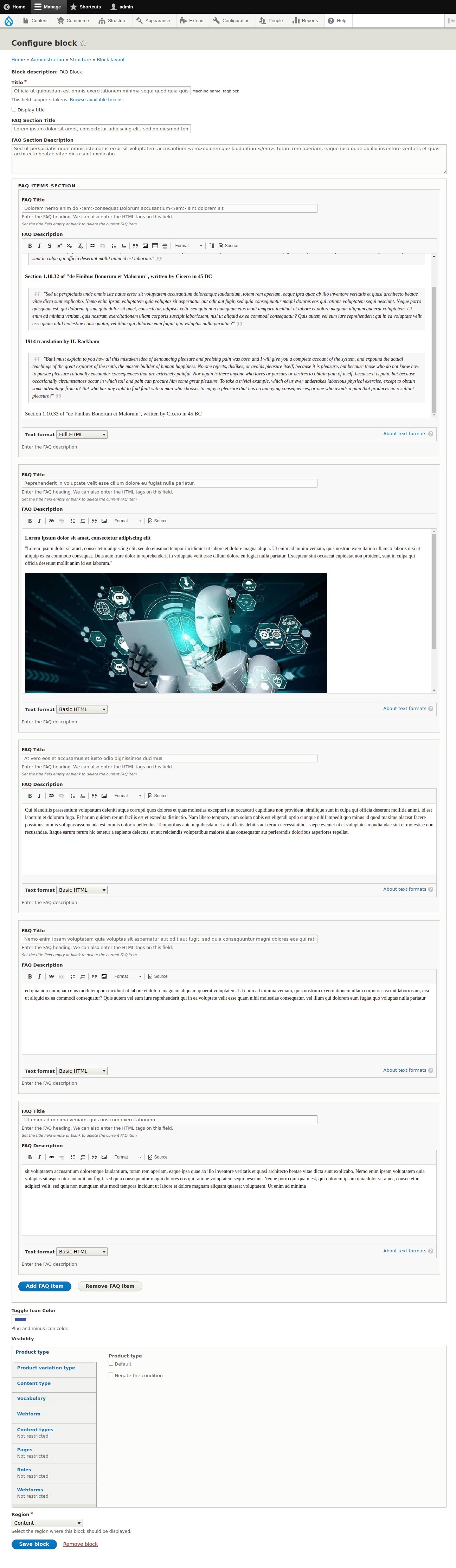
FAQ Block : FAQ Block provices the backend configuration block to add the list of commonly asked questions and answers about a specific topic. We can place the block from structure - block layout or from the layout builder.
How to override the template file
We can copy the default twig template file
templates/block/faq-block.html.twig
and place on the active theme.
Available variables on the twig template:
- faqs: array of faq related accordion details.
- use {{ faq.question }} and faq.answer['value'] inside the loop
- use {{ faqs_data['color'] }} for the toggle icon color
- use faqs_data['section_title'] for the section title
- use faqs_data['section_description'] for the section description
Overriding style sheets to modify the design for the FAQ section
You can override the style sheet provided by this module or add your own custom css for the available elements

|
Support requests are taken on Drupal Answers with the faq_block tag. Ask a question! |

|
Documentation and frequently asked questions can be found here. |
Support
Please post bug reports, feature requests and support requests to the FAQ Block module issue queue.
Demo
- Go to https://simplytest.me/project/faq_block.
- Click "Launch Sandbox".
- Install Drupal as normal.
- Enable "FAQ Block" module, and any optional modules you wish to try out.
Installation and download
Installation with Composer:
composer require 'drupal/faq_block'
Project information
- Project categories: Content display
- Ecosystem: Drupal core
 22 sites report using this module
- Created by sujan shrestha on , updated
 This project is not covered by the security advisory policy.
Use at your own risk! It may have publicly disclosed vulnerabilities.

