


Please refer to the README for higher quality documentation.
Glint is a toolkit that aims to facilitate access of field values for entities.
Features
Cleaner Field Values for Entity References
Accessing information from an entity reference, especially files and media references, can be a little rough in Drupal. Glint facilitates this greatly as we'll see in the following examples.
Below is an example of a snippet of code that you would do traditionally to access a file reference from a node entity.
/**
 * Implements hook_preprocess_HOOK().
 */
function YOUR_THEME_preprocess_node(&$variables) {
  $node = $variables['node'];
  // Field value gives us the target ID.
  $fileFieldValue = $node->get('field_document')->getValue();
  // We can get the referenced entity like so.
  // Then we can get the data we need from the referenced entity.
  $fileFieldEntity = $node->get('field_document')->entity;
  $fileFieldUri = $fileFieldEntity->getFileUri();
  $fileFieldUrl = \Drupal::service('file_url_generator')->generateAbsoluteString($fileFieldUri);
  $fileFieldFileName = $fileFieldEntity->getFilename();
  $fileFieldMetadata = [
    'filesize' => $fileFieldEntity->getSize(),
    'mimetype' => $fileFieldEntity->getMimeType(),
  ];
}
With Glint, you can instead do this:
use Drupal\glint\Glint;

/**
 * Implements hook_preprocess_HOOK().
 */
function YOUR_THEME_preprocess_node(&$variables) {
  $file = Glint::service()->get('field_document', $variables['node']);
}
The value of the $file variable would be the following:
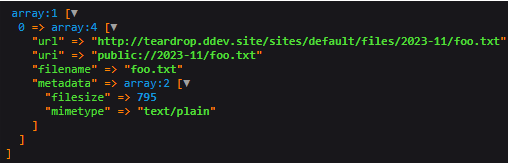
The same can be done for Media References.
use Drupal\glint\Glint;

/**
 * Implements hook_preprocess_HOOK().
 */
function YOUR_THEME_preprocess_node(&$variables) {
  $media = Glint::service()->get('field_featured_image', $variables['node']);
}
Here, the value of $media would be:
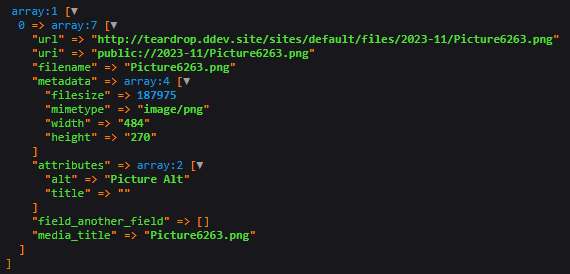
Entity Helpers
Entity Helpers can be used to easily access entity field values. See more here. Streamline data harvesting from Drupal entities and save a large amount of dev time that you would normally spend digging through arrays. These helpers are best used when trying to obtain more information from File Fields or Entity Reference Fields (Content, Media, etc).
/**
 * Implements hook_preprocess_HOOK().
 */
function YOUR_THEME_preprocess_node(&$variables) {
  $helper = \Drupal\glint\Glint::helper($variables['node']);
  $media = $helper->get('field_featured_image'); // File reference field.
}
Entity Helper Collections
In the case where you use Glint to obtain data from an Entity Reference
field that allows multiple values, you will come across an
Entity Helper Collection.
This class is an iterable object that contains helpers for all referenced
entities in the field. It contains some handy helper methods that will be
showcased below.
/**
 * Implements hook_preprocess_HOOK().
 */
function YOUR_THEME_preprocess_node(&$variables) {
  $node = $variables['node'];
  $helper = \Drupal\glint\Glint::helper($node);

  // This gives us a GlintEntityHelperCollection class.
  $relatedPagesCollection = $helper->get('field_related_pages');

  // Get the first, second, nth elements.
  $firstRelatedPage = $relatedPagesCollection->first();
  $secondRelatedPage = $relatedPagesCollection->second();
  $thirdRelatedPage = $relatedPagesCollection->third();
  $fourthRelatedPage = $relatedPagesCollection->fourth();
  $tenthRelatedPage = $relatedPagesCollection->index(9);

  // Get third related page's body.
  $thirdRelatedPageBody = $thirdRelatedPage->get('body');

  // Get the 'body' field value for all related pages.
  // This will return the values cleaned by Glint.
  $allBodyFieldValues = $relatedPagesCollection->harvest('body');

  // Alternatively, get all body field values, but unaltered by Glint.
  // This would be the equivalent of looping through all referenced entities and calling
  // $entity->get('body')->getValue().
  $allBodyFieldValuesRaw = $relatedPagesCollection->harvestRaw('body');

  // Simulate an array_map(), executing a callback on all helpers in the collection.
  // Here we get all the node IDs of the related pages.
  $allRelatedPageIds = $relatedPagesCollection->map(function($helper) {
    return $helper->getEntity()->id();
  });

  // You can also loop through the collection as if it were an array.
  foreach ($relatedPagesCollection as $nodeHelper) {
    $variables['featured_images'][] = $nodeHelper->get('field_featured_image');
  }
}
Post-Installation
Enabling the Glint module does nothing by default. It is intended to be used in code and by developers.
You can configure all settings on the dedicated configuration page found at /admin/config/glint.
Configurations are optional and offer a bit more flexibility. They are also fairly simple to understand and use. For more information on them, see the README.
Advanced Features
Refer to the README for additional documentation on how the module works and what else you can achieve with it!
Project information
- Project categories: Content editing experience, Developer tools, Site structure
 3 sites report using this module
- Created by ksere on , updated
 Stable releases for this project are covered by the security advisory policy.
Look for the shield icon below.

