

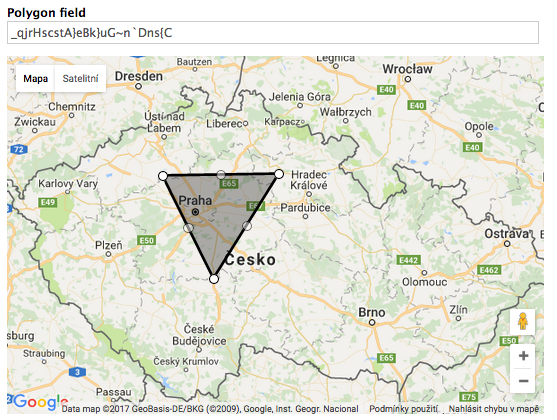
This module provides new type of field - polygon field. With it you can create polygons on the Google Map by clicking and dragging. Polygons are converted and stored in Google polyline format.
Features
- Clicking on unused area of the map adds vertex to polygon.
- Dragging created points moves them to new location.
- Clicking and dragging in the middle of polygon side creates new vertex there.
- On every change polyline's field above the map is updated.
- You can enter / edit polyline - polygon on the map will be immediately updated.
- You can revert last move by clicking on the arrow near the edited point.
- You can delete vertex by right clicking to it.
Requirements
This module has no dependecies on other modules or libraries. Google Maps are initialized directly via Google Maps JavaScript API.
Configuration
First configure user permissions in Administration » People » Permissions. Permission "Administer GMap Polygon Field" is needed for accessing module’s configuration page.
The configuration page can be found in Configuration -> Content authoring -> GMap Polygon Field (/admin/config/content/gmap_polygon_field). You have to specify Google Maps API key there, otherwise Google Maps won't render. You can also adjust there the apperance of polygon - stroke color, opacity and weight.
Using in custom modules
Accessing the polyline from node in custom code is simple:
use Drupal\node\Entity\Node;

$node = Node::load($nid);
$polyline = $node->get({field_name})->getValue()[0]['polyline'];
or in D7:
$node = node_load($nid);
$polyline = $node->{field_name}[LANGUAGE][0]['polyline'];
Project information
 Minimally maintained
Maintainers monitor issues, but fast responses are not guaranteed.- Maintenance fixes only
Considered feature-complete by its maintainers. - Project categories: Content editing experience
 27 sites report using this module
- Created by lingros on , updated
 Stable releases for this project are covered by the security advisory policy.
Look for the shield icon below.

