

 The 2026 Drupal Business Survey is open. Your response will help shape the future of the Drupal business ecosystem.


This project is not covered by Drupal’s security advisory policy.
Grouper - Drupal Log Analysis Made Simple
"Drupal's built-in dblog viewer makes you consume the raw fire hose of data. Grouper lets you sip just the data you are looking for through a straw."
The Problem
Your Drupal site's watchdog log contains thousands of entries. A single PHP error might appear 10,000 times—once for every page view that triggered it. Finding the actual problems buried in this noise is like finding needles in a haystack.
Without Grouper:
- 10,000 log entries for the same error
- 200+ pages of scrolling
- No way to see which errors matter most
- Hours wasted on repetitive investigation
The Solution
Grouper transforms your chaotic error log into an organized, actionable dashboard. Similar messages are automatically grouped into "Issues," ranked by frequency, so you instantly see what matters most.
With Grouper:
- 10,000 identical errors → 1 Issue with count "10,000"
- Instant visibility into your most critical problems
- One-click drill-down to see when, where, and who
- Minutes to identify and fix issues
Key Features
📊 Smart Grouping
Grouper intelligently consolidates similar log messages. PHP errors are grouped by their actual error signature, not just the raw message text—so errors from different pages but the same root cause appear together.
🔍 Multiple Analysis Views
| View | What It Shows |
|---|---|
| PHP Summary | PHP errors grouped by issue, sorted by frequency |
| PHP Detail | All occurrences of a specific error with timestamps, URLs, IPs |
| Other Summary | Non-PHP messages (access denied, page not found, etc.) |
| Distribution | Breakdown of all log types with percentages |
| Severity | Errors organized by severity level |
| Module | PHP errors grouped by originating module |
| Pages | Which pages generate the most errors |
| People | Which users trigger the most errors |
| Host | Errors by IP address (find bad bots!) |
🖥️ Command-Line Interface (NEW in 7.0)
Analyze logs without even opening a browser:
<span class="hljs-meta"># See top PHP errors</span>
drush grouper:php-summary --limit=<span class="hljs-number">10</span>

<span class="hljs-meta"># Drill into a specific issue</span>
drush grouper:php-detail <span class="hljs-number">12345</span>

<span class="hljs-meta"># See all log types</span>
drush grouper:types

<span class="hljs-meta"># Filter by severity (errors only)</span>
drush gps --severity=<span class="hljs-number">3</span>
Perfect for:
- SSH-only server access
- Automated monitoring scripts
- CI/CD pipelines
- Quick command-line troubleshooting
🤖 AI Integration (NEW in 7.0)
The Grouper MCP Tools submodule enables AI assistants like Claude to analyze your logs:
<span class="hljs-type">You</span>: <span class="hljs-comment">"What are the main errors on my site?"</span>

<span class="hljs-type">Claude</span>: [<span class="hljs-type">Analyzes</span> logs via <span class="hljs-type">MCP</span>]
        <span class="hljs-comment">"Your top issue is a TypeError in DateTimePlus.php
         occurring 10,100 times. It's affecting the /stories
         pages. Would you like me to show the details?"</span>
Requires: Tool API + MCP Server modules
🏷️ Markers for Debugging
Create timestamped markers in your log to track changes:
drush grouper:marker <span class="hljs-string">"Before module update"</span>
# ... make changes ...
drush grouper:marker <span class="hljs-string">"After module update"</span>
Then filter your log view to see only what happened between markers.
🧹 Log Maintenance
Selectively trim your log without losing everything:
# Delete old entries (before wid <span class="hljs-number">50000</span>)
drush watchdog-<span class="hljs-built_in">trim</span>-before <span class="hljs-number">50000</span>

# Delete entries <span class="hljs-keyword">in</span> a <span class="hljs-built_in">range</span>
drush watchdog-<span class="hljs-built_in">trim</span>-<span class="hljs-built_in">range</span> <span class="hljs-number">10000</span> <span class="hljs-number">20000</span>
🚫 Message Filtering (Submodule)
The Grouper Message Filter submodule prevents specified messages from being logged at all—reducing database bloat from known, unfixable issues.
Screenshots
PHP Error Summary
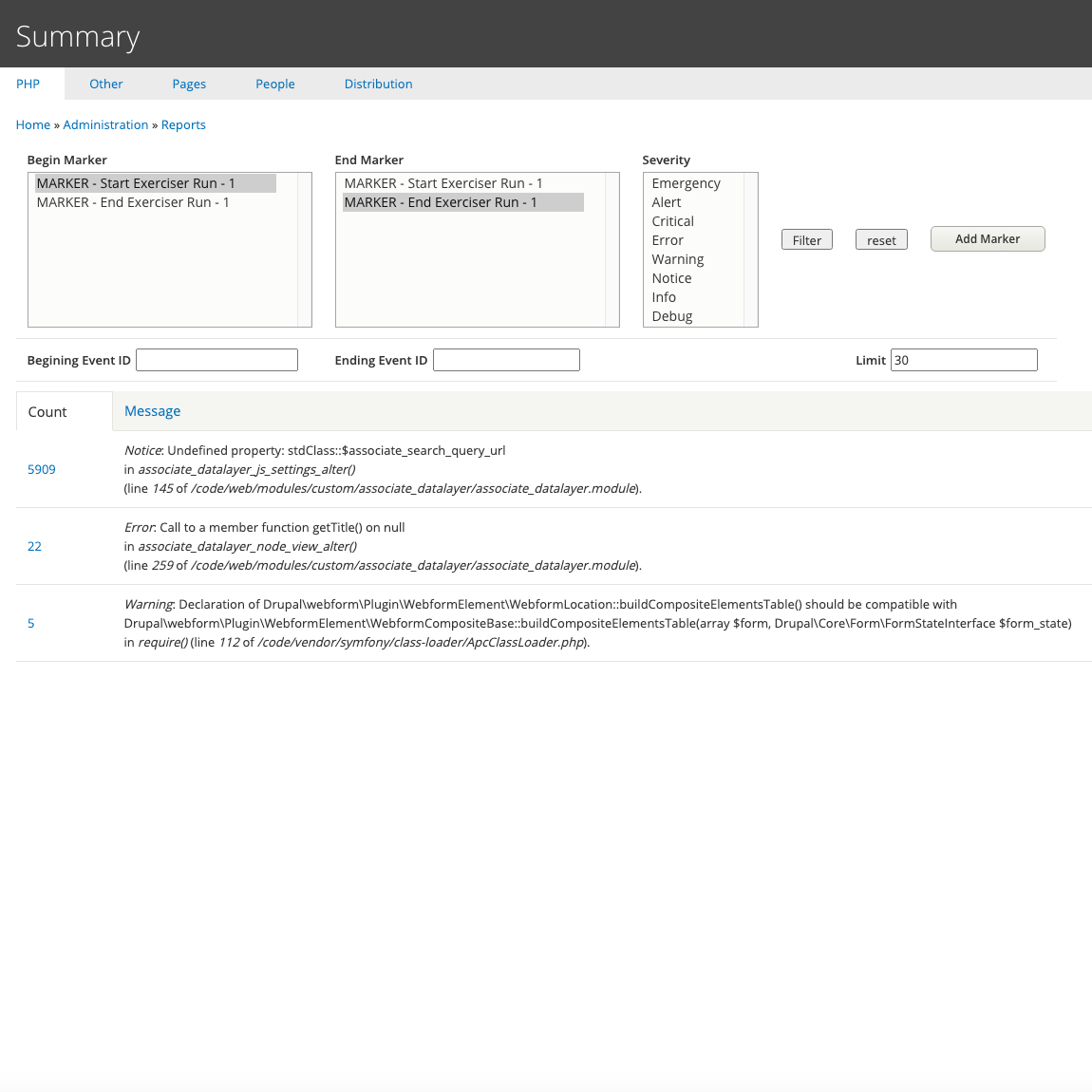
Instantly see your most frequent PHP errors ranked by occurrence count
PHP Error Detail
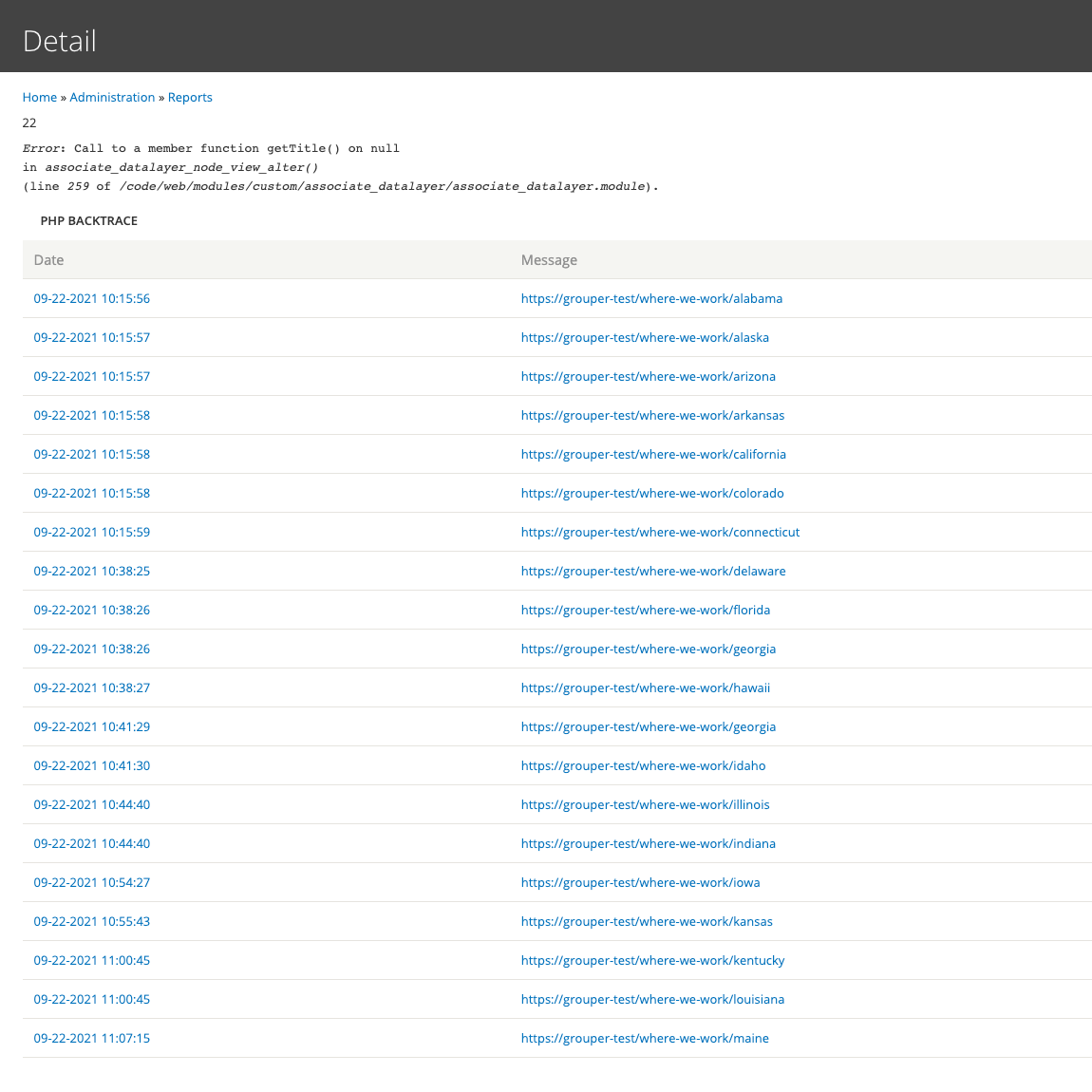
Drill down to see every occurrence with timestamp, URL, and user info
Distribution Summary
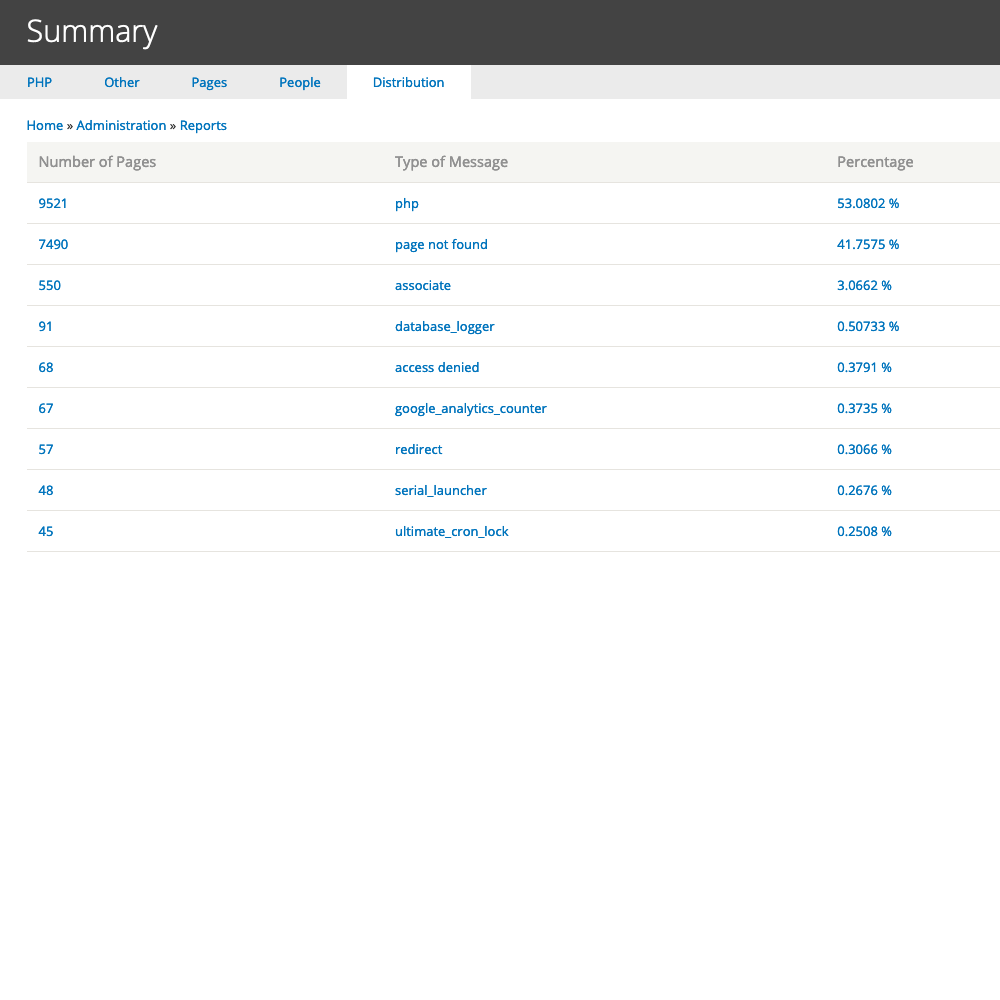
Understand the composition of your entire log at a glance
Pages Summary
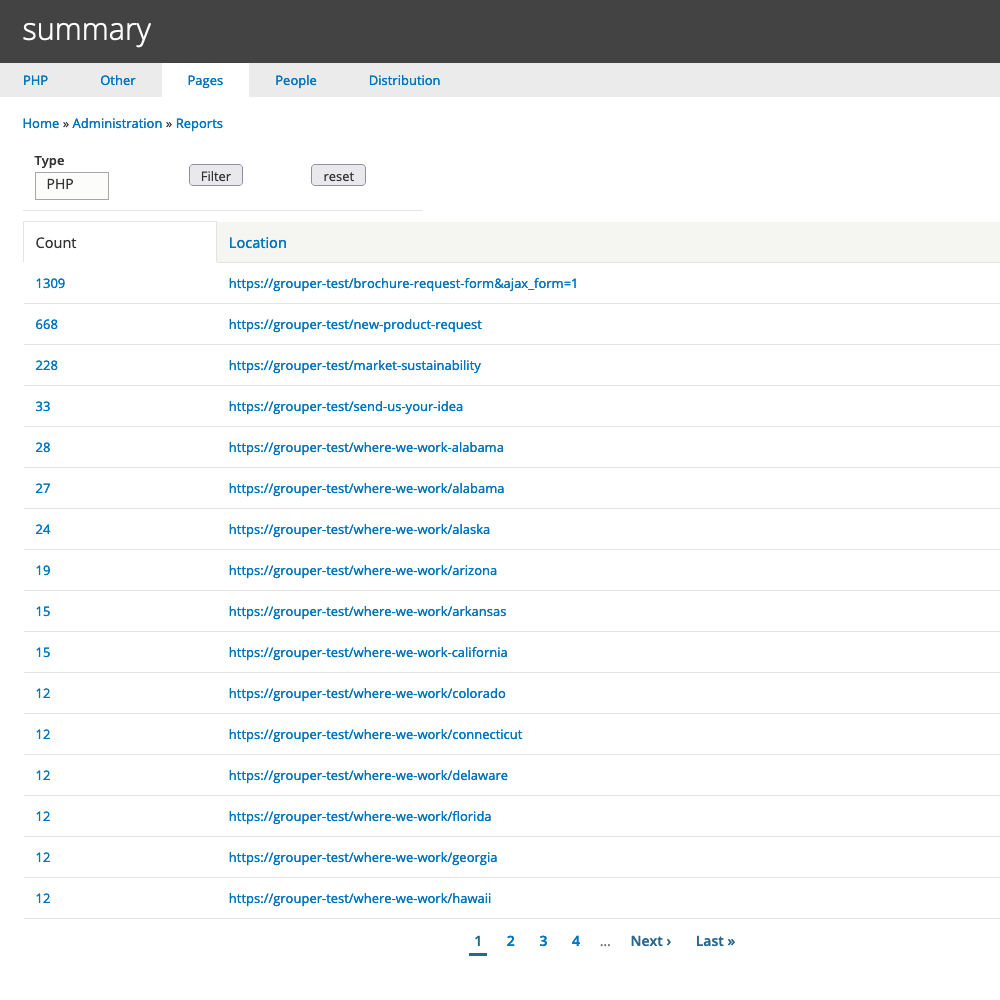
Identify which pages generate the most log entries
Installation
composer <span class="hljs-built_in">require</span> <span class="hljs-string">'drupal/grouper:^7.0'</span>
drush en grouper
Optional submodules:
<span class="hljs-meta"># Message filtering</span>
drush en grouper_message_filter

<span class="hljs-meta"># AI integration (requires Tool API)</span>
composer require drupal/tool
drush en grouper_mcp
Requirements
- Drupal: 10.x, 11.x, or 12.x
- Dependencies: Database Logging (dblog) module
- For AI features: Tool API module, MCP Server module (optional)
Use Cases
Site Builders
- Quickly identify errors introduced by new modules
- Find pages that need attention
- Monitor site health at a glance
Developers
- Debug PHP errors efficiently
- Track down intermittent issues
- Use markers to isolate changes
DevOps
- CLI tools for automated monitoring
- Integration with alerting systems
- Log maintenance without full truncation
AI-Assisted Development
- Let Claude analyze your logs
- Natural language queries about site health
- Automated issue identification
Why Grouper?
| Feature | dblog | Grouper |
|---|---|---|
| View individual entries | ✓ | ✓ |
| Group similar errors | ✗ | ✓ |
| Sort by frequency | ✗ | ✓ |
| CLI interface | ✗ | ✓ |
| AI integration | ✗ | ✓ |
| Markers for debugging | ✗ | ✓ |
| Selective log trimming | ✗ | ✓ |
| Message filtering | ✗ | ✓ |
Links
- Project Page: https://www.drupal.org/project/grouper
- Documentation: https://www.drupal.org/docs/contributed-modules/grouper-usage
- Issue Queue: https://www.drupal.org/project/issues/grouper
- Source Code: https://git.drupalcode.org/project/grouper
Maintainer
Seth Snyder - https://www.drupal.org/u/seth-snyder
Grouper is not covered by Drupal's security advisory policy. Use at your own discretion.
| Attachment | Size |
|---|---|
| Grouper_Documentation.pdf | 585.31 KB |
| Readme.txt | 13.2 KB |
Project information
- Project categories: Administration tools, Developer tools
- Created by seth snyder on , updated
 This project is not covered by the security advisory policy.
Use at your own risk! It may have publicly disclosed vulnerabilities.
Releases
8.x-7.0
released 19 January 2026
Works with Drupal: ^10 || ^11 || ^12
Added Drush Commands for CLI-based log analysis
Install:

