

 Come together with the global Drupal community in Rotterdam, 28 Sept – 1 Oct 2026. Sessions, contribution, connection, and Early Bird savings until 8 June.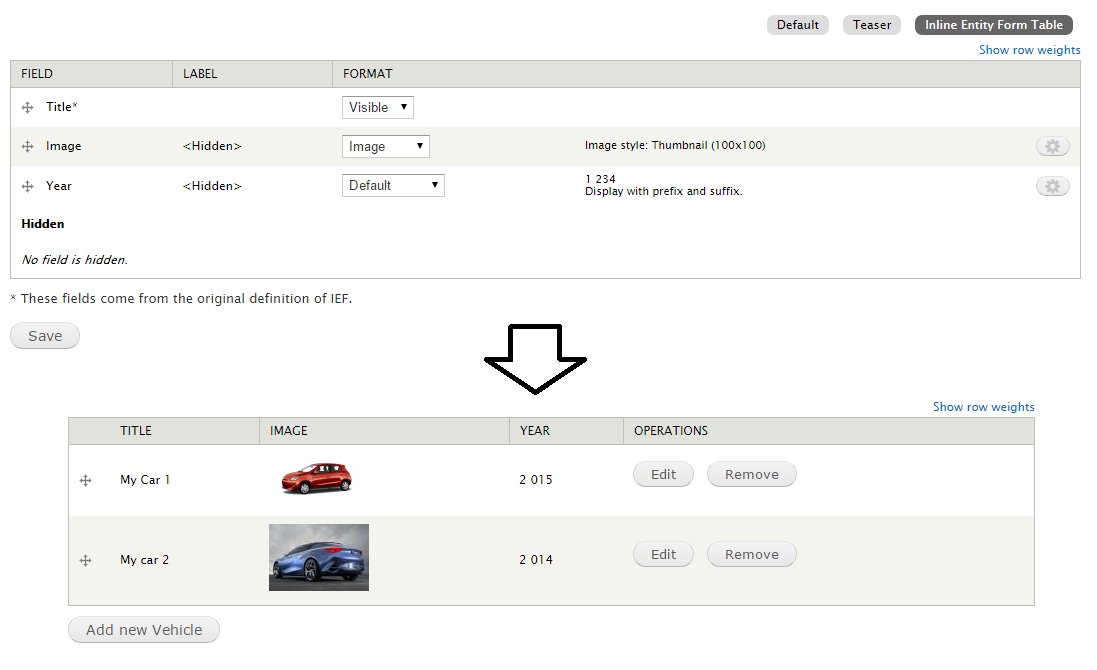
This module defines a view mode to set up the columns of the table for the Inline Entity Form widget.
With this you could define which fields (with their settings) and in what order will be displayed in the table. Also includes the properties defined by the entity and IEF.
Dependencies
- Inline Entity Form (For Drupal 8 from 8.x-1.0-rc3)
Installation
D7 - Configuration
- Enable the module. With drush:
drush en -y ief_table_view_mode - Go to manage display of some entity that are referencing from a field and this field is using Inline entity form.
- In "custom display settings" activate the custom display Inline Entity Form Table.
- Go to the Inline Entity Form Table view mode.
- Configure display of the fields
- Done
Now the fields should appear in the table.
D8 - Configuration
Install as you would normally install a contributed Drupal module. Visit
https://www.drupal.org/docs/8/extending-drupal-8/installing-drupal-8-mod... for further information.
- Configure an entity reference field to use the "Inline entity form - Complex - Table View Mode" widget.
- Go to Manage Display settings of the entity/bundle that would be referenced from the previously configured field.
- In Custom display settings activate the checkbox "Inline Entity Form Table" and press the Save button (If the checkbox does not appear, see the Troubleshooting section and return to this point).
- A secondary tab called Inline Entity Form Table should appear. If is not, clear the cache.
- Go to the secondary tab Inline Entity Form Table.
- Configure display of the fields and save.
- Done
Now the fields should appear in the table.
Troubleshooting
If the view mode "Inline Entity Form Table" does not appear in Custom display settings. Follow these steps:
- Go to Structure > Display Modes > View modes or go to the path /admin/structure/display-modes/view
- Confirm that there is a view mode called "Inline Entity Form Table" that has the machine name [your-entity-type].ief_table such as node.ief_table.
- If there isn't one there, create one called "Inline Entity Form Table" and be sure the machine name is [your-entity-type].ief_table.
Now the view mode Inline Entity Form Table should appear in Custom display settings.
If you still have problems to configure the module visit #2825732: Misleading setup instructions on module page clarified
Supporting organizations:
Project information
- Project categories: Site structure
- Ecosystem: Inline Entity Form
 5,472 sites report using this module
- Created by mnico on , updated
 Stable releases for this project are covered by the security advisory policy.
Look for the shield icon below.
Releases
3.0.1
released 9 August 2024
released 9 August 2024
Works with Drupal: ^10 || ^11
Install:
Development version: 3.0.x-dev updated 10 Apr 2024 at 19:22 UTC
8.x-2.3
released 19 December 2022
released 19 December 2022
Works with Drupal: ^8.7.7 || ^9 || ^10
Install:
Development version: 8.x-2.x-dev updated 17 Feb 2023 at 14:28 UTC

