

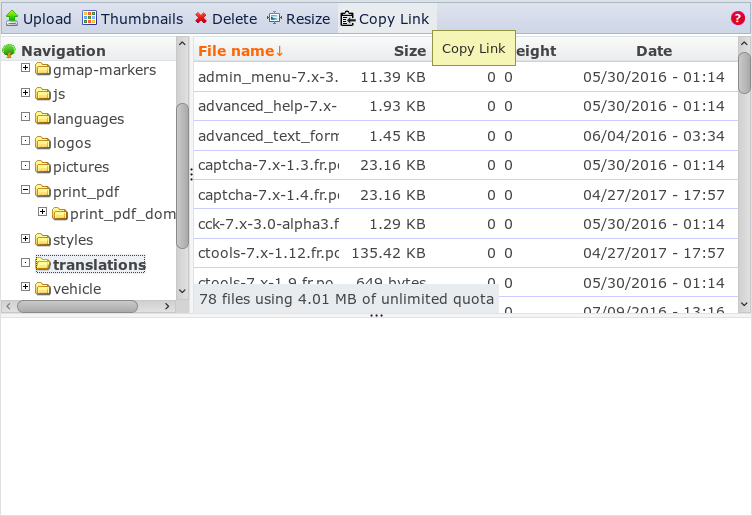
IMCE Copy Link adds a Copy Link button to the IMCE file manager tabs. Clicking it copies the currently selected file URL to the clipboard. The URL can then be pasted into any Drupal text field or an external program.
When no file is selected, the current directory URL is copied.
CONFIGURING AND USING
- Go to /admin/config/media/imce Assuming you have already created an IMCE profile. Under section 'Configuration profiles' click on approprate 'Edit' link.
- On the next page find section 'Directories'. Set appropriate permission using the check box 'Copy link'.
- Click on 'Save configuration' button.
- To test use IMCE. A new 'Copy link' tab button will be display. Select a file and click the 'Copy link' button. Then pasting the clipboard somewhere inserts the file link.
Whether the copied link is absolute or relative is governed by the admin/config/media/imce Common Settings' Enable Absolute URLs flag.
Supporting organizations:
Project information
 Maintenance fixes only
Considered feature-complete by its maintainers.- Project categories: Media
 363 sites report using this module
- By Anonymous on , updated
 Stable releases for this project are covered by the security advisory policy.
Look for the shield icon below.
Releases
8.x-1.4
released 13 September 2024
released 13 September 2024
Works with Drupal: ^8 || ^9 || ^10 || ^11
Install:
Development version: 8.x-1.x-dev updated 20 Oct 2025 at 08:42 UTC

