

 The 2026 Drupal Business Survey is open. Your response will help shape the future of the Drupal business ecosystem.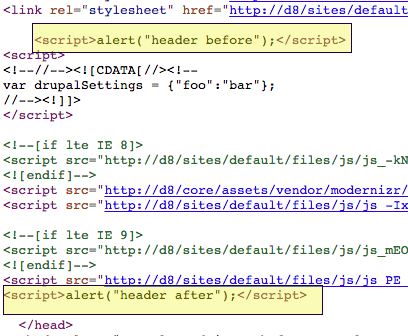
Allows to add inline JavaScript code to different part/position of JS script tag as there is no straight forward way in Drupal 8 core.
How to install
- Install module as usual
- Add below code to
sites/default/services.yml
services: asset.js.collection_renderer: class: Drupal\inlinejs\Asset\InlineJsCollectionRenderer arguments: [ '@state' ] - Implement hook_inlinejs_alter() to add your JS snippet.
/**
 * Implements hook_inlinejs_alter().
 */
function MODULENAME_inlinejs_alter() {
  $js_asset['header'][] = array(
    'data' => 'alert("header before");',
    'group' => JS_LIBRARY - 1,
  );
  $js_asset['header'][] = array(
    'data' => 'alert("header after");',
    'group' => JS_LIBRARY + 1,
  );
  $js_asset['footer'][] = array(
    'data' => 'alert("footer before");',
    'group' => JS_LIBRARY - 1,
  );
  $js_asset['footer'][] = array(
    'data' => 'alert("footer after");',
    'group' => JS_LIBRARY + 1,
  );
  return $js_asset;
}
Supporting organizations:
Project information
- Project categories: Developer tools
 5 sites report using this module
- Created by vijaycs85 on , updated
 Stable releases for this project are covered by the security advisory policy.
There are currently no supported stable releases.

