


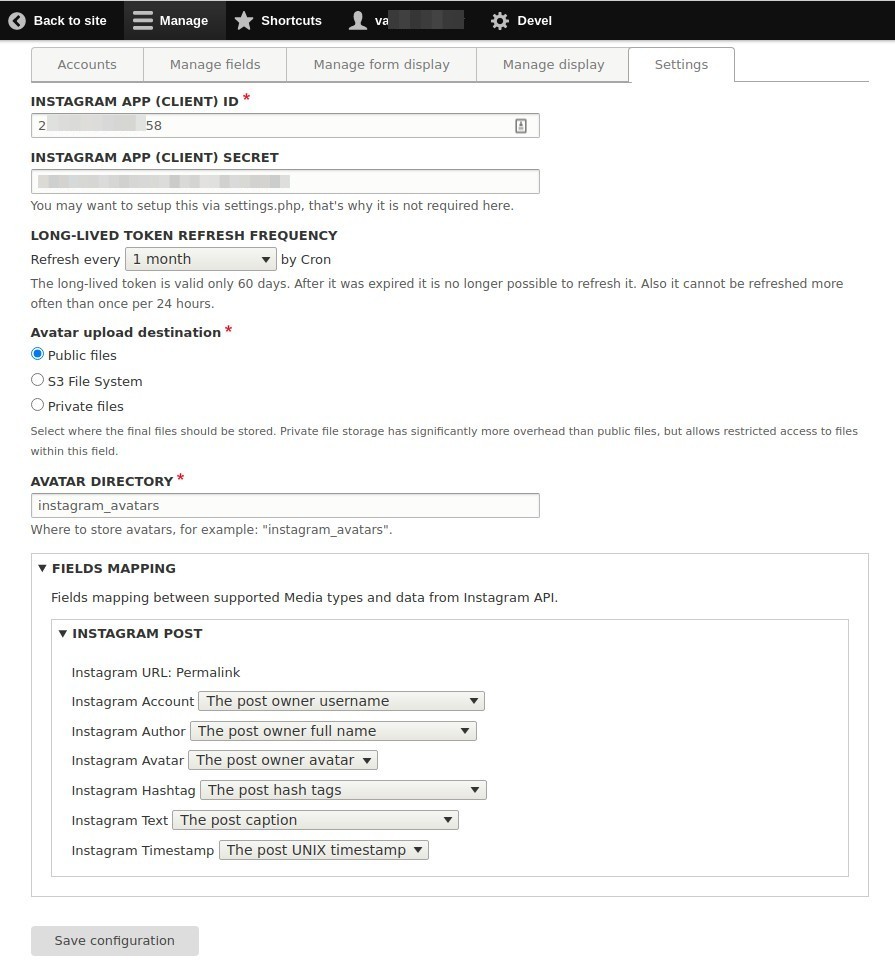
This module imports Instagram images into Drupal as Media entities from particular Instagram accounts using Cron job.
Drupal 8 / Drupal 9 / Drupal 10
This version is under development. Testing, feedback and any help with development are more than welcome.
The module provides a new content entity "Instagram account", which stores Instagram long-lived access_token and is used in hook_cron() to import Instagram posts with help of Instagram Basic Display API into Media types, which use "Media Entity Instagram" source.
Requirements
- Drupal 8.5+ | Drupal 9 | Drupal 10
- Facebook app with "Instagram Basic Display" product configured.
- Token - optional but strongly recommended
Migration from Drupal 7 version is unsupported!
Known Issues
- Unwanted second post request to Instagram API to obtain access token using already used auth code.
- Instagram avatar and Instagram account full name are not available through the Instagram Basic Display API, so current version of the module uses scrape technology to obtain these data, but it might not work if to send requests too often from the same IP address.
Drupal 7
Drupal 7 version of this project is unsupported (and has development status obsolete), so consider trying the Instagram Social Feed module in stead.
This is a Feature module. It allows you to create Instagram feeds for your site that will download images from Instagram using filtering by hashtags and / or usernames.
You can use default module presets, so the absolutely ready for use features will be available:
- Creating unlimited number of Instagram Feeds (that will be available as blocks) with custom settings for each one (custom node type)
- Ready Views Displays for management of Instagram Feeds and Instagram images via administrative interface
- Downloading new Instagram images by cron
- Deleting old images by cron (expiration time sets up at Instagram Feeds settings page)
- Inserting Instagram Feeds into any filterable text fields (body, long text, long text with summary) using special button in WYSIWYG editor, or into any other place as a block
- Custom permissions for creating new Instagram Feeds, managing images and inserting Feeds via WYSIWYG editor
- Adding Instagram users in the black list
- Hiding images that flagged by users as inappropriate until moderator's check.
Or you can use the basic module functionality to create your own applications.
Requirements
- Feeds 7.x-2.0-alpha5 or higher
- API Tokens (optional)
- Features
- Color Field (with Bgrins-spectrum library)
- Colorbox
- Date
- Feeds JSONPpath Parser (follow the installation instructions at https://drupal.org/project/feeds_jsonpath_parser)
- Feeds Tamper
- Field Group
- Flag
- Instagram Feeds Plugins (included in this package)
- Link
- Strongarm
- Views
- Wysiwyg (optional)
Installation
- Decompress the instagram_feeds-n.x-n.n.tar.gz file into your Drupal modules directory (usually sites/all/modules, see http://drupal.org/node/176044 for more information).
- Check that all needed for this module dependencies are met. Install and enable all needed modules before enabling Instagram Feeds. Please pay attention that some modules require custom installation steps e.g. Feeds JsonPath Parser
- Enable the Instagram Feeds (and Instagram Feeds Moderation) modules: Administration > Modules (admin/modules)
- Go to the Administration > Structure > Features (admin/structure/features) and check that all Instagram features are in default state. If not please revert them to default.
- Go to the Instagram Developer Documentation (http://instagram.com/developer/clients/manage) and register new application for your site.
- Go to the Administration > Configuration > Web services > Instagram Settings (admin/config/services/instagram). Fill Client ID and Client Secret fields from created for your site Instagram Client. Save changes and then click to the link under Access Token (in the Description to the field) to generate it.
- If you have the WYSIWYG, API Tokens and CKEditor library installed:
- Go to the Administration > Content Authoring > Text Formats
(admin/config/content/formats), choose one of the available formats (for ex. Full HTML)and switch on "API Tokens" filter for it. Make sure that "API Tokens" is the last in the Filter Processing Order list. - Go to the Administration > Content Authoring > Wysiwyg Profiles (admin/config/content/wysiwyg) and for the selected in the previous paragraph text format switch on the "Instagram" button, so it become available to insert Instagram Feeds into any filterable text fields.
- Go to the Administration > Content Authoring > Text Formats
Configuration
There are several settings that can be configured in the following places:
- Administration > Modules (admin/modules)
Enable or disable the basic module and its submodules. (default: disabled) - Administration > Configuration > Web services > Instagram Settings (admin/config/services/instagram)
After Instagram Feeds module installation please fill out the Instagram Client ID, Client Secret and generate Access Token. These options are required to have access to Instagram. Also it is recommended to set images expiration time (1 month by default). - Administration > People > Permissions (admin/people/permissions)
Under Instagram Feeds module:
Insert Instagram Feeds: Enable access to insert Instagram Feed via WYSIWYG editors. (default: disabled)
Under Node module:
Instagram Feed: Create new content, Edit own content, Edit any content, Delete own content, Delete any content. (default: disabled)
Under Taxonomy module:
Edit terms in Instagram Users: Enable access to add Instagram users into the black list. (default: disabled) - Administration > Content > Instagram (admin/content/instagram)
This page becomes available after enabling the Instagram Feeds Moderation module. Allows to view and manage all Instagram Feeds. - Administration > Content > Instagram > Instagram Media Items (admin/content/instagram/media)
This page becomes available after enabling the Instagram Feeds Moderation module. Allows to view and manage all Instagram images and videos.
Project information
 Minimally maintained
Maintainers monitor issues, but fast responses are not guaranteed.- Project categories: Media, Integrations
- Ecosystem: Drupal Media
 166 sites report using this module
- Created by vaza18 on , updated
 Stable releases for this project are covered by the security advisory policy.
There are currently no supported stable releases.
Releases
Drupal 9.3 + Drupal 10 full support.
Development version: 2.0.x-dev updated 23 Oct 2023 at 23:06 UTC
Works with D10.
Development version: 8.x-1.x-dev updated 7 Oct 2023 at 01:01 UTC

