

 The 2026 Drupal Business Survey is open. Your response will help shape the future of the Drupal business ecosystem.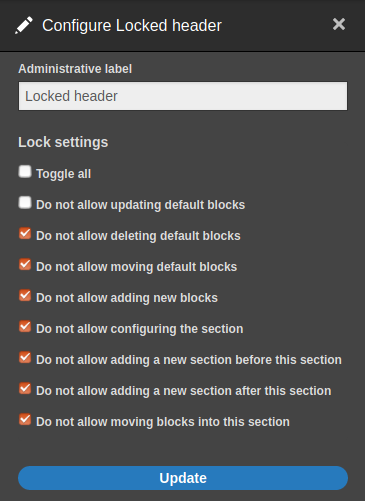
Layout Builder Lock allows administrators to lock sections of a default layout so users can't perform certain actions when overriding the layout for an individual entity.
Lock options:
- Update default blocks
- Move default blocks
- Delete default blocks
- Configure a section
- Add a section before or after
- Move blocks from other sections into this section
- Add new blocks: New blocks will be placed under default blocks. Users will be able to update, move and delete these blocks. Blocks from other sections can be moved into this section then, so the 'Move blocks from other sections into this section' lock setting will not apply anymore.
As soon as one lock setting is enabled, a user won't be able to delete the section either.
After installation
- Go to admin/people/permissions and toggle the roles which are allowed to configure lock settings. The permission is 'Manage lock settings on sections'.
- On the default display, click on any 'Configure section' link to open the section configure form and toggle the options you want to lock for users.
Supporting organizations:
Project information
- Project categories: Access control, Content display
- Ecosystem: Layout Builder
 6,096 sites report using this module
- Created by swentel on , updated
 Stable releases for this project are covered by the security advisory policy.
Look for the shield icon below.
Releases
2.0.0-rc2
released 4 June 2024
Works with Drupal: ^9.2 || ^10 || ^11
New feature to allow regions to be locked + D11 compatibility
Install:
8.x-1.4
released 27 November 2023
released 27 November 2023
Works with Drupal: ^9.2 || ^10
Drupal 10 compatibility is available!
Install:
Development version: 8.x-1.x-dev updated 27 Jan 2024 at 10:15 UTC


