

 The 2026 Drupal Business Survey is open. Your response will help shape the future of the Drupal business ecosystem.
Mix provides a series of necessary features that almost every project needs but are not included in Drupal core.
The main goals of the Mix module include
- Provide simple but useful features that most Drupal projects could use without installing too many dedicated modules.
- Automate, simplify tasks (e.g. Disabling/enabling caches, Synchronizing block contents, terms and menu links, etc.) and provide better Drupal user experiences.
* This module is under active development. If you encounter some bugs, please update to the latest version, check and run the
/update.php, reinstall this module or try another version. If the problem persists, please file an issue. Features
Development
- Enable development mode (Intro | Doc)
- Environment Indicator (Intro)
- Show form ID - Show form ID and
hook_form_alter()function template before forms to make form altering easier (Intro)
Menu
- Dropdown menu - Allow menu blocks to be displayed as dropdown menus for better UX
- Menu token - Allow to use token in menu url, e.g.
/user/[current-user:uid](Doc) - Menu item per role - Control menu item visibility by roles
- Menu item attributes - Allow to set attributes like id/class/target to a menu link and its wrapper (Doc)
- Menu item HTML - Allow to use HTML in menu items, e.g. add an icon, add a wrapper for menu title text, etc.
Users
- Register password - Passwords can be set when registering.
- Standalone password change page: Remove password fields in the user edit form, and provide a standalone password change page at
/user/{user}/password, to provide a clean password change UI and better UX.
Configuration Management
- Content synchronization - Sync block contents, menu links and taxonomy terms between sites (Doc)
- Config import ignore (Doc)
Site Building & UX
- Block class - Allow to add custom classes to a block
- Custom error page (Doc)
- Hide revision field (Intro)
- Hide submit button - Disable submit buttons after one has been clicked, to prevent duplicate postings, duplicate e-commerce orders or other duplicate form submissions.
- Unsaved form confirm - Show a confirm dialog when user is about to leave an unsaved form.
- Remove X Generator (Intro)
SEO
- Meta tags - Set title and meta tags for the front page and a description meta tag for the node page. (Doc)
Todo & TBD
- Login destination/redirect (Redirect users to different target urls based on roles)
- Auto logout
- Term of use
- Quick account switch
- ...
Enable development mode.
Disable Drupal caches and enable twig debugging without editing settings*.php and *services.yml files.
Disable Drupal (>=8.0) caching during development can be annoying. Mix module provides a simple checkbox to help switch between Dev and Prod mode (by disable/enable caches, twig debug, CSS/JS aggregation, error message display, etc..), which makes module and theme development much easier.

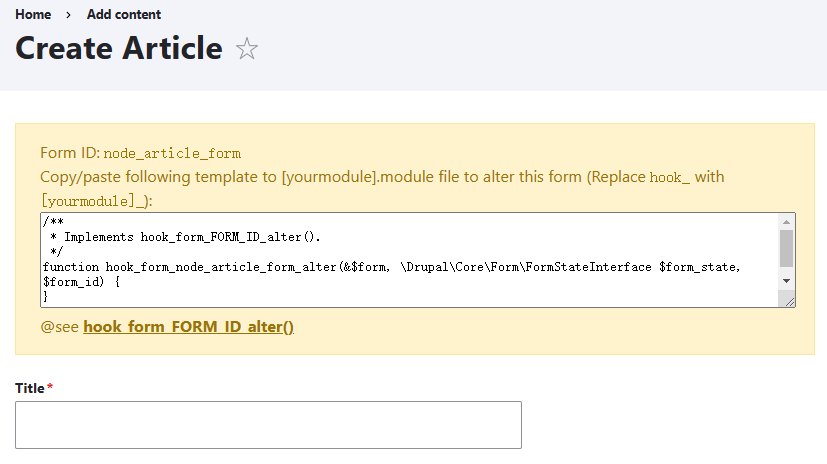
Show form ID
Show form ID and form alter function template before forms to make form altering easier.
Config import ignore
By enabling "Config import ignore" in the Mix module, we can easily run different modules and configurations between environments without having to worry about overriding the Production configuration. Read More.
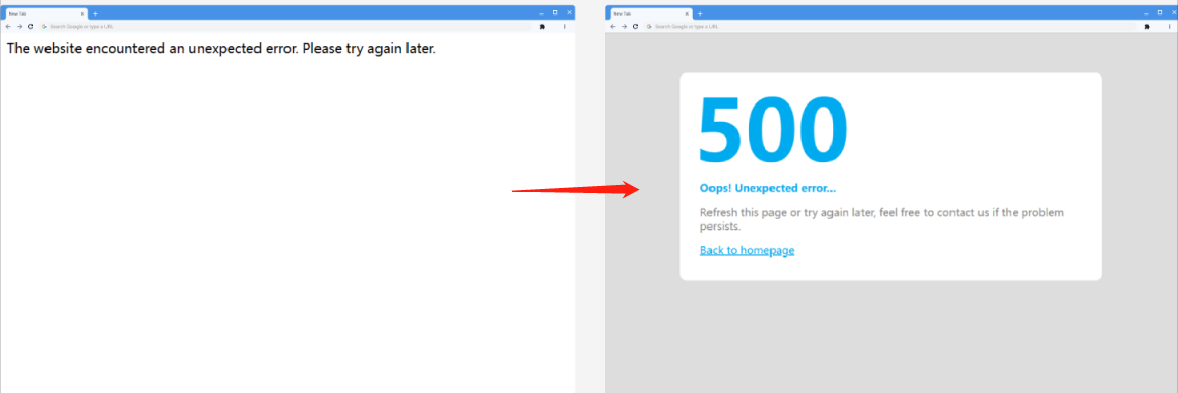
Custom Error Page
Get rid of the default pale error page, replace it with custom messages or a well designed HTML page to provide a better user experience for clients and visitors.
When "Enable development mode" is checked, extra error messages and backtrace information can also be displayed for development and debugging purposes.
Remove X-Generator
Remove the meta tag <meta name="Generator" content="Drupal 10 (https://www.drupal.org)"> from the page source code and remove the "X-Generator" in the HTTP header to obfuscate that your website is running on Drupal.
NOTE: This can't prevent others from knowing the site is running on Drupal (Why?), but it is a reasonable idea sometimes when you don't want it.
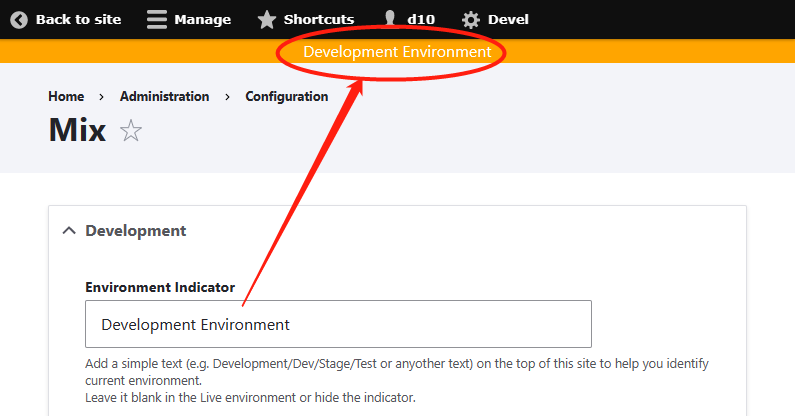
Environment Indicator
Add custom text (e.g. Development/Dev/Stage/Test or any other text) at the top of the site to help you identify the current environment.
Hide revision field
Hide the revision field for all users except UID 1 to provide a clear UI.

Installation
Install as you would normally install a contributed Drupal module.
Configuration
Configure Mix module at /admin/config/mix.
Project information
- Project categories: Administration tools, Developer tools, Import and export
 494 sites report using this module
- Created by lugir on , updated
 Stable releases for this project are covered by the security advisory policy.
Look for the shield icon below.

