

 The 2026 Drupal Business Survey is open. Your response will help shape the future of the Drupal business ecosystem.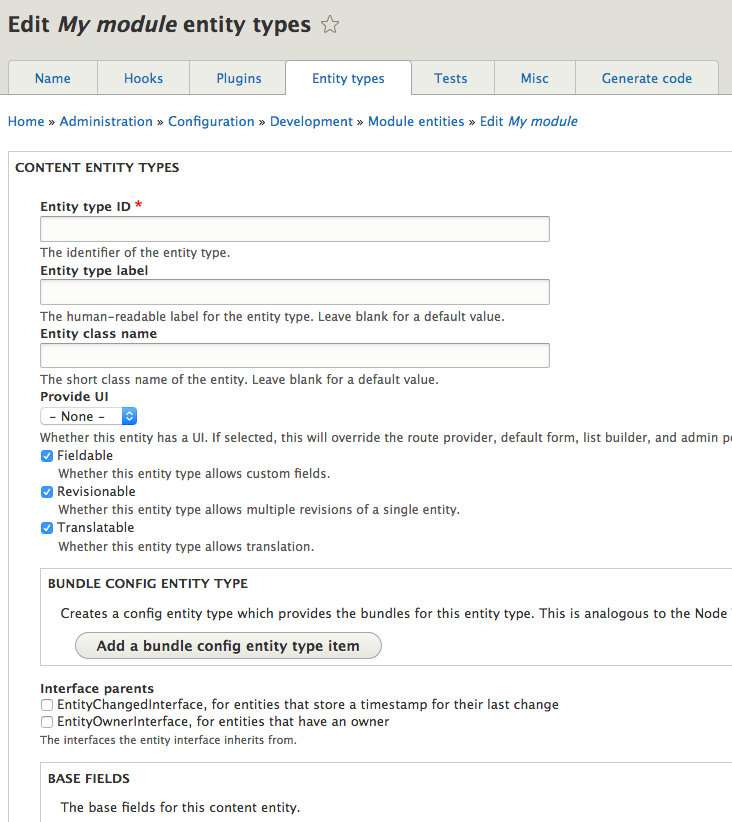


A module which auto-generates a skeleton or "scaffolding" for a module, along with hints on how to fill them in. Useful for newbie developers to learn how Drupal code works, and seasoned developers who are too lazy to look up what arguments a function has to take.
Module Builder is unlike any other code generator in that it analyses your site's code to detect plugin types, hooks, services, and so on. It can then generate code for any of these, whether from core, contrib, or your custom code.
But more than this, module builder can generate:
- Content and config entity types
- Plugins of just about any type, with injected services
- Forms, with injected services
- Routes and controllers, with injected services
- Permissions
- Services
- Plugin types
- PHPUnit test case classes, and test modules
- An api.php file to document the module's hooks
- An admin settings form
- A README file
- ... and more.
You can watch a demonstration of some of the components that can be generated.
You can read more about how to use Module Builder on the documentation site.
Module Builder saves the data for a generated module as a config entity, meaning that you can return to a generated module and add or change its components and generate code again.
Module Builder also has partial functionality for adopting and existing module as a module config entity, to then add further code to it. For example, this allows adopting an existing service class and adding an extra injected service to it.
There is also experimental code for generating a theme.
Installation
- Install Module Builder with Composer, as with a normal module, but with the '--dev' Composer option, so that Module Builder is not deployed to production servers. WARNING: Module Builder is a developer tool. It should NEVER be installed on a production site, as it has the capability to write to the site's codebase.
- Go to Administration › Configuration › Development › Module Builder › Analyse and run the code analysis.
- Go to Administration › Configuration › Development › Module Builder › Modules and add a new module entity.
Versions
- Drupal 8/9/10/11: 4.x is stable and being actively developed. This provides a Drupal UI. For use with Drush commands, use the Drush command.
- Drupal 7: 7.x-2.x-dev is stable and only receiving maintenance. 7.x-2.0 is the final version that includes the Drush commands.
- Drupal 6: 6.x-2.x-dev is stable and no longer supported. For Drush, use 7.x-2.0 as a Drush plugin.
- Drupal 5: 5.x-1.x-dev is stable and no longer supported.
Drupal UI
Install this module as normal, using the version appropriate for your version of Drupal. For 4.x, use Composer to install the Drupal Code Builder library and other dependencies (see the README for instructions). After installation, run the code analysis on the settings page.
Drush plugin (7.x-2.0 and earlier only)
Install the entire module folder in a place where Drush can find plugins (see Drush documentation for details). It can then be used for any Drupal site that Drush can be used with, independent of Drupal version. Use 7.x-2.0 version as a Drush plugin for version 6 or 7 of Drupal, and use Drush 8 or prior; see the documentation for more details.
Co-maintainers needed: http://drupal.org/node/278908
Invitation for roadmap ideas: http://drupal.org/node/310691
Project information
- Project categories: Developer tools
 309 sites report using this module
- Created by webchick on , updated
 Stable releases for this project are covered by the security advisory policy.
Look for the shield icon below.


