

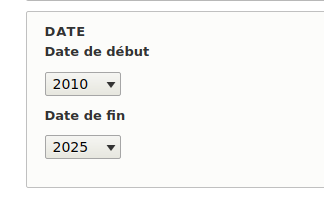


Month Year Range
Provides form widgets for month/year date selection. Users only need to select month and year (or just year), making data entry more efficient for date-based content.
Features
- Month Year Range Widget: For date range fields
- Month Year Datetime Widget: For single datetime fields
- Flexible ordering: Year/Month, Month/Year, or Year only
- Optional year ranges: Restrict available years
- Smart day handling: Auto-set first or last day of month
Installation
Install as any other Drupal module.
Usage
- Enable the Month Year Range module
- Create a Date or Date Range field
- In Form Display Settings, select the appropriate widget:
- Month Year Range for date range fields
- Month Year datetime for single date fields
Configuration
- Date order: Year/Month, Month/Year, or Year only
- Year range: Optional limits (e.g.,
2020:2030,-5:+5) - Day options: First or last day of month
Supporting organizations:
Project information
- Project categories: Site structure
- Ecosystem: Date Range, Date
 288 sites report using this module
- Created by nikral on , updated
 Stable releases for this project are covered by the security advisory policy.
Look for the shield icon below.

