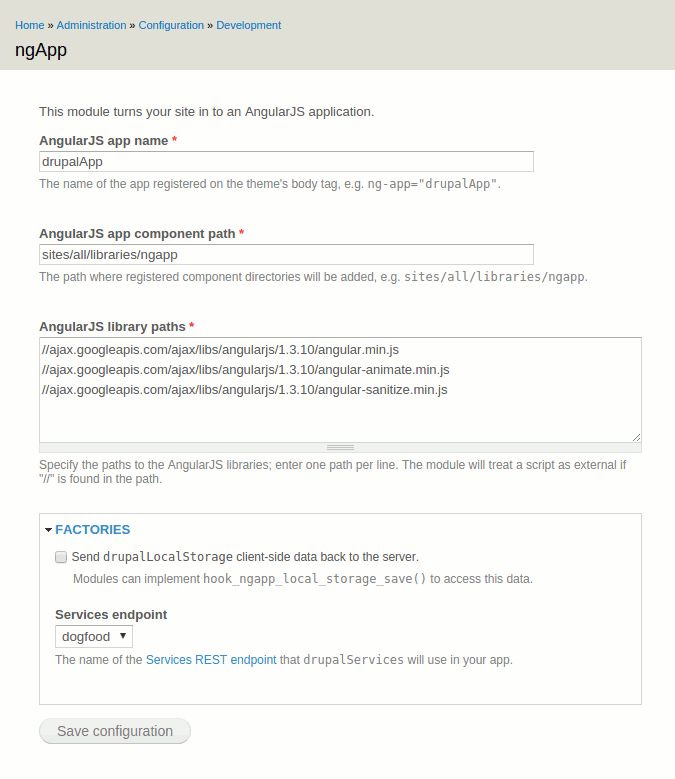
This module turns your site in to an AngularJS application. Its goal is to help you start using Angular on your site very quickly, optionally using popular contrib modules for retrieving JSON data from local RESTful endpoints.
TLDR, here's the demo. To AngularJS-ify your site, the module does a few basic things:
- Adds some attributes to the body tag:
ng-app="drupalApp" ng-strict-di ng-view - Adds baseline AngularJS libraries. By default these use v1.3.10 from the Google CDN, but you can set whatever stack you want from the configuration screen.
- Creates a new Angular app (exposed as JS variable
$drupalApp) that registered Angular controllers, factories, directives, etc. will bind to. Note: each of these Angular keywords will generically be referred to as "components" on this page.
Registering Angular components
To start building out your new Angular app you'll want to add some components to it. Each registered component can be output as a standard block, based on the presence of files[]. Here's the HOWTO:
- Create
my_componentdirectory and add amy_component.infofile to it. Add standard .info stuff to that file - scripts are required, files and stylesheets are optional.
name = My Component scripts[] = my_component.js files[] = my_component.html - In
my_component.jsbind to the$drupalAppvariable provided by the module.
$drupalApp .controller('MyComponent', ...); - Go write any Angular stuff you want in
my_component.js, my_component.html, keeping in mind that$drupalAppgives you access to other registered components using strict Angular dependency injection. Review patterns inexamples/app/*for a good starting point. - Add
my_componentdirectory to the configured component directory (sites/all/libraries/ngappby default) and clear caches. You should now have a block titled "ngApp: My Component" available.
$drupalApp Factories
The module provides a few factories to your new Angular app that can be injected in to registered components as needed. The example modules' app components illustrate how to use each.
drupalUser- This factory exposes the current Drupal user to your app.drupalLocalStorage- This factory can be used as a persistent key/value storage between page refreshes. The really handy thing about it is that when Drupal server-side caches are flushed a signal is sent to your app, instructing client browsers to also flush their own local storage.
- Modules can also implement
hook_ngapp_local_storage_save()to access local storage data when the config option is set - e.g. modules might save user preferences defined by your Angular app.
- Modules can also implement
drupalServices- If you want to "eat your own dogfood" in your new Angular app and consume JSON data from local endpoints, the module offers a few integration options through itsdrupalServicesfactory. It takes care of Angular$httpcalls for you returning data via easy-to-use JS promise methods. By using this factory, endpoint paths can change with no impact on your Angular app.
- For now, only GET operations are supported for each contrib mod.
- Pros and cons of each contrib mod are discussed in README.txt.
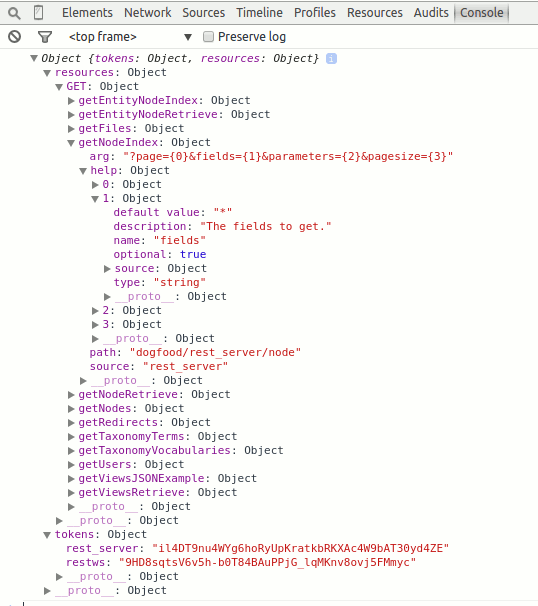
- This factory provides help on methods available (and their arguments) directly in your JS console.
drupalServices .help() .then(function(help) { console.log(help); }); - This factory provides a function to access contextual menu arguments from the current Drupal path, e.g. current node, taxonomy term.
drupalServices
  .context()
  .then(function(context) {
    console.log(context);
  });
Supported
drupalServicesintegrations for modules configured to outputapplication/jsondata are:Services (3.x) REST server
The
drupalServicesfactory can use a Services REST server once you've set the server name on the configuration screen. The factory adds theX-CSRF-Tokenrequest header for the current Drupal user.- Example usage when the Services Views contrib module is also enabled...this hits a View with machine name "dogfood" and display id "default" (Master) which has an exposed filter "tags".
drupalServices .getViewsRetrieve('dogfood?display_id=default&filters[tags]=Term 1') .then(function(result) { vm.data = result.data; }); - Note:
drupalServicesconcatenates each resource key ("node", "user", "views") and operation key ("retrieve", "index") for function names, transforming them togetResourceKeyOperationKey.
Views Datasource
To use this module's packaged Views JSON style plugin with the
drupalServicesfactory, do the following:- Add a View page display using the "JSON data document" option and set the page path; the factory will GET data from here.
- Example usage when View page has machine name "articles" and an exposed filter "tags".
drupalServices .getArticles('?tags=Term 1') .then(function(result) { vm.data = result.data; }); - Note:
drupalServicesuses each View page's machine name for JS function names, transforming them togetYourPageMachineName.
RESTful Web Services
To use this module with the
drupalServicesfactory, just enable and set permissions. The factory adds theX-CSRF-Tokenrequest header for the current Drupal user.- Example usage for getting a list of node entities.
drupalServices .getNodes('?limit=3&page=0') .then(function(result) { vm.data = result.data; }); - Note:
drupalServicesuses a pluralization of the entity type key for JS function names, transforming them togetEntityTypes.
Brought to you by your friends at Socha Dev.
| Attachment | Size |
|---|---|
| Sample help ouput in JS console. | 21.45 KB |
| ngapp-admin.png | 26.25 KB |
Project information
- Project categories: Developer tools
 1 site reports using this module
- Created by natemow on , updated
 Stable releases for this project are covered by the security advisory policy.
There are currently no supported stable releases.