




The Onpage External Libraries module lets you add external JS/CSS to any page.
An example use case would be including an icon css library to load on a specific page without having to push the library through a theme libraries.yml.
INSTALLATION
- Install as you would normally install a contributed Drupal module. Visit: https://www.drupal.org/node/1897420 for further information.
CONFIGURATION
- Navigate to Adminstration > Extend and enable to module.
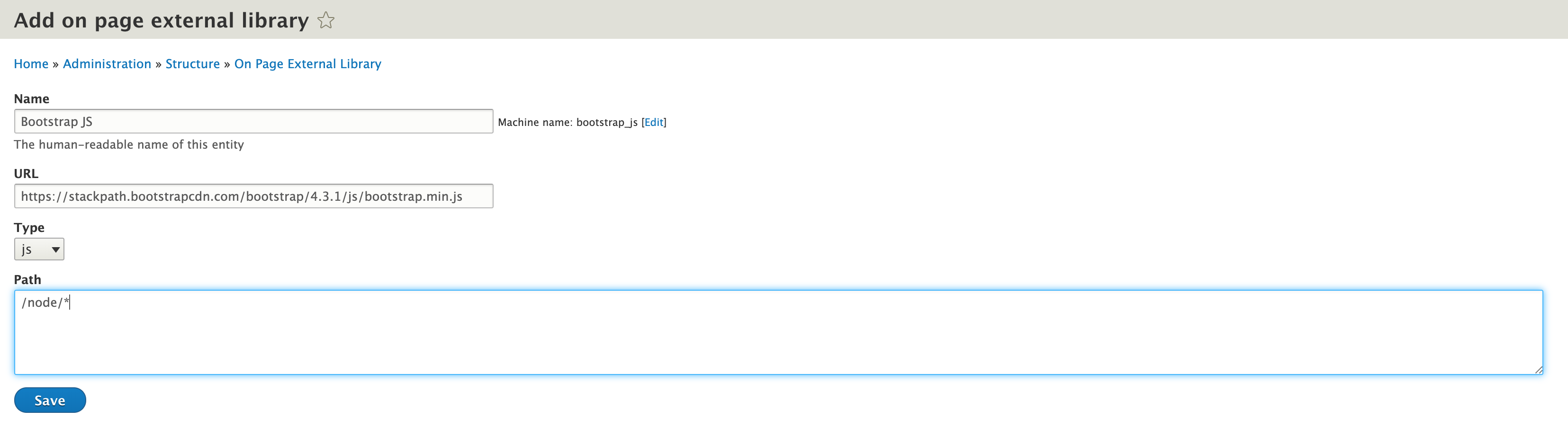
- Navigate to Adminstration > structure > On Page External Library to add your external libraries entity.
- Set/add the following in the provided fields:
- Set/Add a name for what you are adding
- URL of where the js/css can be located
- Type, either CSS or JS
- Path on which node/page the library should be loaded
- Click 'Save'
Current maintainers
Supporting organizations:
Project information
- Project categories: Developer tools
 8 sites report using this module
- Created by rawdreeg on , updated
 Stable releases for this project are covered by the security advisory policy.
Look for the shield icon below.


