


This project is not covered by Drupal’s security advisory policy.
The Packthub E-book Integration module is a powerful tool designed to seamlessly integrate the Packthub API with your Drupal 9, and 10 websites. This module facilitates the incorporation of Packthub's extensive ebook catalog directly into your Drupal environment, offering a range of features to enhance your content creation and management process.
Features
Dashboard Display:
Enjoy a convenient dashboard display of ebooks sourced directly from Packthub.com. Stay informed about the latest additions to the catalog effortlessly.
Search Functionality:
Effortlessly search through the Packthub ebook catalog without leaving your Drupal site. Find the content you need with ease.
Node Creation:
Streamline the creation of Drupal nodes by leveraging Packthub ebook data. Generate rich content using information seamlessly imported from Packthub.
Post-Installation
Access the module's configuration page at /admin/config/packt/content-type-form on your Drupal project.
Select the desired content type to associate with Packthub ebook data.
Allow the module to process and configure itself based on your content type selection.
Mapping Packthub Data:
Additional fields corresponding to the selected content type will appear.
Map Packthub ebook data to the relevant fields to ensure accurate integration.
Packthub api token
Open this form /admin/config/packt/api-key to save your packthub api token.
Additional Requirements
There is no additional requirement outside Drupal core for this module
Usage:
Creating Nodes:
Single Ebook:
Choose a single ebook by clicking on the respective card.
A dialog will display the title and description of the selected ebook.
Creating Node (Single Ebook):
Click the "Create Node" button in the dialog.
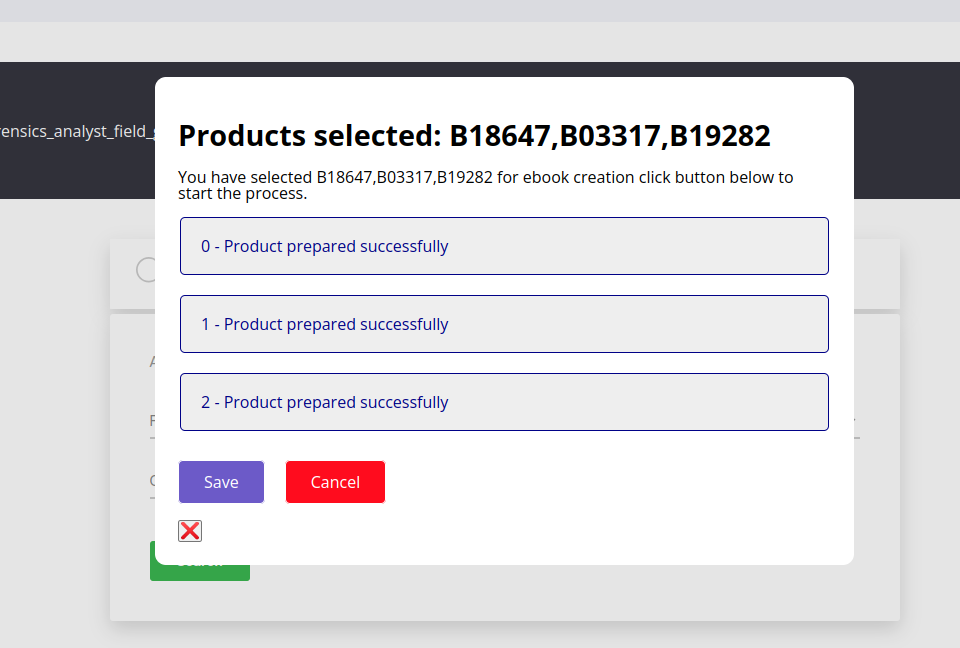
Wait for the "Prepared" message and choose to save or cancel.
Multiple Ebooks:
Select multiple ebooks and use the "Processed selected products" button for a batch node creation process.
File Handling:
As ebooks typically come with files, choose to save or cancel the prepared ebook node. Cancelling will delete the associated file if not saved.
Community Documentation
A great place to add links to YouTube walkthroughs, external documentation, or a demo site (use DrupalPod!).
Project information
- Project categories: E-commerce
- Created by chancenyasulu on , updated
 This project is not covered by the security advisory policy.
Use at your own risk! It may have publicly disclosed vulnerabilities.
Releases
Packthub API integration with drupal Node Entity.


