

 The 2026 Drupal Business Survey is open. Your response will help shape the future of the Drupal business ecosystem.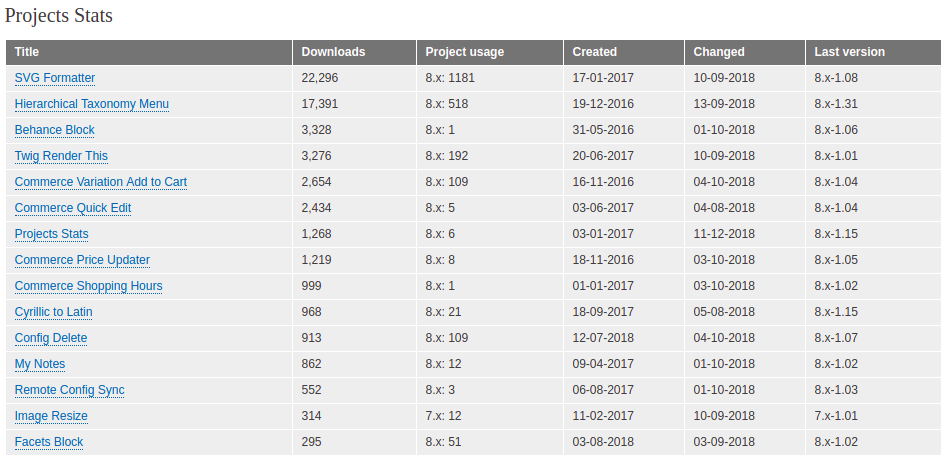
Are you a module or theme developer? Have you created several modules, themes, or distributions and you want to see how popular they are? Probably not. But if you for some reason need to display usage count for a list of modules, themes, and/or distributions then you should try out this module.
Projects Stats provides a block, which displays a table or a list with project names, usage count, and some additional stats. Another great option is Slack integration. You can receive downloads count directly to your Slack channel.
How to use it?
After you install the module, go to the block layout 'admin/structure/block' and add a 'Projects Stats' block. After you click the 'Place block' button, you will see a number of options. You need to enter the machine names of the projects you want to display in your block, and there are several more options like cache age for block, sort type, and table classes. Every block has its own settings, so you can have multiple blocks that show a different list of projects.
Slack integration can be configured here: 'admin/config/services/projects-stats' To enable sending messages to your Slack channel, you have to create an integration. Go to this page: https://slack.com/services/new/incoming-webhook and follow the instructions. After you create an integration copy and paste the given Webhook URL to the module settings. You can choose when you want to send a message. If you choose to use Drupal's cron, then the sending interval will depend on the cron settings.
Notice
In order to get the best possible performance, please install BigPipe (core) and Sessionless BigPipe (contrib) modules.
Supporting organizations:
sponsored development
Project information
 Minimally maintained
Maintainers monitor issues, but fast responses are not guaranteed.- Maintenance fixes only
Considered feature-complete by its maintainers. - Project categories: Integrations
 1 site reports using this module
- Created by gnikolovski on , updated
 Stable releases for this project are covered by the security advisory policy.
Look for the shield icon below.

