

This project is not covered by Drupal’s security advisory policy.
This module allows to render nodes referenced via a node reference field in tabs, with node titles as tab titles and rendered nodes as tab content.
How to use:
- Setup a node reference field, with multiple (or unlimited) number of values.
- On "manage display", set the field formatter to Rendered Node
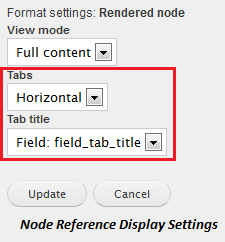
- Edit field formatter settings:
- set Tabs to Horizontal or Vertical
- set Tab title to either Node: Title or any of the fields defined on referenced node type.
See #1402226-3: Configuration help for a set of screenshots showing the steps above and the visual result.
Tipp: You can use the display suite module to create a custom view_mode for nodes rendered within tabs.
Dependencies:
- Node References (part of References)
- Field formatter settings
- Field group (provides horizontal-tabs library)
Project information
 Minimally maintained
Maintainers monitor issues, but fast responses are not guaranteed.- Maintenance fixes only
Considered feature-complete by its maintainers. - Project categories: Content display, Site structure
 12 sites report using this module
- Created by bforchhammer on , updated
 This project is not covered by the security advisory policy.
Use at your own risk! It may have publicly disclosed vulnerabilities.

