

 The 2026 Drupal Business Survey is open. Your response will help shape the future of the Drupal business ecosystem.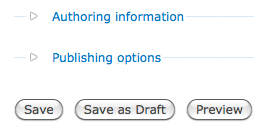
Save Draft adds a 'Save as Draft' Button to the node_form for content types, allowing the user to click the 'Save as Draft' button to save the node as a draft.
Drupal 8 has this UX feature in the core!!
This helps improve usability, as the content creator no longer has to search for the published checkbox to publish or unpublish a node, as they can just click the 'Save as Draft' Button.
If you require more than just a simple way to publish and unpublish node then you may want to check this module out http://drupal.org/project/draft
To install:
1. Download, unpack and place in sites/all/modules/
2. For Drupal 6: Enable the module using Administer -> Site building -> Modules (/admin/build/modules) and for Drupal 7, go to admin/modules
3. Now when you create a new node, a 'Save as Draft' button will be added to the form.
Note: Once the module is enabled, all the content types have "save draft" button enabled and the published checkbox in the node create form will be hidden.
Supporting organizations:
Project information
 Minimally maintained
Maintainers monitor issues, but fast responses are not guaranteed. 2,742 sites report using this module
- By rooby on , updated
 Stable releases for this project are covered by the security advisory policy.
There are currently no supported stable releases.


