




Drupal integration of Swiffy Slider.
This module provides a field formatter for the field type entity_reference and a views format.
Swiffy Slider provides a lightweight slider/carousel solution. All the sliding, dragging, snapping etc. are native browser behavior and not Javascript. Swiffy Slider can even run in a simple mode with no JS at all. Support for any input device (including touch pads, pencils, assistive devices) and 100% WCAG compatible.
How to use it
Implementation
This module ships already the required library, but it is possible to override the used version.
1. Add the following snippet to your composer.json inside repositories
{
  "type": "package",
  "package": {
    "type": "drupal-library",
    "name": "dynamicweb/swiffy-slider",
    "version": "v1.6.0",
    "dist": {
      "url": "https://github.com/dynamicweb/swiffy-slider/archive/refs/tags/v1.6.0.zip",
      "type": "zip"
    }
  }
}
2. Download the dependency
composer require dynamicweb/swiffy-slider
3. Enable the module
Field formatter
Mise en place
- Build a multi-value media field, e. g. in the content type article
- Create a content with at least two images in that field
- Go to https://swiffyslider.com/configuration/ and customize the slider options, copy the "Perma link"
Configure the field formatter
- In your content type, go to "Manage display", spot the media field
- Under "Format", select "Swiffy Slider"
- Click settings (the gear icon) and paste the copied Perma link
No third-party calls. The field allows the complete URL for your convenience, all customized config will be handled locally.
Views display
Have some nodes at hand (e. g. articles) and make sure you have configured a suitable teaser display (e. g. title, body trimmed to 200 characters, teaser image).
- Add a display to a node-based view, e. g. to the frontpage view
- Use unformatted list with teasers or fields, as you like
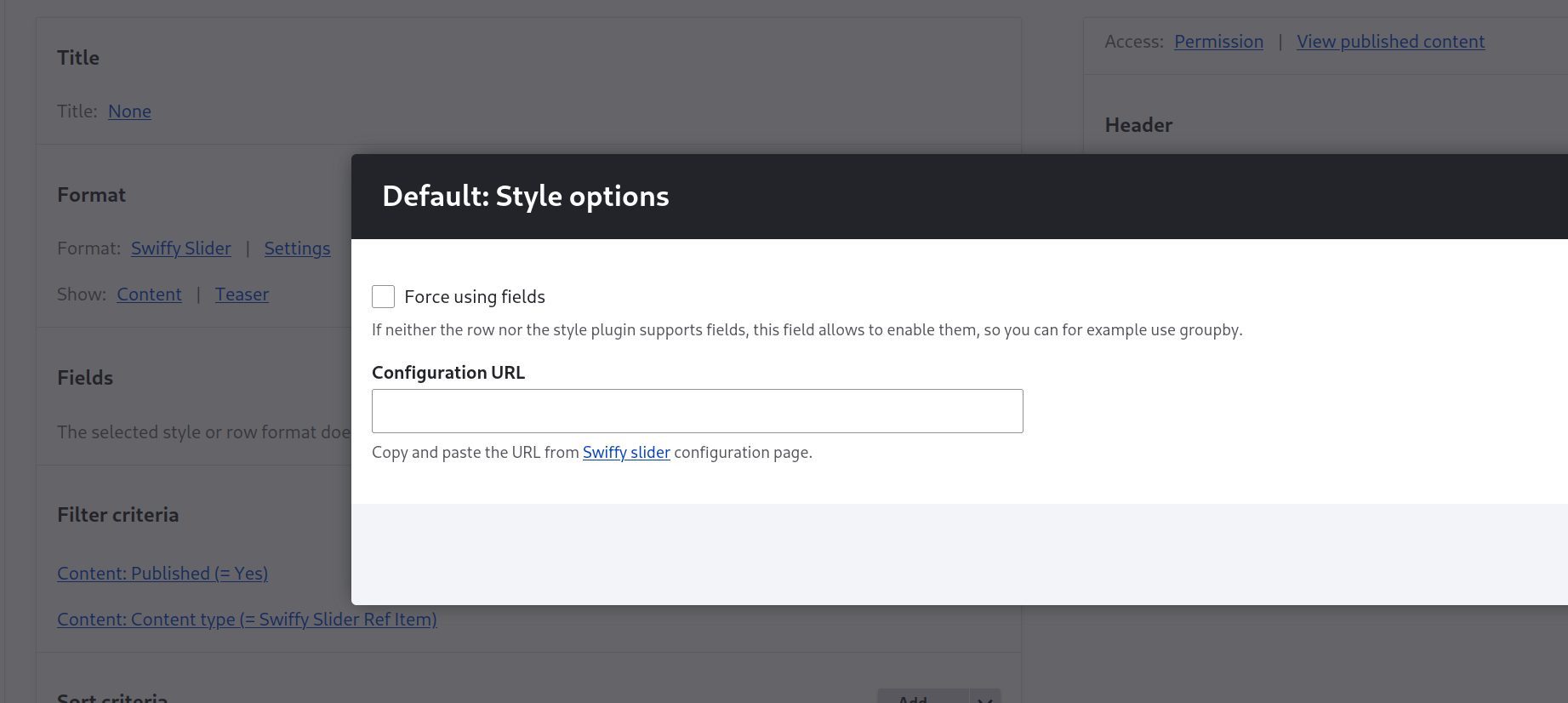
- Select format: Swiffy Slider
- Go to https://swiffyslider.com/configuration/ and customize the slider options, copy the "Perma link"
- Paste the copied link in the Settings field "Configuration URL"
No third-party calls, as stated above.
Known issues
For some reason the loop (at the end of a list go to first item) does not work when snap behaviour is active. Any ideas welcome.
Why only a configuration URL?
Swiffy Slider has a lot of configuration options. We find it very convenient to configure everything on the Configuration page with a sample preview right in place.
Replicating all settings to the field formatter or views settings would add a lot of complexity to the Drupal back-end forms. If you think it would be worth the effort nevertheless, we'd recommend to build a complimentary module with all the settings in the Drupal back-end.
Supporting organizations:
Project information
 Maintenance fixes only
Considered feature-complete by its maintainers.- Project categories: Content display, Integrations
 111 sites report using this module
- Created by tobiasb on , updated
 Stable releases for this project are covered by the security advisory policy.
Look for the shield icon below.
Releases
1.4.0
released 29 August 2025
released 29 August 2025
Works with Drupal: ^10 || ^11
New formatter for text fields
Install:
Development version: 1.4.x-dev updated 20 Jun 2026 at 10:21 UTC
1.3.1
released 3 August 2024
released 3 August 2024
Works with Drupal: ^10 || ^11
Drop support for Drupal 9 and add support for Drupal 11. The dependency dynamicweb/swiffy_slider is now included.
Install:


