

 Come together with the global Drupal community in Rotterdam, 28 Sept – 1 Oct 2026. Sessions, contribution, connection, and Early Bird savings until 8 June.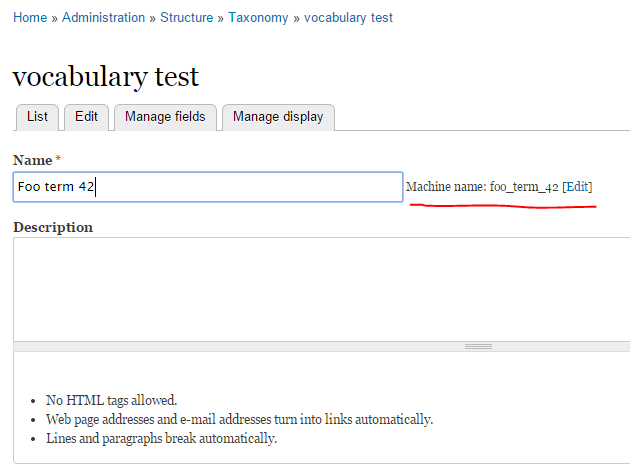
Taxonomy is a very helpfull tool in Drupal's world.
However, support for "machine_name" is really missing, overall when you need to exchange terms with others systems.
In such situation, the only way is to create a field to hold external term code which is not the best way due to poor performance consequences.
This module create a new property named "machine_name" as for Taxonomy Vocabulary to store a "slug" for each term, and a "unique key" index to check unicity into a vocabulary.
If not provided during term creation, machine name will be automatically generated based on term name.
This new property can be used too with pathauto to generates rewrited urls.
Requirements
- Taxonomy
Features
- Alter database schema to add new column for "taxonomy_term_data" table
- Automatically generate machine_name if missing based on term name
- Can use Pathauto, Transliteration or Token to sluggify term name
- Add function to load one term by its machine name
- Machine name exposed to Views
- Machine name exposed to Token
- Machine name exposed to Migrate (Destination & Field Handler)
- Machine name exposed to Rules
Note: working with Migrate, the reference is no more the 'name' property, but the 'machine_name'. So if you encountered duplicate names, that's because you have differente machine names.
For a such behavior, you have to use the "MigrateDestinationTermMachineName" destination class.
Installation and configuration
- Put the module in sites/all/modules folder
- Enable this module
- If available, enable and setup Pathauto / Transliteration modules
Usage - Drupal 7.x
Load term by machine name
// Load with vid.
$vid = 1;
$term = taxonomy_term_machine_name_load('term_foo', $vid);
// Load with vocabulary machine name.
$vocabulary_machine_name = 'categories';
$term = taxonomy_term_machine_name_load('term_foo', $vocabulary_machine_name);
// Load with full object vocabulary.
$vocabulary = taxonomy_vocabulary_machine_name_load('categories');
$term = taxonomy_term_machine_name_load('term_foo', $vocabulary);
Migrate terms by machine name
CSV sample file
machine_name,name
term_1,Term 1
term_2,Term 2
term_3,Term 3
term_4,Term 4
term_5,Term 5
term_X1,Term X
term_X2,Term X
term_X3,Term X
term_X4,Term X
term_X5,Term X
Sample code
Notice: To support parent links between terms, you need to use MigrationTaxonomyTermMachineName as parent class instead of Migrate.
// Note the use of "MigrateDestinationTermMachineName" destination class.
class TestMigration extends MigrationTaxonomyTermMachineName {
  public function __construct(array $params) {
    parent::__construct();

    $this->description = t('Import');
    $this->machineName = 'example';

    // Create a map object for tracking the relationships between source rows
    $this->map = new MigrateSQLMap(
      $this->machineName,
      array(
        'machine_name' => array(
          'type'     => 'varchar',
          'length'   => 255,
          'not null' => TRUE,
        ),
      ),
      MigrateDestinationEntityAPI::getKeySchema('taxonomy_term')
    );

    // Create a MigrateSource object.
    $this->source      = new MigrateSourceCSV(
      drupal_get_path('module', 'migrate_example') . '/terms.csv',
      $this->columns(),
      array(
        'header_rows' => 1,
        'delimiter'   => ',',
      )
    );
    $this->destination = new MigrateDestinationTermMachineName('example');

    $this->addFieldMapping('machine_name', 'machine_name');
    $this->addFieldMapping('name', 'name');
  }

  /**
   * @return array
   */
  public function columns() {
    $columns   = array();
    $columns[] = array('machine_name', 'Machine name');
    $columns[] = array('name', 'Name');

    return $columns;
  }
}
Sample code (Migrate FIeld Handler)
// Use new property is available which switch mechanism to machine name instead of looking for taxonomy term using name.
$this->addFieldMapping('field_tags', 'tags');
$this->addFieldMapping('field_tags:machine_name')->defaultValue(TRUE);
// You can too enable the term creation based on machine name, which will fill the name with the machine name if term is not found.
$this->addFieldMapping('field_tags:create_term')->defaultValue(TRUE);
Supporting organizations:
Project information
- Project categories: Import and export, Site structure
 4,423 sites report using this module
- Created by sebastien m. on , updated
 Stable releases for this project are covered by the security advisory policy.
Look for the shield icon below.


