

 The 2026 Drupal Business Survey is open. Your response will help shape the future of the Drupal business ecosystem.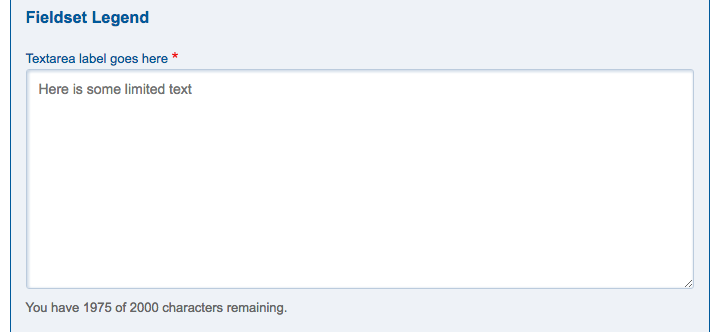
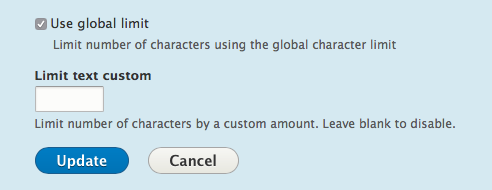
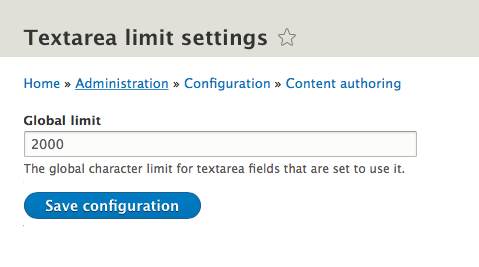
The Textarea Limit module adds in character limiting to selected textarea widgets. Widgets are selected on the respective form display edit form(s). A global character limit can be used, configurable via admin form or a local limit can be set.
Requirements
This module requires the jquery.limit javascript library which is currently loaded externally.
Install/Usage
Install module via composer:
composer require drupal/textarea_limit
drush en textarea_limit
- Configure global settings at: /admin/config/content/textarea-limit
- Setup/add textarea field on entity of choice.
- Adjust field form display formatting options on textarea field. Set custom text limit or use global text limit.
- Now goto create/edit form for entity and inspect textarea field. It should now indicate how many characters are left/limit you.
Supporting organizations:
Initial development
Project information
 Minimally maintained
Maintainers monitor issues, but fast responses are not guaranteed.- Maintenance fixes only
Considered feature-complete by its maintainers. - Project categories: Administration tools, Content editing experience, Site structure
 251 sites report using this module
- Created by mikejw on , updated
 Stable releases for this project are covered by the security advisory policy.
Look for the shield icon below.


