

This project is not covered by Drupal’s security advisory policy.
Overview
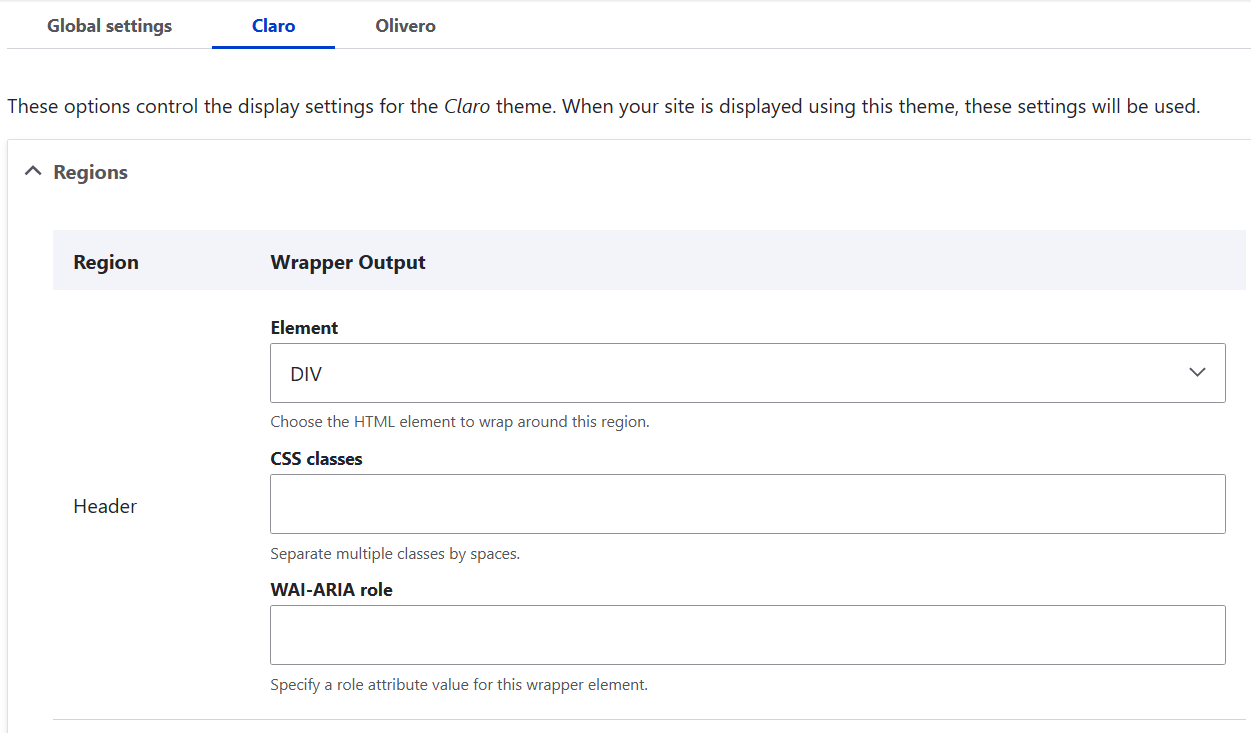
Theme region wrapper module provides UI to specify HTML element for theme's each region. You can configure each wrapper element, CSS classes and WAI-ARIA role on a theme settings page.
Motivation
The core views module can change field HTML output with provided UI, and some contribution modules such as Fences and Block Class and so on, also can change HTML output with module provided UI. When you want to change a theme region's wrapper HTML, however cannot change with UI, so need to rewrite the page.html.twig or region.html.twig.
NOTE
This module overrides only a region template which is located in core directory.
If a region uses twig template which is located in custom theme directory,
configured settings for that region does not override anything.
Features
Theme's each region can configure following list items from UI on theme settings page.
- HTML element
- CSS class
- WAI-ARIA role
How to configure a region wrapper settings for a theme?
- Go to /admin/appearance.
- Click a theme "Settings" link in the installed themes list.
- Click "Theme region wrapper settings" header.
- Configure each region wrapper output.
- Click "Save configuration" button.
Override HTML element settings (advanced)
If you want not to use default HTML element settings, you can override settings.
You want to override the configuration by other module installation, see hook_install() code at this module's testing code.
Project information
- Project categories: Accessibility, Content display
 4 sites report using this module
- Created by tom konda on , updated
 This project is not covered by the security advisory policy.
Use at your own risk! It may have publicly disclosed vulnerabilities.

