

 The 2026 Drupal Business Survey is open. Your response will help shape the future of the Drupal business ecosystem.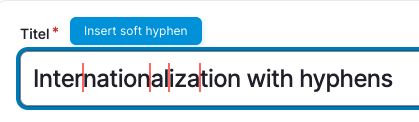

Sometimes you want to indicate where words should break as css hyphens sometimes breaks words in ugly ways.
That's where soft hyphens is needed. But some fields don't allow ­ to be used so that we developed the Unicode Soft Hyphens
Features
Unicode Soft Hyphens provides the possibility to add soft hyphens in title fields where you can't add html ­. Instead it will add a unicode character for this and visualize it as it is normally invisible.
It is not necessary to add a new field for this and works with existing title fields of nodes or blocks.
Configuration
Go to the settings of your content type or block type and find the "Unicode Soft Hyphens settings". Enable it for the title field of the content type or block type.
On the edit form of your content or blocks you will now find a small button next to the title label to insert soft hyphens by unicode.
Supporting organizations:
Development, Maintenance, Sponsoring
Development
Project information
 Maintenance fixes only
Considered feature-complete by its maintainers.- Project categories: Accessibility, Content editing experience
 30 sites report using this module
- Created by guido_s on , updated
 Stable releases for this project are covered by the security advisory policy.
Look for the shield icon below.


