

About
Views Contextual Filter Validator: Regular Expression adds a Views contextual filter validator that can evaluate an argument based on user-supplied regular expression pattern.
Requirements
This module does not require any additional modules outside of Drupal core.
Installation
Install as you would normally install a contributed Drupal module. See: https://drupal.org/documentation/install/modules-themes/modules-8 for further information.
Configuration
The module has no menu or modifiable settings. There is no configuration.
Use
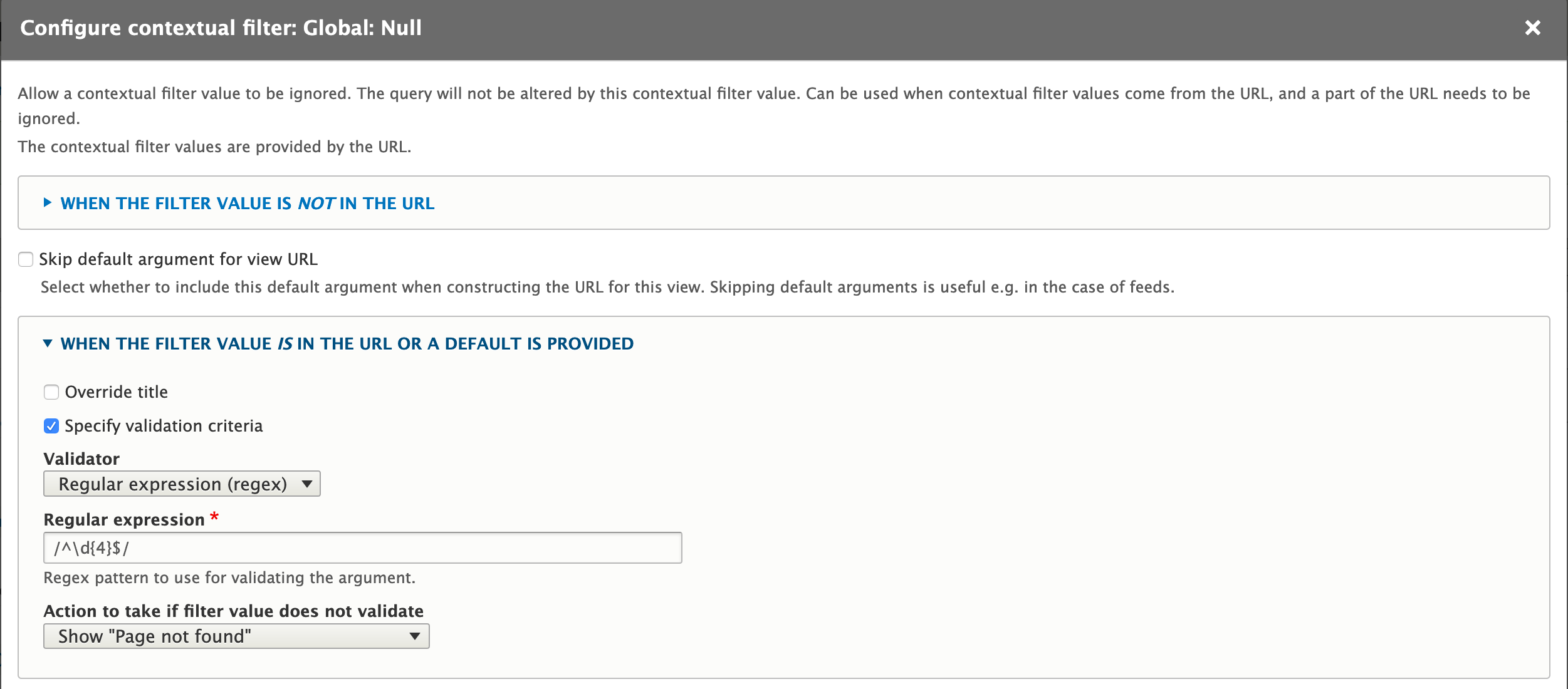
Add a Regular express (regex) validator to a View's contextual filter to use this module. E.g. --
- Create a new View with a page display.
- Add a contextual filter (Advanced -> Contextual Filters -> Add).
- From the "Add contextual filters" popup:
- Select "Global" from the Category menu.
- Enable the checkbox for the "Null" filter.
- Click Add and configure contextual filters.
- Under When the filter value IS available or a default is provided, select Specify validation criteria and set the following options:
- Validator: Regular expression (regex)
- Regular expression: /^\d{4}$/
- Action to take if filter value does not validate: Show Page not found
- Click Apply.
- Click Save for the full view.
This example ensures that the first contextual filter is exactly four digits. If the filter contains any non-digits or is not exactly four characters, the View page will give a "Page not found" error.
Supporting organizations:
Project information
 Seeking new maintainer
The current maintainers are looking for new people to take ownership. No further development
No longer developed by its maintainers.- Project categories: Administration tools, Content display, Content editing experience
 54 sites report using this module
- Created by wells on , updated
 Stable releases for this project are covered by the security advisory policy.
Look for the shield icon below.

